Defining Daybooks
Use the Daybook (25.8.1) activities to create, view, modify, and delete daybooks. Daybooks contain the transaction posting lines, and control the posting of transactions because each daybook must be linked to an accounting layer. In addition, each daybook is associated with a daybook control type, which separate postings based on their source.
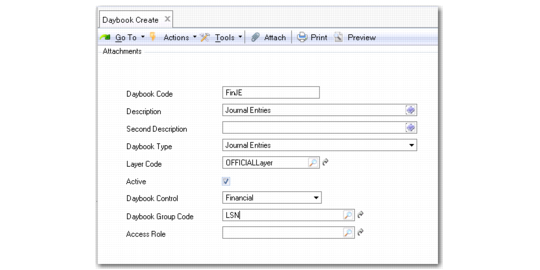
Daybook Create
Field Descriptions
Daybook Code
Enter a daybook code (maximum eight characters).
Description
Enter a brief description (maximum 24 characters) of the daybook. You can optionally enter descriptions in more than one language. For more information on the Translation Option, see
Introduction to QAD Enterprise Applications User Guide.
Second Description
Specify an additional description of the types of transactions posted to this daybook.
You can display this description on the GL Numbering report and the GL Transactions by Account report.
Daybook Type
Select a daybook type from the drop-down list. See
Daybook Types for a list of types.
Layer Code
Select an accounting layer: official, management, or transient. See
Transactions and Related Daybooks for information on the layers with which each daybook type can be associated.
Active
Indicate if this is an active daybook.
Daybook Control
Choose the type of daybook control from the drop-down list:
• Financial, which contains postings originating in the financial modules. See
Financial Daybooks.
• External, which contains postings originating from external, third-party systems; for example, payroll applications. See
External Daybooks.
Daybook control types are used to clearly separate postings based on their source.
Transactions and Related Daybooks indicates which transaction types can be posted to each daybook control type.
Transactions and Related Daybooks
Transactions | Daybook |
Banking Entries | Financial, External |
Cash Entries | Financial, External |
Consolidation | Financial, External |
Customer Adjustments | Financial, Operational |
Customer Credit Note Corrections | Financial, Operational |
Customer Credit Notes | Financial, Operational |
Customer Deduction | Financial |
Customer Invoices | Financial, Operational |
Customer Invoices Corrections | Financial, Operational |
Customer Payments | Financial |
Finance Charge | Financial |
Journal Entries | Financial, Operational, External |
Matching Daybook | Financial |
Revaluation Customer Payments | Financial |
Revaluation Customer | Financial |
Revaluation GL | Financial |
Revaluation Intercompany | Financial |
Revaluation Supplier Payments | Financial |
Revaluation Suppliers | Financial |
Revaluation Tax | Financial |
Reversing Entries | Financial |
Supplier Adjustments | Financial |
Self-Bills | Financial, Operational |
Supplier Credit Note Corrections | Financial |
Supplier Credit Note | Financial, Operational |
Supplier Invoice Corrections | Financial |
Supplier Invoices | Financial, Operational |
Supplier Payments | Financial |
Year-End Closing | Financial |
Daybook Group Code
Specify a daybook group to associate with the daybook for ease of reporting.
If you have created at least one daybook group, it is mandatory that you specify a daybook group value. Otherwise, this field is optional.
If no active daybook groups exist, the Daybook Group field is blank and read-only.
Access Role
Specify a role to restrict access to the daybook. Only users with that role can post transactions to the daybook.
You can specify a role for the following types of daybook:
• Journal Entries, for Daybook Control types other than Operational
• Consolidation
• Matching
If no role is specified for a daybook, the daybook can be used by all roles.
See
Daybook Security for more information.