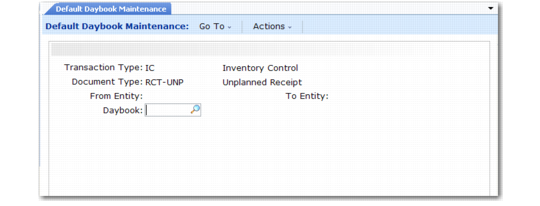
Defining Default Daybooks
Use Default Daybook Maintenance (25.8.4) to control the assignment of the following types of operational GL transactions to daybooks:
• FA: Fixed Assets
• IC: Inventory Control
• SO: Sales Orders (non-invoice transactions only; invoice daybooks are controlled by daybook sets)
• WO: Work Orders
When creating a transaction, the system searches for a daybook starting with an exact match on the lowest level of the hierarchy (matching transaction type-document type and entity) to the highest level (system daybook).
Important: At a minimum, you must create at least a system daybook record, which has transaction type, document type, and entity range blank. This is the daybook used when the system cannot find a matching record based on a combination of transaction type, document type, and entity.
When creating an operational transaction, the system uses the specified daybook to generate a GL reference. See
Operational Accounting Controls.
Note: In addition to the daybook-assigned number, the system also assigns two more reference numbers to each transaction. One is a transaction sequence number; the other is an operational transaction ID consisting of the transaction type (FA, IC, SO, WO), the date, and a system-maintained sequence. These numbers are used as cross-references by reporting functions to allow you to drill down from the general ledger all the way to the original operational transaction.
Default Daybook Maintenance (25.8.4)
Field Descriptions
Transaction Type
Specify a valid GL transaction type or leave blank to define the system daybook.
FA: Fixed Assets
IC: Inventory Control
SO: Sales Orders (non-invoice transactions created only by Revenue Recognition)
WO: Work Orders
Document Type
Specify the GL document type assigned to this daybook. You can enter a value only when Transaction Type is not blank. If you leave this field blank, the GL transaction is assigned to a transaction type daybook. To define the system daybook, leave both fields blank.
The system assigns GL transactions for the specified transaction type and a corresponding document type to this daybook.
Valid Transaction Type/Document Type Combinations lists valid transaction type/document type combinations.
Valid Transaction Type/Document Type Combinations
Transaction Type | Document Type | Description |
FA | FA | Fixed Assets |
IC | CN-ADJ | Consignment Inventory Adjustment |
| CN-CNT | Consignment Inventory Count |
| CN-ISS | Consignment Inventory Issue |
| CN-ISSTR | Consignment Inventory Transfer (Issue) |
| CN-RCT | Consignment Inventory Receipt |
| CN-RCTTR | Consignment Inventory Transfer (Receipt) |
| CN-SHIP | Consignment Inventory Transfer (Customer) |
| CN-USE | Consignment Inventory Usage |
| CST-ADJ | Cost Adjustment |
| CST-TR | Cost Transfer |
| CYC-CNT | Cycle Count Adjustment |
| CYC-ERR | Cycle Count Error |
| CYC-RCNT | Cycle Count Recount |
| FLR-STK | Floor Stock |
| ISS-CHL | Change Inventory Detail |
| ISS-DO | Distribution Order Issue |
| ISS-FAS | Final Assembly Issue |
| ISS-GIT | Goods in Transit Issue |
| ISS-PRV | Purchase Order Return to Supplier |
| ISS-RV | Inventory Return to Supplier |
| ISS-SO | Sales Order Shipment |
| ISS-TR | Inventory Transfer |
| ISS-UNP | Unplanned Issue |
| ISS-WO | Work Order Issue |
| MATL-VAR | Material Variance |
| MIX-VAR | Mix Variance |
| MTHD CHG | Method Change Variance |
| RCT-AVG | PO Receipt - Average Cost Item |
| RCT-CHL | Change Inventory Detail |
| RCT-CNFG | Inventory Receipt Configured Products |
| RCT-DO | Distribution Order Receipt |
| RCT-FAS | Final Assembly Work Order |
| RCT-GIT | Goods in Transit Receipt |
| RCT-LBR | Inventory Receipt Labor |
| RCT-PO | Purchase Order Receipt |
| RCT-RS | Inventory Return to Stock |
| RCT-SOR | Inventory Sales Order Return |
| RCT-TR | Inventory Transfer |
| RCT-UNP | Unplanned Receipt |
| RCT-WO | Work Order Receipt |
| RJCT-WO | Work Order Reject |
| TAG-CNT | Physical Inventory Update |
| WIP-ADJ | WIP Material Cost Revalue |
| WO-CLOSE | Work Order Accounting Close |
WO | BACKFLSH | Advanced Repetitive Labor/Material Usage |
| CLOSE | Advanced Repetitive Accounting Close |
| DOWN | Non-Productive Labor Posted |
| DOWNTIME | Downtime |
| EXPENSE | Customer Service Expense |
| FLOORSTK | Floor Stock |
| LABOR | Direct Labor Posted |
| MUV-CMP | Component Material Usage Variance Posted |
| MUV-WIP | WIP Material Scrap Usage Variance Posted |
| OP-CLOSE | Operation Close |
| RBUV | Run Burden Usage Variance Posted |
| REWORK | Work Order Rework |
| RLUV | Run Labor Usage Variance Posted |
| SBUV | Setup Burden Usage Variance Posted |
| SCRAP | Scrap Account Posted |
| SETUP | Work Order Setup |
| SLUV | Setup Labor Usage Variance Posted |
| SUBCNT | Subcontract |
| SUV | Setup Usage Variance Posted |
| TRANSFER | Work Order Transfer |
| VAR-POST | Labor Variance Posted |
| WIPADJ-I | WIP Adjustment, Input Queue |
| WIPADJ-O | WIP Adjustment, Output Queue |
| WIPADJ-R | WIP Adjustment, Reject Queue |
| WO-CLOSE | Work Order Accounting Close Post |
| RCT-RS | Inventory Return to Stock |
|
From/To Entity
Optionally enter a range of entity codes to associate with the specified daybook for this transaction type.
Note: Leave this range blank for the system daybook.
Define entity codes in Entity Create.
Daybook
Specify the daybook code for an active daybook created using Daybook Create.
All GL transactions created with the specified GL transaction type and GL document type are assigned to this daybook.