Defining Daybook Sets
Each sales order is associated with a daybook set assigned to the bill-to customer address, and each purchase order is associated with a daybook set that defaults from the supplier data (but can be modified). Individual daybooks in the set are used to record invoices, credit notes, intercompany transactions, and, when correction invoices are used, associated correction documents. The system also uses daybooks to generate GL reference numbers for these transactions.
See
Setting Up GL Correction Control for details about enabling correction transactions.
Depending on your company’s business requirements, you can define daybook sets either for the entire domain or for individual sites. For example, the site-based method supports the requirement to use a different invoice sequence for each shipping site.
The Use Daybook Set by Site options in Sales Order Accounting Control (36.9.6) and Purchasing Accounting Control (36.9.5) determine how daybook sets are defined.
• When daybook sets by site is activated, use Daybook Set by Site Maintenance (25.8.9) to define sets that apply only to a specified shipping site.
• Otherwise, use Daybook Set Maintenance (25.8.7) to define sets for all orders created in the domain.
Note: Regardless of which method you use, you must define at least two daybook sets; one each for AR and AP. These defaults are needed for new customer and supplier records.
Before defining daybook sets, you must define the individual daybooks in Daybook Create (25.8.1.1). All daybook sets require daybooks to be specified for invoices and credit notes, as well as an intercompany daybook used when a transaction involves more than one entity. Additionally, when Use Correction Invoices is selected in Sales Order Accounting Control for AR daybook sets and Accounts Payable is set to Yes in the AP AR Correction section of GL Correction Control for AP daybook sets, each daybook set must also specify daybooks for correction invoices and correction credit notes.
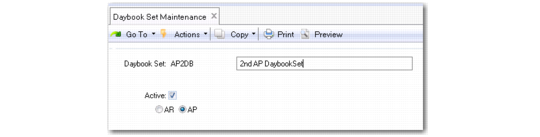
Daybook Set Maintenance
Daybook Set Maintenance (25.8.7) lets you create distinct daybook sets for numbering AR and AP invoices.
Important: All daybooks included in an AR daybook set must have a control type of Operational. All daybooks included in an AP daybook set must have a control type of Financial.
Daybook Set Maintenance
Daybook Set
Enter a maximum of 24 characters for the daybook set name.
Active
Indicate if this is an active daybook set.
Daybook Set Type
Select the relevant field to indicate whether the daybook set is specific to AR or AP.
Note: You cannot change the daybook set type if the daybook set has been used and invoices or credit notes have been created.
Invoice Daybook
Enter the daybook the system uses for generating invoice numbers.
If you select AR, the invoices daybook must have a daybook type of Customer Invoices.
If you select AP, the invoices daybook must have a daybook type of Supplier Invoices.
Credit Note Daybook
Enter the daybook the system uses for generating credit note numbers. This must be an active daybook defined in Daybook Create.
For AR daybooks, the Daybook Type value depends on the settings of Use Correction Invoices in Sales Order Accounting Control and GL Correction in GL Correction Control. When Use Correction Invoices is No and GL Corrections is Yes, the system does not use this daybook during processing. However, to validate correctly, the specified daybook must be of type Customer Invoice Corrections.
If you select AP, the credit note daybook must have a daybook type of Supplier Credit Notes.
Intercompany Daybook
Enter the daybook the system uses for managing transactions that involve multiple entities. This must be an active daybook defined in Daybook Create with a daybook type of Journal Entries.
Note: This field is only available for AR daybook sets.
Correction Invoices (Negative)
Enter the daybook the system uses for generating correction invoice numbers for negative correction amounts. This must be an active daybook defined in Daybook Create.
For AR daybooks, the Daybook Type value depends on the setting of the GL Correction field in GL Correction Control. If the GL Correction field is set to Yes, specify a Customer Invoice Corrections daybook. If the GL Correction field is set to No, specify a daybook type of Customer Credit Note. This field displays only when Use Correction Invoices is Yes in Sales Order Accounting Control.
For AP daybook sets, this field only displays if you set the Accounts Payable field to Yes in the AP AR Correction section of GL Correction Control (25.13.24). Specify a daybook type of Supplier Invoice Corrections.
Correction Credit Notes (Negative)
Enter the daybook the system uses for generating credit note numbers for negative correction amounts. It must be an active daybook defined in Daybook Create.
For AR daybooks, the required daybook type depends on the setting of the GL Correction field in GL Correction Control. If the GL Correction field is set to Yes, specify a Customer Credit Note Corrections daybook. If the GL Correction field is set to No, specify a Customer Credit Note daybook. This field displays only when Use Correction Invoices in Yes in Sales Order Accounting Control.
For AP daybook sets, this field only displays if you set the Accounts Payable field to Yes in the AP AR Correction section of GL Correction Control (25.13.24). Specify a daybook type of Supplier Invoice Corrections.
Correction Invoices (Positive)
Enter the customer invoices daybook the system uses for generating correction invoice numbers for positive correction amounts. This must be an active daybook with a daybook type of Customer Invoices.
This field displays only when Use Correction Invoices in Yes in Sales Order Accounting Control.
Note: This field is only available for AR daybook sets.
Correction Credit Notes (Positive)
Enter the customer credit notes daybook the system uses for generating correction credit note numbers for positive correction amounts. This must be an active daybook with a daybook type of Customer Credit Note.
This field displays only when Use Correction Invoices in Yes in Sales Order Accounting Control.
Note: This field is only available for AR daybook sets.
Adjustment Daybook
Enter the daybook the system uses for generating numbers for adjustment transactions. It must be an active daybook with a daybook type of Customer Adjustments.
This field displays only when Use Correction Invoices in Yes in Sales Order Accounting Control.
Note: This field is only available for AR daybook sets.
Assigning Customer Daybooks Sets
After creating daybook sets, assign one to each customer address in Customer Data Maintenance (2.1.1). The system determines the default value for new customer records as follows:
• When you define database sets by site, Customer Data Maintenance looks for the first active daybook set that matches the default customer site. If one has not been defined, it uses the first active daybook set with a blank site. If no definitions have been set up by site, you must create at least one with blank site before you can complete Customer Data Maintenance records.
• Otherwise, the customer daybook set value defaults from the Default Daybook Set field in Sales Order Accounting Control. However, you can overwrite this value.
Note: That field is not available when Use Daybook Set by Site is selected.
The customer record determines the default daybook set for new orders. You can update the daybook set in the following programs:
• Sales Order Maintenance (7.1.1)
• Customer Scheduled Order Maintenance (7.3.13)
• Sales Order Shipments (7.9.15)
• Sales Quote Maintenance (7.12.1)
• Pending Invoice Maintenance (7.13.1)
• Call Activity Recording (11.1.1.13)
• Call Invoice Recording (11.1.1.15)
• RMA Maintenance (11.7.1.1)
• RMA Receipts (11.7.1.13)
• RMA Shipments (11.7.1.16)
Note: These programs verify that the updated value has been defined and, when you use daybook sets by site, matches the order header site.
Assigning Supplier Daybooks Sets
After creating daybook sets, assign one to each supplier address in Supplier Data Maintenance (2.3.1). The system determines the default value for new customer records as follows:
• When you define daybook sets by site, Supplier Data Maintenance looks for the first active daybook set that matches the default supplier site. If one has not been defined, it uses the first active daybook set with a blank site. If no definitions have been set up by site, you must create at least one with blank site before you can complete Supplier Data Maintenance records.
• Otherwise, the supplier daybook set value defaults from the Default Daybook Set field in Purchasing Accounting Control (36.9.5). However, you can overwrite this value.
The supplier record determines the default daybook set for new orders. You can update the daybook set in the following programs:
• Purchase Order Maintenance (5.7)
• Supplier Scheduled Order Maintenance (5.5.1.13)
When a supplier scheduled order is a trade sales order, the Daybook Set field defaults from the related supplier, but is read-only.
• Blanket Order Maintenance (5.3.1)
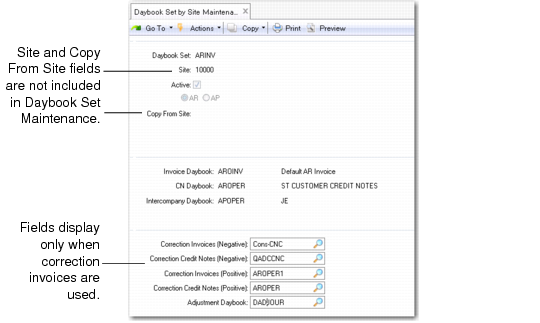
Daybook Sets by Site
Use Daybook Set by Site Maintenance (25.8.10) to define site-specific default sets of daybooks that are used for recording invoices, credit notes, intercompany transactions, and, when used, for correction invoices.
Daybook Sets by Site Maintenance (25.5.10)
Field Descriptions
Daybook Set
Enter a code (maximum eight characters) to identify a daybook set.
Description
Enter an optional description (maximum 40 characters) of this daybook set.
Site
In Daybook Set by Site Maintenance only, enter the site that uses this daybook set.
Leave blank to define the default daybook set that is used when site-specific records do not apply. When you are using daybook sets by site, this is the default for new customer and supplier records unless a daybook set has been defined for the customer or supplier site.
Active
Specify whether this daybook set is currently available to other functions. By default, new daybook sets are active.
If an AR set is inactive, you cannot specify it in Customer Data Maintenance (2.1.1) or Sales Order Accounting Control (36.9.6), or use it in any of the order transaction processing programs. If an AP daybook set is inactive, you cannot specify it in Supplier Data Maintenance (2.3.1) or Purchasing Accounting Control (36.9.5). Additionally, Invoice Post and Print (7.13.4) verifies that the order daybook set is active before allowing the invoice to be posted.
If you change the way you set up daybook sets after implementation, the system automatically deactivates some records. For example, if you clear Use Daybook Set by Site after site-specific records have been created, the system clears the Active field on all records that include a site value. See
Changing the Use Daybook by Site Setting.
Note: You cannot clear this field for the daybook set currently defined as the Sales Order Accounting Control or Purchasing Accounting Control default.
Daybook Set Type
Select the relevant field to indicate whether the daybook set is specific to AR or AP.
Note: You cannot change the daybook set type if the daybook set has been used and invoices or credit notes have been created.
Copy from Site
When you are defining daybook sets by site, optionally save data-entry time by entering the site code associated with an existing daybook set. The system creates a new daybook set record for the new site based on the existing daybook set by site definition.
Daybooks
Specify the daybook code associated with each type of transaction. Codes must be defined in Daybook Create with Daybook Control set to Operational; they also must be active. Additionally, the current date must be within the specified effective date range for the associated Number Range Maintenance sequence. The required value of Daybook Type in the definition depends on the transaction.
Field | Required Daybook Type |
Invoice Daybook | Customer Invoices (when daybook set type is AR) Supplier Invoices (when daybook set type is AP) |
Credit Notes Daybook | For AR daybooks, the daybook type to enter depends on the settings of Use Correction Invoices in Sales Order Accounting Control and GL Correction in the Sales Orders/Invoice frame of GL Correction Control: • When Use Correction Invoices is cleared and GL Corrections is selected, the system does not use this daybook during processing. However, to validate correctly, the specified daybook must be of type Customer Invoice Corrections. • Otherwise, Customer Credit Note. For AP daybooks, the credit note daybook must have a daybook type of Supplier Credit Notes. |
Intercompany Daybook | Specify a Journal Entries daybook for intercompany transactions. This field is only available for AR daybook sets. |
Correction Invoices (positive) | Specify a Customer Invoices daybook. This field is only available for AR daybook sets. |
Correction Invoices (negative) | For AR daybook sets, the daybook type you can enter depends on the setting of GL Correction in the Sales Orders/Invoice frame of GL Correction Control (25.13.24): • Yes: Customer Invoice Corrections • No: Customer Credit Note For AP daybook sets, this field only displays if you set the Accounts Payable field to Yes in the AP AR Correction section of GL Correction Control (25.13.24). Specify a daybook type of Supplier Invoice Corrections. |
Correction Credit Notes (positive) | Specify a Customer Credit Notes daybook. This field is only available for AR daybook sets. |
Correction Credit Notes (negative) | For AR daybook sets, the daybook type you can enter depends on the setting of GL Correction in the Sales Orders/Invoice frame of GL Correction Control (25.13.24): • Yes: Customer Credit Note Corrections • No: Customer Invoices For AP daybook sets, this field only displays if you set the Accounts Payable field to Yes in the AP AR Correction section of GL Correction Control (25.13.24). Specify a daybook type of Supplier Credit Note Corrections. |
Adjustment Daybook | Specify a Customer Adjustment daybook. This field is only available for AR daybook sets. |
Changing the Use Daybook by Site Setting
Although it is not recommended, it is possible to change the way you assign daybook sets after you have implemented your system. However, you should keep in mind the effects of doing this.
System behavior and user requirements depend on the direction of the change:
• If you disable the daybook set by site feature, the system makes existing site-specific daybook sets inactive. You can continue to use records that do not specify a site when you create new orders. However, order-entry, shipping, and invoice programs validate the daybook set field. The next time you access an existing order with a site-specific daybook set, you must update that field manually before completing a transaction.
• If you enable the feature, the system makes inactive all daybook sets except the defaults specified in Sales Order Accounting Control (36.9.6) and Purchasing Accounting Control (36.9.5). You can continue to use that value in customer and supplier records and transactions, but you must define site-specific records in Daybook Set by Site Maintenance (25.8.10). You also must update existing orders to reference an active daybook set.