Domain/Account Control
Domain/Account Control (36.9.24) is a key program that affects processing throughout the system. It is critical to set up this control program correctly, because the system automatically propagates this data to other tables as data records are created.
Example: When you designate a domain account for work in process, this account becomes the default account for each product line you create. The product line account becomes the default account for work order accounts defined in Work Order Account Maintenance (1.2.9). The work order account defaults to the specific work orders and is updated when inventory transactions are posted to the general ledger.
Domain/Account Control has two sections.
• General settings for the domain, most of which are read only here, except for the GL audit trail
• Multiple frames that display default accounts, sub‑accounts, and cost centers used by various programs in the system
General Domain Information
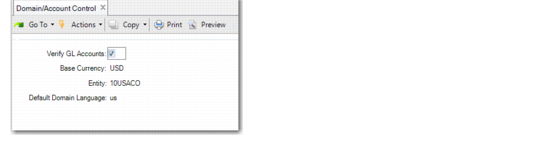
Most of the fields in the first frame of Domain/Account Control display information defined for the domain in Domain Create (36.1.1.1).
Domain/Account Control (36.9.24), General Settings
Field Descriptions
Verify GL Accounts
This system-maintained field determines whether the system validates general ledger (GL) accounts and effective dates for transactions created in modules other than General Ledger. Accounts are verified in the GL module regardless of the value in this field.
This field is cleared in a newly created domain. After implementing the GL and defining default accounts throughout the system, you can run Operational Account Structure Validation (36.9.20). This program validates the initial setup and selects Verify GL Accounts if no problems are encountered.
When this field is selected, the system validates the following:
• Each account, sub-account, cost center, and project code entered for a transaction are defined in the appropriate GL setup function with the Active field selected.
• The components of the account number are valid in combination with each other, based on the GL masks specified in the GL setup functions.
• The transaction effective date is within an open GL calendar period.
Base Currency
This field displays the base currency of the domain, defined in Domain Create. Each entity in the domain uses the same base currency. The base currency is the default currency used for financial reports. Financial statements, such as balance sheets and income statements, always print amounts in the base currency. Other reports may specify base or some other currency.
Entity
This field displays the entity that has been marked as Primary in Domain Create. The primary entity defaults to each new site created in a domain. See
Setting Up Domains.
Default Domain Language
The system displays the default language specified for the domain in Domain Create. The system selects descriptions in this language to display in operational functions when multiple language descriptions exist.
For information on multiple languages, see
QAD System Administration User Guide.
Setting Default GL Accounts
The second section of Domain/Account Control (36.9.24) defines default GL accounts, sub-accounts, and cost centers that are accessed by many operational maintenance functions.
Each account is identified by an account code, a sub-account code, and a cost center code. Sub-accounts and cost centers are optional depending on how the account is defined.
These accounts determine defaults when you add static data such as tax rates, product lines, and departments. Later, they appear as defaults on some transactions, such as sales and purchasing.
Note: A few accounts in Domain/Account Control are updated directly, such as Sales Freight Accrued and Applied. These accounts typically cannot be modified in the transactions that reference them.
Since these are only default accounts, none of the static data or transactions that reference them are changed when these accounts are modified in Domain/Account Control.
Follow these guidelines for system accounts.
• Know how the system uses them. Many are used in transactions that the software creates automatically.
• Assign every account a value, even though it may never be used. This ensures that transactions cannot be created with a blank account number.
Default Domain Accounts lists all of the accounts set up in Domain/Account Control. The Type column indicates how the account is used. The Updated By column indicates transactions that update the account.
If you are using either of the optional consignment modules—Customer Consignment Inventory or Supplier Consignment Inventory—you can also define consignment accounts. See
QAD Sales User Guide and
QAD Purchasing User Guide for information on these modules.
Default Domain Accounts
| Account | GL Type | System Type | Updated in |
Sales Accounts | Sales | Standard | | Invoice Post |
Sales Discount | Standard | | Invoice Post |
Sales Invoice Tax | Tax | | Invoice Post |
Sales Tax Credit Note | Tax | | Invoice Post |
Sales Tax Absorbed | Tax | | Tax Rate Maintenance |
Sales Invoice Suspended Tax Account | Tax | | Invoice Post |
Sales Credit Note Suspended Tax Account | Tax | | Invoice Post |
Sales Returns | Standard | | Inventory Receipt–Sales Order Return |
COGS Material | Standard | | SO Shipment |
COGS Labor | Standard | | SO Shipment |
COGS Burden (Variable) | Standard | | SO Shipment |
COGS Overhead (Fixed) | Standard | | SO Shipment |
COGS Subcontract | Standard | | SO Shipment |
Sales Freight Accrued | Standard | | Invoice Post |
Sales Freight Applied | Standard | | Invoice Post |
Terms Late Interest | Standard | | Invoice Post |
Accounts Payable | AP Tax Invoice | Tax | | Supplier Invoice |
AP Tax Credit Note | Tax | | Supplier Invoice |
AP Tax Retained | Tax | | Supplier Invoice |
AP Invoice Delayed Tax | Tax | | Supplier Invoice |
AP Credit Note Delayed Tax | Tax | | Supplier Invoice |
Expensed Item Receipts | System | PO Receipts | Supplier Invoice |
Expensed Item Usage Variance | Standard | | Supplier Invoice |
Expensed Item Rate Variance | Standard | | Supplier Invoice |
Department | Cost of Production | Standard | | Non-Prod Labor, SFC Transfer |
Labor (Absorbed) | Standard | | SFC, Repetitive, WO Close |
Burden (Absorbed) | Standard | | SFC, Repetitive, WO Close |
Product Line | Inventory | Inventory Control | | Inventory Transactions |
PO Receipts (Accrued AP) | System | PO Receipts | PO Receipt, Supplier Invoice |
Purchases | Standard | | PO Receipt (Non-Inventory) |
Overhead Appl | Standard | | PO Receipt |
Scrap | Standard | | WO Receipt |
Work-in-Process | WIP Control | | WO, Backflush, Repetitive |
Inventory Discrepancy | Standard | | Inventory Counts |
Cost Revalue | Standard | | GL Cost Change |
Floor Stock | Inventory Control | | WO Close |
Variances | PO Price Variance | Standard | | PO Receipt |
AP Usage Variance | Standard | | Supplier Invoice |
AP Rate Variance | Standard | | Supplier Invoice |
Method Variance | Standard | | WO Close |
Transfer Variance | Standard | | Multisite Transaction |
Material Usage Variance | Standard | | WO Close |
Material Rate Variance | Standard | | WO Issue, WO Close |
Labor Usage Variance | Standard | | SFC, Repetitive, WO Receipt |
Labor Rate Variance | Standard | | SFC, Repetitive |
Burden Usage Variance | Standard | | SFC, Repetitive, WO Receipt |
Burden Rate Variance | Standard | | SFC, Repetitive |
Subcontract Usage Variance | Standard | | WO Close |
Subcontract Rate Variance | Standard | | WO Close |
Mixed Variance | Standard | | WO Close for joint orders (co‑products, by-products) |
Service | Service Labor | Standard | | Call and Project Activity Recording |
Service Overhead | Standard | | Call Activity Recording |
Service Expense | Standard | | Call and Project Activity Recording |
Expense Due | Standard | | Invoice Post |
Service Returns | Standard | | Call Activity Recording |
Deferred Revenue | Standard | | Contract Maintenance |
Accrued Revenue | Standard | | Contract Maintenance |
Consignment | SO Consigned In-Transit | Inventory Control | | SO Shipment |
SO Consigned Inventory | Inventory Control | | Inventory Transactions |
SO Consigned Offset | Inventory Control | | AR Deferral |
PO Consigned Inventory | Inventory Control | | Inventory Transactions |
PO Consigned Offset | Inventory Control | | AP Deferral |
|