Operational Allocation Codes
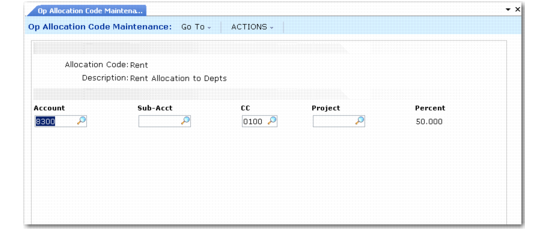
To simplify data entry in operational transactions, use Operational Allocation Code Maintenance (25.3.23) to define codes that allocate fixed percentages of expenses to different accounts, sub‑accounts, cost centers, and projects. You can specify an allocation code anywhere you enter an account in operational transactions, such as sales orders and purchase orders.
Transactions involving an amount allocated among several accounts can reference an allocation code rather than individual accounts, sub‑accounts, cost centers, and projects. Transaction amounts are distributed automatically to allocation accounts when transactions are posted.
You can define nested allocation codes so that one allocation code references another. When the system calculates amounts, it explodes each level of allocation codes, multiplying the amount to be apportioned by the percentages at each level.
Operational Allocation Code Maintenance (25.3.23)
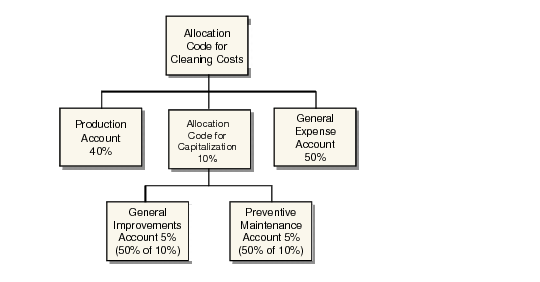
Example: When ABC Company posts utility expenses to Accounts Payable, a part of the expense is posted to cleaning costs. Cleaning costs are pro-rated among several accounts: 40% to Production, 50% to General Expense, 10% to Capitalization. Rather than enter multiple account codes for each transaction, ABC defines an allocation code for the group of accounts, allowing the data entry operator to enter one allocation code rather than three accounts.
Taking this example one step further, allocation codes can be nested. In the example above, 10% of cleaning cost is capitalized as improvements. This 10% is split evenly between accounts for general improvements and preventive maintenance. An allocation code is set up for capitalization. The accounts for general improvements and preventive maintenance each have an allocation percentage of 50%. However, only 5% of the total cleaning cost expense is posted to each account.
Allocation Code Examples
Purchase Order Lines
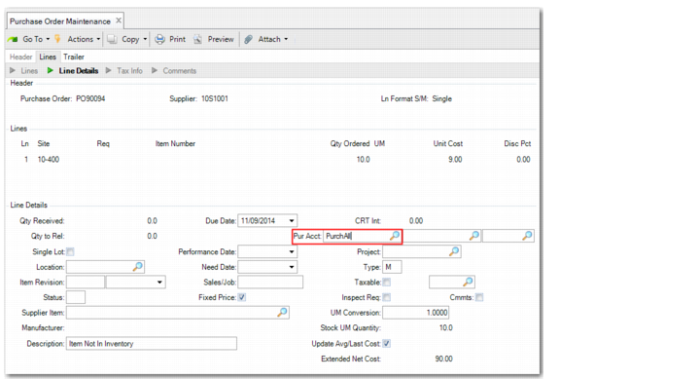
When you purchase a memo item in Purchase Order Maintenance, you can use operational allocation codes at line level to split the posting lines across several GL accounts, sub-accounts, cost centers, or projects. To use operational allocation codes, specify the allocation code in the Pur Acct field when you create the purchase order.
During Operational Transaction Post, operational allocation codes in PO Receipt and other transactions are “exploded” to split the posting lines across the GL accounts, sub-accounts, cost centers, and projects in the relevant allocation codes. Therefore, in most cases, the system creates the required allocation postings for memo item purchases during Operational Transaction Post.
Purchase Order Maintenance
Receiver Matching
Receiver Matching supports the use of operational allocation codes.
If you set up an operational allocation code for several GL accounts and then specify the allocation code on a purchase order, Receiver Matching splits the posting lines across the GL accounts, sub-accounts, cost centers, and projects in the allocation code.
If you set the Use Exp Item Var Accts field to Yes in Supplier Invoice Control, you can view the operational allocation code in Receiver Matching, but the code is not actually used in the matching process. This situation occurs because the system has already charged the expense to the allocation code. The expense posting was created during PO Receipt, and was offset by the posting to the Expensed Item Receipts account and posted using Operational Transaction Post. In Receiver Matching, the main posting is to the Expensed Item Receipts account, and other accounts (other than tax accounts, the supplier control account, and the unmatched invoices account) are only used if there are usage or rate variances for the memo item purchase. If usage or rate variances occur, these are charged to the Expensed Item Usage Variance account or to the Expense Item Rate Variance account defined in Domain/Account Control.
If you set the Use Exp Item Var Accts field to No in Supplier Invoice Control, any usage or rate variances that arise from the matching of a memo item receipt are instead charged to the expense account defined on the purchase order line. If you specify an allocation code instead of a GL account, the allocation code is used in Receiver Matching.
For memo purchases only, you can change the GL account on the Receiver Matching line to an allocation code or you can change the allocation code on the matching line to a different one. In each of these cases, the Receiver Matching GL postings reverse the original postings made at PO receipt and replace those with the new account or allocation code. As part of Receiver Matching, the allocation code is then exploded to its constituent accounts, sub-accounts, cost centers, and projects.
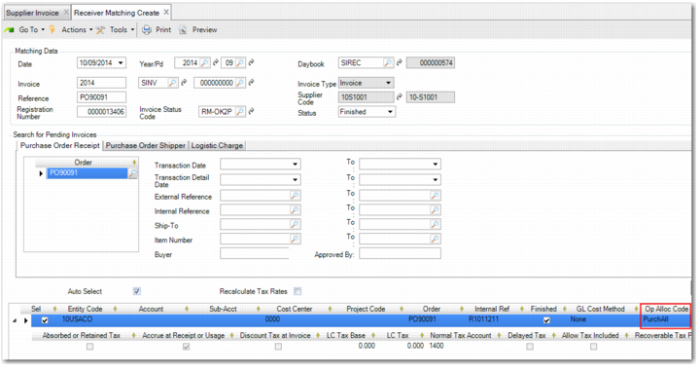
You can view operational allocation codes in Receiver Matching when you are matching memo items. The Op Alloc Code field in the Receiver Matching grid displays an operational allocation code if one was specified on the purchase order for the memo item. For memo items only, you can also enter a new allocation code, even if one was not used on the purchase order line.
Receiver Matching Create
Evaluated Receipts Settlement
If you set up an operational allocation code for several GL accounts and then specify the allocation code on a purchase order, you can use ERS to split the posting lines for the invoice and receiver matching across the GL accounts, sub-accounts, cost centers, and projects in the allocation code.
Example:
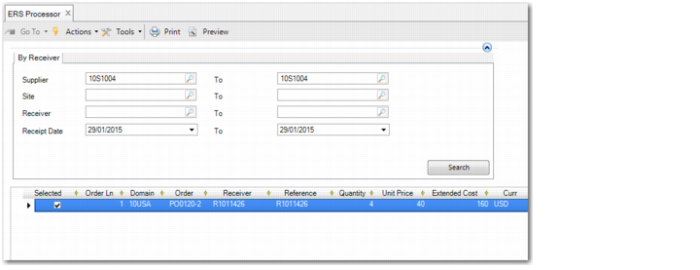
An allocation code specifies that 60% of a transaction amount be allocated to GL account 100801 and that 40% of a transaction amount must be allocated to GL account 100800. You specify the allocation code on a purchase order for a memo item ($160), receive the items and create the purchase order receipt, and then run the ERS Processor.
ERS Processor
The ERS Processor creates a matched supplier invoice.
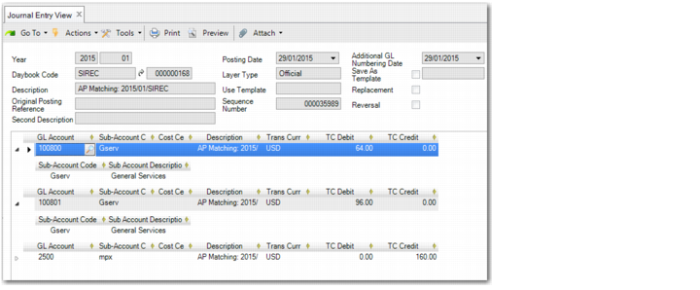
Journal Entry View shows the matching posting with 60% of the $160 transaction amount allocated to account 100801 and 40% allocated to GL account 100800.
Journal Entry View
Cross-Company Postings
If you create and receive a purchase order for a memo item that uses an operational allocation code in one entity and then create the supplier invoice and receiver matching in another entity, the system creates cross-company postings. The GL accounts in the operational allocation code must be Standard accounts, and the system then uses the AP cross-company control account specified in the domain for the cross-company postings. During Operational Transaction Post, the posting lines, split according to the operational allocation code, are transferred to the other entity, where the original expense was recorded.
You must set the Use Expensed Item Var Accts field in Supplier Invoice Control to No to use any postings from allocation codes in Receiver Matching. To split the operational allocation code, the system takes a single posting line and splits the posting into two or most combinations of account, sub-account, cost center, and project, according to the allocation code. For each one of these postings, there must be an equal and opposite posting to the cross-company account in the invoice entity. Related cross-company control account postings in two entities must be equal and opposite.