Currency
For accounts that are not denominated in a unique currency, you can record journal entries in either the base currency (BC) of the domain or in a non-base, transaction currency (TC). For accounts denominated in a specific currency, you enter amounts using the transaction currency and the system converts the amounts to the base currency.
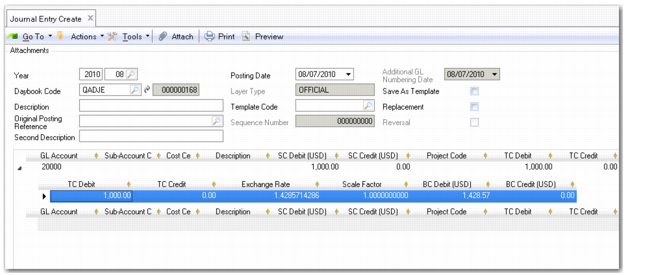
The system displays a level 2 posting line with fields for entering the transaction currency when:
• You specify a GL account that is denominated in a non-base currency.
• You modify the default base currency value in the Currency field in the level 1 posting line to a non-base currency (for accounts that accept postings in all system currencies).
The level 2 posting line for the transactions currency contains the following fields:
• TC Debit
• TC Credit
• BC Debit
• BC Credit
• Exchange Rate (TC/BC)
• Scale Factor (TC/BC)
The system uses the accounting exchange rate to convert between the transaction currency and base currency, and calculates the base currency amount as:
BC Amount = TC Amount * Exchange rate (TC/BC) * Scale Factor (TC/BC)
Note: On level 1 of a currency posting line, the system displays either the transaction amounts or base currency amounts, depending on the setting in the Currency View field at the bottom of the screen.
If the Exchange Rate field is displayed in the posting line, you can modify the exchange rate there. If you modify the exchange rate, the new value is used in the base currency calculation.
See
Setting Up Multiple Currencies for more information on currencies and exchange rates.
Journal Entry, Currency Grid
Field Descriptions
TC Debit
Enter the debit amount in the transaction currency. The credit amount is set to zero when you enter a debit amount.
TC Credit
Enter the credit amount in the transaction currency. The debit amount is set to zero when you enter a credit amount.
Exchange Rate
The system displays the default exchange rate for the currencies defined for the shared set. Edit the rate if necessary. See
Exchange Rates for more information on exchange rates.
Scaling Factor
This field displays the scaling factor for the exchange rate. The scaling factor is used for currencies that have a very small value relative to other currencies.
BC Debit/Credit
The system displays the debit or credit amount calculated in the base currency.