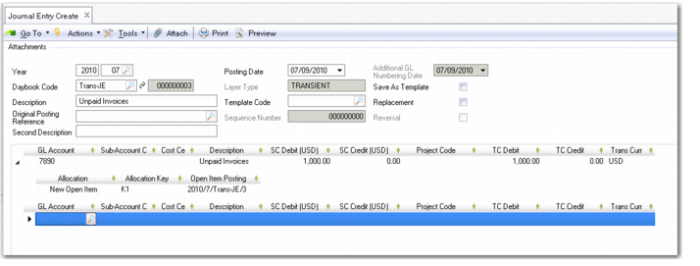
GL Open Item
The Open Item grid displays when the account specified in the posting is defined as an open item account. GL open items are typically used for posting accruals, for example, insurance costs for an entire year, broken down into monthly values.
You can save transactions on GL open item accounts to the official, management, or transient layers.
When you post to GL accounts of type Open Items, you have three options:
• Create a new GL open item denoted by a new allocation key.
• Link to and update an existing GL open item by specifying the existing item’s allocation key. The system then creates a GL open item movement.
• Save the transaction without an allocation key by selecting the Allocate Later option. In this case, the system does not create a GL open item or a GL open item movement.
This behavior applies in the following screens where you can specify GL open item accounts for transactions:
• Banking Entry Create—Allocate and Banking Entry Allocate
• Open Item Adjustment Create
• Receiver Matching Create and Receiver Matching Modify
• Supplier Invoice Create and Supplier Invoice Modify
• Customer Invoice Create and Customer Invoice Modify
• Recurring Entry Post
• Journal Entry Reverse
• Reversing Journal Create
• Petty Cash Create—Allocate and Petty Cash Allocate
You can then use GL Open Item Reconciliation (25.15.2.13) to perform a mass reconciliation of transactions on GL open item accounts. In GL Open Item Reconciliation, you can allocate entries to a new open item or to an existing open item. In addition, you unallocate allocated transactions by resetting their statuses to Allocate Later. See
GL Open Item Reconciliation for more information.
For more information on GL Open Item accounts, see
GL Account Types.
Journal Entry, Open Item Grid
Field Descriptions
Allocation
Choose a transaction type from the drop-down list.
New Open Item: Allocate transaction amounts to a new open item.
Link to Open Item: Use the allocation key to link this transaction to an existing open item.
Allocate Later: Save the transaction without an allocation key. The system does not create a GL open item or a GL open item movement.
Allocation Key
Specify an allocation key for a new open item. This key subsequently identifies the GL open item in browses and reports.
If you chose Link to Open Item, click the lookup to display the allocation keys of existing open items and select the one you want to link to.
Open Item Posting
This field displays the posting reference for the open item.