Sequence Number for Posted Transactions
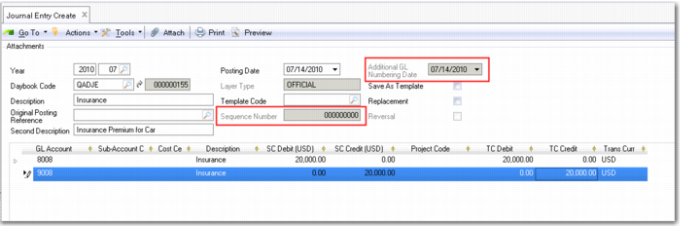
When creating journal entries in entities and layers for which additional GL numbering is active, a sequence number is generated. This number remains at zero until you save the journal entry.
Unsaved Journal Entry
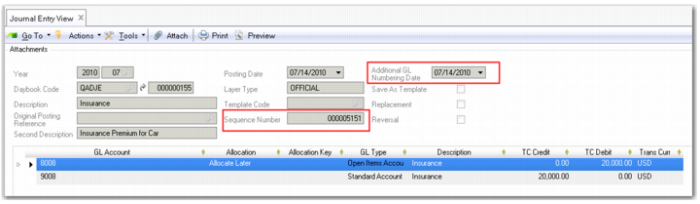
Saved Journal Entry shows a saved journal entry record with its sequence number. You can also view the sequence number in Journal Entry Modify (25.13.1.2), Journal Entry Excel Integration (25.13.1.6), and Journal Cross Co Excel Integration (25.13.1.10) when exporting transactions.
Saved Journal Entry
Numbering Date
The sequence number is also associated with a numbering date, as shown in
Saved Journal Entry. The numbering date for a transaction can be the same as or later than the transaction’s posting date. When creating a posting in Journal Entry Create (25.13.1.1), the numbering date is set to the posting date and cannot be modified.
There are exceptions where you can specify the date used for numbering. In the following functions, you can specify a numbering date when creating or modifying a posting in a correction period:
• Journal Entry Create (25.13.1.1) and Journal Entry Modify (25.13.1.2)
• Journal Entry Transient Create (25.13.1.11) and Journal Entry Transient Modify (25.13.1.12)
• Journal Entry Reverse (25.13.1.5) and Journal Entry Transient Reverse (25.13.1.17)
• Reversing Journal Create (25.13.1.14)
Numbering Dates and Journal Entry Approval
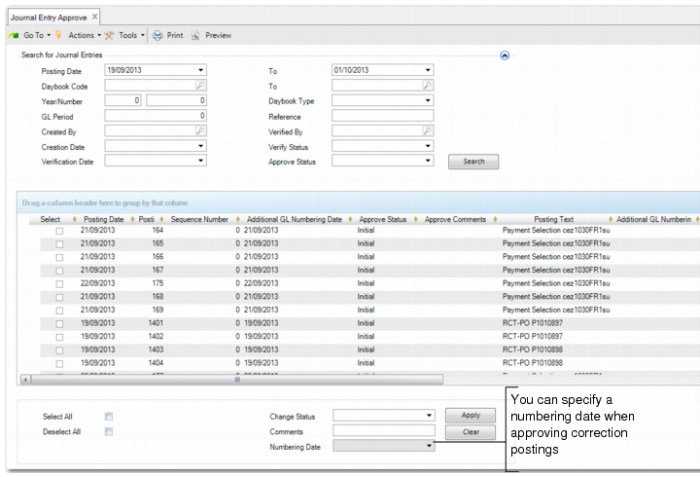
When Additional GL Numbering is enabled, you can specify a numbering date for correction postings in Journal Entry Approve (25.13.1.8). If you specify a numbering date, all approved postings selected in the grid are assigned that numbering date. If you do not specify a numbering date, the numbering date for the postings is not updated.
See
Verifying and Approving Transactions for more information on approving transactions.
Journal Entry Approve (25.13.1.8)
Numbering Dates and Year-End Closing
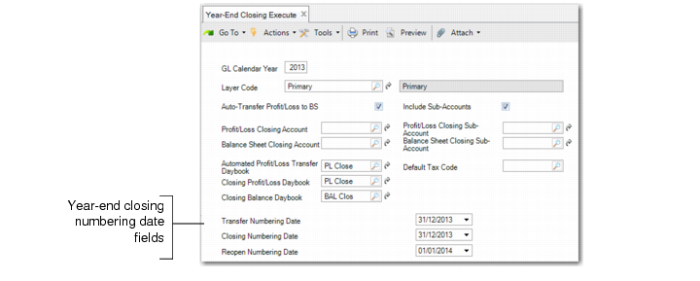
When Additional GL Numbering is enabled, you can specify numbering dates for official layer and management layer year-end closing postings in Year-End Closing Execute (25.21.4.1).
Year-End Closing Execute (25.21.4.1)
Use the Transfer Numbering Date field to specify a numbering date for the system-generated posting that transfers the profit and loss to the balance sheet. This numbering date is optional, and the Transfer Numbering Date field is only available when you select the Auto Transfer Profit/Loss to BS field.
The Closing Numbering Date field lets you specify a numbering date for the profit and loss and balance sheet closing postings, and the Reopen Numbering Date field lets you specify a numbering date for the balance sheet reopening posting. Both of these numbering dates are mandatory and their default value is the system date.
See
Year-End Transactions for more information on year-end closing.