GL Sequence Renumber Report
The GL Sequence Renumber report (36.30) can be used to renumber additional GL numbering sequence numbers for the current entity or for all the entities in a numbering group, if the current entity is a source entity. If you want to renumber additional GL numbering sequence numbers for another entity, you must log in to that entity and run the GL Sequence Renumber report there.
The GL Sequence Renumber report removes the original sequence numbers and reassigns sequence numbers to the postings, based on the starting sequence number you specify when you run the report.
Note: In order to reassign sequence numbers, the GL periods for which you run the GL Sequence Renumber report must be locked.
If you reassign sequence numbers to an entity that is the numbering source for other entities, sequence numbers are reassigned for the whole numbering group of entities.
The GL Sequence Renumber report renumbers postings sequentially and consecutively based on their numbering date. The posting with the earliest numbering date is assigned the first number in the new sequence. If several postings share the same numbering date, these postings are assigned sequence numbers by daybook code and entity code.
If the Reset Number Yearly field is selected in the Additional GL Numbering tab for the entity, the reassigned sequence numbers are numbered sequentially and consecutively within the GL calendar year.
Before reassigning sequence numbers, the system checks to ensure that no transactions without sequence numbers exist within the numbering group for the specified GL calendar year and period. If GL transactions without sequence numbers are found, an error displays and no sequence numbers are reassigned. You must then assign sequence numbers to the prior GL periods before proceeding.
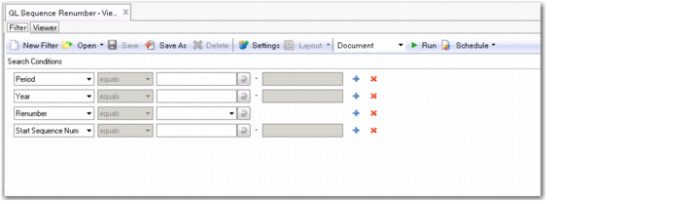
The GL Sequence Renumber report has the following selection criteria:
• Year
Specify the GL calendar year for which you want to renumber additional GL sequence numbers. The default is the current GL calendar year.
• Period
Specify the GL period for which you want to renumber additional GL sequence numbers. The default is the current GL period. The period must be locked before you can renumber the additional GL sequence numbers.
• Renumber
Select Yes to renumber the sequence numbers that match the selection criteria. The function removes the original assigned sequence numbers and reassigns new sequence numbers for the specified GL periods. An audit report then summarizes the updates made.
Select No to print a simulation of the sequence number reassignment based on the criteria you have entered. This option does not update sequence numbers.
• Start Sequence Number
Specify the first sequence number you want to assign. This number is assigned to the posting with the earliest numbering date.
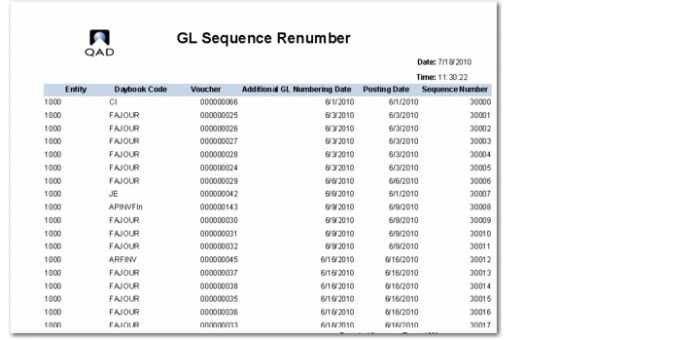
The GL Sequence Renumber report displays the following information for each posting that matches the selection criteria:
• Sequence number
• Numbering date
• Posting date, if it is different than the numbering date
• Daybook code
• Entity code
• Voucher
• Posting description
GL Sequence Renumber Selection Criteria
GL Sequence Renumber Report (36.30) shows the GL Sequence Renumber report run in simulation mode for the start sequence number 30000.
GL Sequence Renumber Report (36.30)