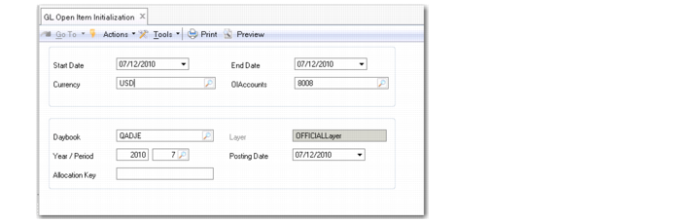
GL Open Item Initialization
If you change a standard GL account to an Open Item GL account and the account already has transactions posted to it, you can use GL Open Item Initialization (25.15.2.12) to reconcile the transactions automatically. This function accommodates situations where there was prior uncertainty over which accounts required the use of GL open items.
When you convert a standard account to a GL open item account, all existing transactions on the account are assigned the default allocation value of Allocate Later.
If a standard account was created for use in the operational modules and specified in, for example, Domain/Account Control (36.9.24), Product Line Maintenance (1.2.1), Purchasing Account Maintenance (1.2.5), or Inventory Account Maintenance (1.2.13), the system prevents you from changing the standard account to a GL open item account.
When you run GL Open Item Initialization (25.15.2.12), the system gathers all transactions for the specified converted open items account, reconciles any transactions that can be reconciled, and creates a closing and an opening transaction for the account.
The closing transaction is automatically assigned the allocation key you specify in GL Open Item Initialization (25.15.2.12). The same key is also assigned to all unallocated transactions on the account, linking the historical transactions in one step. This prevents the older unmatched transactions on the account from being continuously listed as unallocated in GL Open Item Reconciliation (25.15.2.13) or in the GL Open Item report (25.15.1.8).
GL Open Item Initialization (25.15.2.12)
Start Date
Specify a start date to search for transactions on GL open item accounts that were converted from standard accounts. The start date is mandatory.
End Date
Specify an end date to search for transactions on GL open item accounts that were converted from standard accounts. The end date is mandatory.
OI Accounts
Specify one or more active GL open item accounts, previously converted from standard accounts, for which to create a reconciled initial open item. This field is mandatory.
Currency
Specify a currency to search for open items denominated in this currency. This field is mandatory.
Important: The following five fields are used to define the posting details for the closing and opening postings created for the initial open item:
Daybook
Specify the daybook to which you want to post the reconciled initial open item. This field is mandatory.
Layer
This field displays the layer to which the daybook belongs.
Year/Period
Specify the GL calendar year and GL period in which to create the initial open item. These fields are mandatory. The defaults are the GL calendar year and GL period of the current system date.
Posting Date
Specify the posting date that the system must use when posting the reconciled initial open item. This field is mandatory. The default is the current system date.
Allocation Key
Enter the allocation key to assign to the new initial open item. This field is mandatory.
Example:
Transactions with the following amounts are posted to standard account 8008.
Posting Date | BC Debit | BC Credit |
06/01/2014 | 375 | |
06/11/2014 | 425 | |
6/25/2014 | | 1500 |
Total | 800 | 1500 |
The outstanding balance on the account is 700 Cr.
Account 8008 is later converted to an open items account using GL Account Modify (25.3.13.2). The transactions on the account are automatically assigned the allocation status Allocation Later.
Posting Date | Allocation | Allocation Key | BC Debit | BC Credit |
06/01/2014 | Allocate Later | N/A | 375 | |
06/11/2014 | Allocate Later | N/A | 425 | |
6/25/2014 | Allocate Later | N/A | | 1500 |
Total | | | 800 | 1500 |
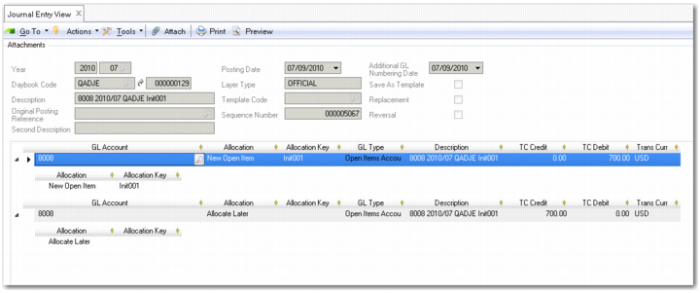
You run GL Open Item Initialization (25.15.2.12) to create an initial open item for all transactions on the account. You specify the allocation key Init001. As a result, the following postings are created on the daybook you specified. The first line is the closing posting and the second line is the opening posting.
Account | Allocation | Allocation Key | BC Debit | BC Credit |
8008 | New Open Item | Init001 | 700 | |
8008 | Allocate Later | N/A | | 700 |
Journal Entry View, Initial Open Item Posting
The original transactions on account 8008 are updated to reflect that they are now linked to open item Init001. As a result, allocation key Init001 is closed, and all original transactions are reconciled with the closing transaction. You can then reconcile any new transactions on the account with the opening transaction.
Posting Date | Allocation | Allocation Key | BC Debit | BC Credit |
06/01/2010 | Link to Open Item | Init001 | 375 | |
06/11/2010 | Link to Open Item | Init001 | 425 | |
6/25/2010 | Link to Open Item | Init001 | | 1500 |
Journal Entry View (25.13.1.3) shows the updated grid from the original journal entry posting on account 8008 for 425 USD debit, showing that the transaction is now linked to allocation key Init001.
Journal Entry View (25.13.1.3)