Journal Entry Levels
Journal entries defined in Excel must contain a minimum of three levels of data. However, a posting loaded through Excel can contain up to seven levels.
• Level 1 (parent)
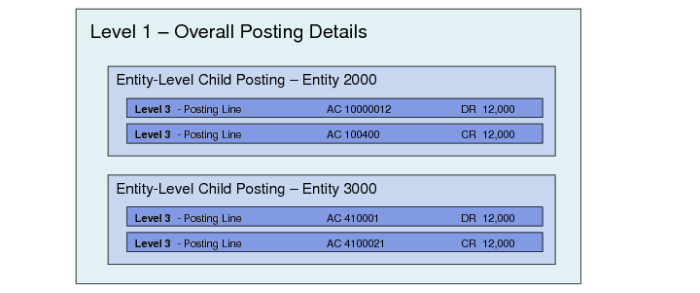
This level contains details that relate to the overall posting. Each level 1 entry maps to one cross-company transaction.
An Excel file can contain many separate level 1 records. If a posting fails at level 1, all postings within that record remain unposted. However, all other valid level 1 records and their level 2 and level 3 lines are posted.
When you are creating a cross-company posting, each level 1 record must have at least two level 2 records associated with it: one record for the source entity posting and one record for the target entity posting. For a standard single-entity posting, only one level 2 record is required.
• Level 2 (child)
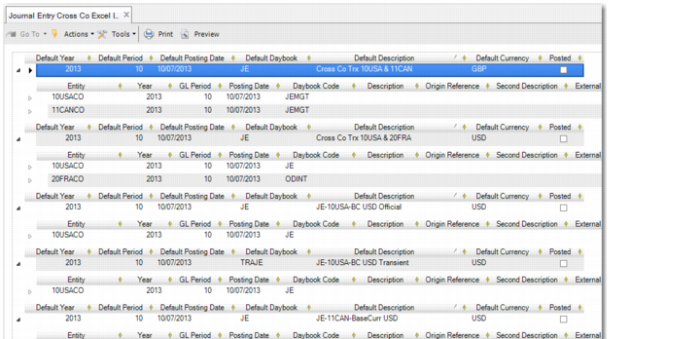
This level contains details specific to the entity posting. For cross-company postings, the Excel spreadsheet must contain level 2 entries for each entity to which you want to post. For single entity postings, there is only one level 2 entry. An Excel spreadsheet containing both types is displayed in
Cross-Company Journal Entry Integration Single Entity and Cross-Company Postings.
The level 2 row structure matches that of level 1, and must also include a cross-company code and an entity code for cross-company postings.
If you leave certain fields blank at level 2, such as the daybook, posting date, and description, these values default from level 1 when you load the Excel file in Journal Entry Cross Co Excel Integration and click Save. See
Defaulting. If you specify all required values, no defaulting occurs.
You must define a year and period at level 2.
• Level 3 (grandchild)
This level contains details specific to a single posting line. Each level 2 entry must have at least two level 3 lines associated with it. The sum of these posting lines must be zero.
• Lower Levels
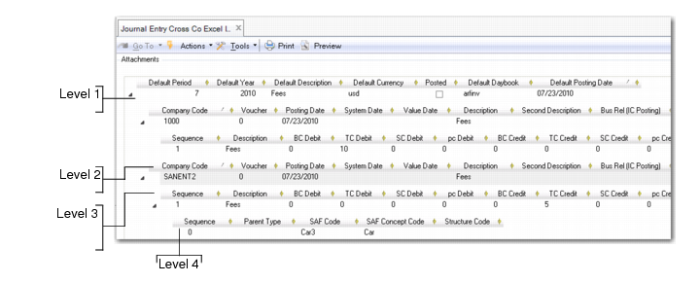
A posting line can be composed of multiple sub-levels containing additional posting information, depending on how the GL accounts used in the transaction are defined. If you specify a tax account, GL open item account, an account with SAF analysis, or an account defined with quantities, you must enter details pertinent to these accounts at lower levels in the spreadsheet. See
Journal Entry Cross Co Excel Integration, Data Levels, which shows a fourth level because the GL account is defined with SAF analysis.
Cross-Company Journal Entry Integration Levels
Journal Entry Cross Co Excel Integration, Data Levels
Cross-Company Journal Entry Integration Single Entity and Cross-Company Postings