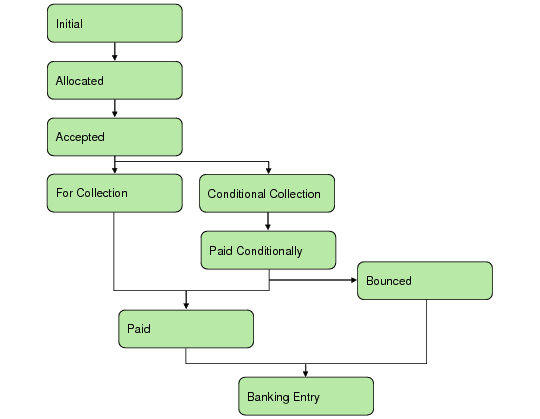
Status | Description | Account Activity | |
Debit | Credit | ||
Initial | Initial payment status. The payment is in your system but does not generate any postings. | Not applicable | Not applicable |
Allocated | The payment is received and is linked to open items. The transition to Allocated generates postings and sub-ledger updates. | Allocated Customer Payment account | Customer Control account |
Accepted | The payment is signed by the relevant parties. When a draft is signed by a customer, you change the status of the associated customer payment to Accepted. | Accepted Customer Payment account | Customer Control account, if this is the first posting for the payment Otherwise, the account associated with the previous payment status |
For Collection | The payment is presented to the bank for immediate payment. Some examples of payments for collection include a check, a payment selection that is transferred directly to the bank, and paper transfers to the bank. A selection is automatically created when a payment status is changed to For Collection. | For Collection Customer Payment account | Customer Control account, if this is the first posting for the payment Otherwise, the account associated with the previous payment status |
Conditional Collection | The payment is presented to the bank conditionally, the condition being that a draft is honored by the bank before the draft due date. This status is followed by the Paid Conditionally status in banking entry. The Conditional Collection status is also referred to as Discounted Draft. | Conditional Collection Customer Payment account | Customer Control account, if this is the first posting for the payment Otherwise, the account associated with the previous payment status |
Paid Conditionally | When a draft is discounted to the bank and the payment is conditionally received, change the payment status to Paid Conditionally. Payments are automatically be assigned this status when they are marked as Paid during banking entry and when their previous status was Conditional Collection. Unlike other statuses, the Paid Conditionally posting does not transfer the amount from the control account linked to the previous status to the control account of the current status. Instead, it credits a liability account, which is backed out again when the status of the payment is changed from Paid Conditionally to Paid (final). | Bank account | Liability account associated with Paid Conditionally status |
Paid For payments coming from any status, except Paid Conditionally | The incoming payment amount has been paid. Individual Payments are either fully paid or not paid at all. The payments cannot be partially paid. A Payment Selection can be said to be partially paid if individual payments within it are bounced. | Bank account | Customer Control account, if this is the first posting for the payment Otherwise, the account associated with the previous payment status |
Paid For payments coming from Paid Conditionally | The incoming payment was already posted on the bank account with the previous status Paid Conditionally and is now confirmed as final. | Liability account associated with the Paid Conditionally status | Conditional Collection Customer Payment account |
Bounced For payments coming from any status, except Paid Conditionally | The incoming payment, which was sent to the bank for collection, has been refused by the bank. The linked open items are re-opened and the invoice payment links are deleted. | Customer Control account | For Collection Customer Payment account |
Bounced For payments coming from Paid Conditionally | The incoming payment, which was sent to the bank for collection, has been refused by the bank. The linked open items are re-opened and the invoice payment links are deleted. | Liability account and Customer Control account | Conditional Collection Customer Payment account and Bounced Customer Payment account |