Bill Print
Bill Print (27.3.2.5) enables you to print and confirm bills and send them to customers. You can select bills for printing based on Print Type, Customer, Bill Year, Bill Number, Bill Date, and Bill Collector.
For Print Type, there are three options:
• Test Print prints initial bills for review before sending them to the customer.
• Confirm Print prints initial bills and changes the status to confirmed. However, you cannot confirm print a bill when there is an earlier bill with status Initial for the same customer, currency, and entity.
Note: For Confirm Print, if you specify a Bill Number or a Bill Date, you must specify a range for the bill to print.
• Reprint prints confirmed bills. For the reprint function, you must enter a bill number or bill date.
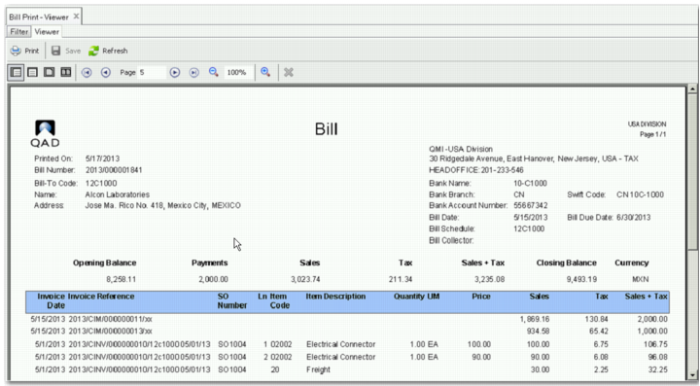
The print page contains a header section and the list of invoices. If the Bill with Item Details field is selected in the Customer record, item line columns are included, as displayed in
Bill Print Viewer - Item Line Detail.
Bill Print Viewer - Item Line Detail
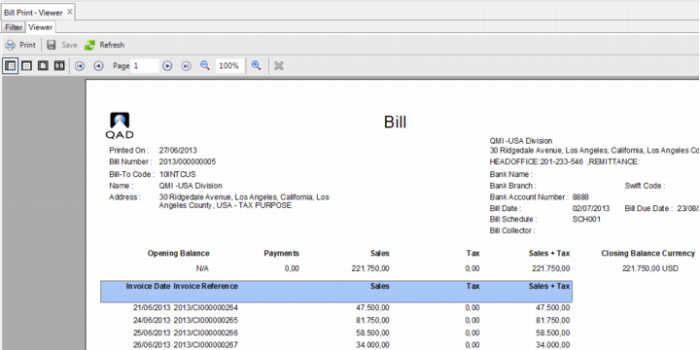
When Bill with Item Details is not selected, the report is displayed without the detail columns, as displayed in
Bill Print Viewer - Item Line Detail.
Bill Print Viewer - Item Summary