Supplier Invoice Control Settings
Use Supplier Invoice Control (28.24) to set defaults that affect the invoice process.
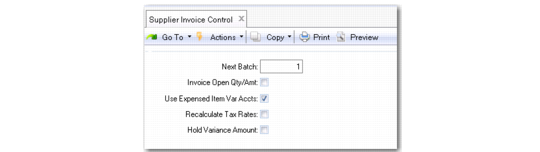
Supplier Invoice Control
Next Batch
The batch number is used to identify a group of supplier invoices created at one time using Evaluated Receipts Settlement (ERS) functions.
The system assigns the next batch number from the control program, and increments the next number by one.
Invoice Open Qty/Amt
Define the default setting for the Auto-Select field in the Receiver Matching screen. You can override it as needed. How you set this field depends on your company’s matching process, and the accuracy and timeliness of the invoices you receive from your suppliers.
Select this field if you want all lines to be matched by default. You can then review the lines in Receiver Matching Create and deselect the lines that you do not want to match. All purchase order line items received are normally processed on one invoice.
Clear this field if you often receive supplier invoices with an incorrect quantity and price. If you clear the field, all receiver matching lines are deselected by default, and you must then select matching receivers manually in Receiver Matching Create.
Use Expensed Item Var Accts
The setting of this field determines whether AP rate and usage variances for non-inventory items are expensed to the account defined on the PO line. For more precise variance tracking, enable the Use Expensed Item Var Accts option.
When a non-inventory item is purchased, it is immediately expensed and the expected payable amount is accrued to Expensed Item Receipts. If the supplier invoice has a different amount, a variance is calculated when the invoice is matched.
• A rate variance arises when the invoice price is different from the PO price.
• A usage variance arises when the invoice quantity is different from the PO receipt quantity.
Note: The Expensed Item Receipts account defaults first from that associated with the supplier in Supplier Accounts Maintenance (2.3.7). If not specified there, the one in Domain/Account Control (36.9.24) is used.
Example: A PO is received for 100 units of an expensed item at 11 cents each. At receipt, the GL entries are:
If the invoice later shows 110 units at 15 cents each, AP rate and usage variances are calculated when the invoice is matched. The control setting determines whether these variances are posted to Expensed Item Usage Variance and Expensed Item Rate Variance or to the Purchases account.
Note: As shown in the example, the system charges the expense for a memo item receipt to the account on the PO line, which is the Purchases (Expensed) account by default. However, you can change this value.
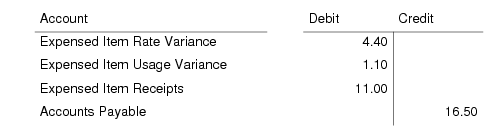
When Use Expensed Item Var Accts is selected, expensed item variances are tracked separately, and the following GL entries are created:
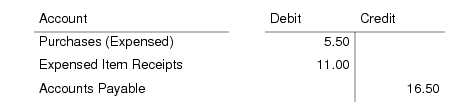
However, if variances are not tracked separately, the GL entries are:
Recalculate Tax Rates
When you select this field, the system recalculates tax rates for each line in the receiver matching grid, based on the taxable, tax class, tax usage, and tax environment values selected for each line. This option ensures that any changes in tax rate between the point when the PO receipt was created and when it is matched are accounted for by the system. If you do not select this field, the system uses the original tax rates applied when the PO Receipt was created, without recalculating.
This control applies domain-wide and provides the default for the Recalculate Tax Rates field on Receiver Matching Create. You can clear the field in Receiver Matching if required.
Hold Variance Amount
When there is an adverse variance following the matching of an invoice to receivers (that is, the invoice amount is greater than the pending voucher amount), the system automatically puts all or part of the invoice amount on hold. Select this field to place only the variance amount on hold. Deselect the field to place the entire invoice amount on hold. The system displays a warning when all or part of the invoice is on hold but does not prevent you from saving.