Using Invoice Status Codes
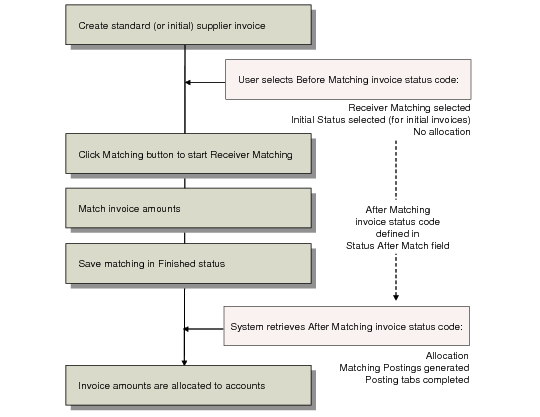
Both types of invoice go through matching and allocation stages before they are posted to the sub-ledger. When you intend to match an invoice, you must define an invoice status code for the invoice for both of these stages:
• A first status code that is defined to allow matching (Receiver Matching is selected), but does not allow allocation (No Allocation selected). You apply this status code to the invoice before matching. When no allocation is defined for the invoice, the Matching Posting tab is disabled and no matching postings are generated.
• A final status code that allows both receiver matching and allocation. This code is used in the Matching Data section of the Receiver Matching screen, and ensures that the matching postings are generated and the matching amounts are allocated to accounts. The system automatically applies this status code to the invoice post-matching, and completes the postings on the Matching Postings tab.
You link these two codes by creating the first status code (before matching), and then selecting the final status code (after matching) as an attribute of the first. You make this selection in the Status After Match field on the Invoice Status Code Create screen.
This link then ensures that when you select an invoice status code that allows matching but not allocation when creating the supplier invoice, the system automatically retrieves the linked post-matching code (which does allow allocation) when matching is complete and the invoice is posted.
Invoice Status Codes and Receiver Matching
See
Invoice Status Codes for details on setting up invoice status codes.
Initial invoices use a status code that has the Initial Status field enabled. When you create an initial invoice that you intend to match, you must select an invoice status code for which both the Initial Status and Receiver Matching fields are selected. Once you select the Receiver Matching field, you are required to enter the status code to be used for matching postings and allocation in the Status After Match field. When the initial invoice is matched and the matching has a status of Finished, this final status code is retrieved to generate the final postings.
Selecting a status code for an invoice in which Receiver Matching has been enabled has two effects:
• The Matching button is enabled in the Invoice Create screen. This lets you click Matching to go directly into the Receiver Matching screen.
• This invoice is displayed when you browse for invoices to match through Receiver Matching Create. The browse for invoices in Receiver Matching Create displays only those invoices for which Receiver Matching has been enabled.