Initial Invoices and Taxes
Taxes on initial invoices are resolved at the receiver matching stage, when the tax amounts generated by the matching postings update the invoice tax or when the invoice status code is changed to one that does not have the Initial status.
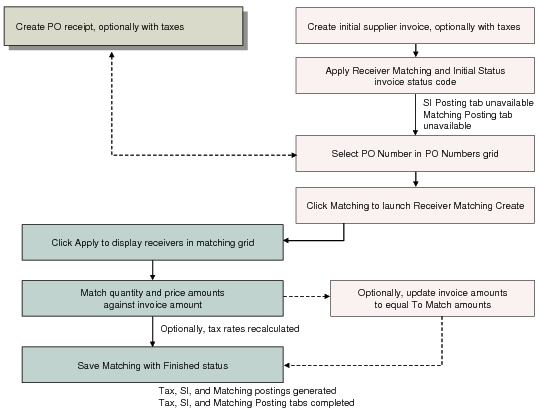
Receiver Matching Flow for Initial Supplier Invoice illustrates the matching flow for an initial invoice.
Receiver Matching Flow for Initial Supplier Invoice
You normally detect an error in the matching or in the invoice amount when you have matched and the system displays a difference.
Differences between initial invoice matching and To Match amounts caused by user error can be handled in the following ways:
The matching clerk has made a mistake in entering the matching amounts.
Receiver matching can be saved with a status of Initial, which lets you review the matching amounts before completing the process.
The AP clerk has entered the wrong amount on the original invoice.
When the matching and invoice totals do not agree, the system displays a warning if the matching is in Initial status, or an error if the matching is in Finished status. When in Initial status, you can update the invoice amount and save the matching. When in Finished status, you can update the invoice amount using the matched amounts, and then try to save again. If both amounts match, the matching can be saved.
The supplier submitted an invoice for the wrong amount.
If your local accounting practices permit, you can delete initial invoices with no effect on accounts, and can simply request a correct invoice from your supplier.