Supplier Payment Statuses
Payment processing is controlled by payment status codes. Different payment instruments follow different status sequences. The number of statuses you need depends on your particular implementation. At a minimum, you must have two statuses: Paid and Void. Typically, you also want to have a For Collection status for payments sent to the bank. The Initial status is used if you want to do an initial payment registration. The Initial supplier payment status has no accounting effect so you can modify its associated details, such as the amount. You cannot link invoices to a payment in Initial status.
When a payment is changed to any status that creates a posting (every status except Initial), you can only change the payment status assigned in Supply Payment Modify. You cannot allocate it to a different invoice or change the payment amount.
You can define an account for each status through which the payment is processed, or use one GL account to record the transitions. For example, if you are processing a check through the Initial, Allocated, For Collection, and Paid statuses, you can define a GL account of type Supplier Payment for each status. This approach supports detailed reporting requirements.
Each status transition usually generates a posting, which updates the account associated with the status and bank or liability accounts. The posting information, including account and daybook details, is contained in the payment status definition.
If you do not need a complex payment cycle, you can use Initial, Paid, and Void statuses only, in which case you do not have to use supplier payment accounts for the Initial and Void statuses. Setting the status of a payment immediately to Paid updates your bank account automatically, without the need to create a final banking entry to record the payment.
However, note that while you can move a payment directly to the Paid status, you cannot undo a Paid document. This means that if you print checks after setting the payment to Paid and the print run fails for some reason, you cannot void the payment. You must reopen the invoice manually with Open Item Adjustment.
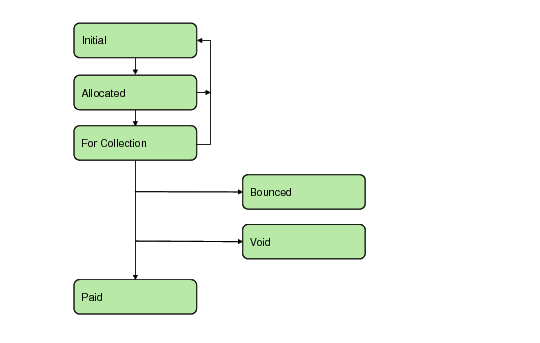
Supplier Payment Status Flow
Like customer payments, it is not mandatory to process a supplier payment through all of the statuses described, and you can process a payment using Initial and Paid statuses only. You can also use Supplier Payment Mass Change to select payments with an Initial status and change their status directly to Paid. This status change immediately updates your bank account, without the need to create a banking entry. You must then allocate the payment to one or more outstanding invoices.
You can also use Supplier Payment Mass Change to void any payment at any stage in the flow (except after the Paid status) or to revert it to Initial.
Note: Setting the status of a payment directly to Paid is available for payments in the base currency of the account only. You cannot change a payment status directly to the Paid status if the payment currency is different than the base currency. In this case, you must use Banking Entry to complete the payment.
Supplier Payment Statuses and Account Activity describes each payment status, and lists the postings created by status transitions.
Supplier Payment Statuses and Account Activity
Status | Description | Account Activity |
| | Debit | Credit |
Initial | Initial payment status. The payment is in your system but does not generate any postings. | Not applicable | Not applicable |
Allocated | The payment is created and is linked to open items. The transition to Allocated generates postings and sub-ledger updates. | Allocated Supplier Payment account | Supplier Control account |
For Collection | The payment is presented to the bank for immediate payment. Some examples of payments for collection include a check, a payment selection that is transferred directly to the bank, and paper transfers to the bank. | For Collection Supplier Payment account | Supplier Control account, if this is the first posting for the payment Otherwise, the account associated with the previous payment status |
Paid | The outgoing payment amount has been cleared on your bank account. Payments are either fully paid or not paid at all. A selection can be said to be partially paid if an individual payment is bounced. | Bank account | For Collection Supplier Payment account |
Bounced | The incoming payment amount has not been paid. The linked open items are re-opened and the invoice payment links are deleted. | Supplier Control account | Account associated with the previous payment status |
Void | The payment is voided when, for example, a duplicate payment is detected, or a printing error corrupts the payment numbering system. | Supplier Control account | Account associated with the previous payment status |
For each of the different payment statuses, a specific GL account representing the status can be defined.
The Void payment status is unique to supplier payments and is used to ensure that you can void a payment when, for example, a duplicate payment is detected, or a printing error corrupts the payment numbering system. When you void a payment, the links to open items are deleted.
When you change the status of a payment directly to Paid, you cannot subsequently change the status to Void to void the payment. The Paid status indicates that the payment has been received by the supplier.
Voiding a payment does not generate any postings. Instead, it resets the payment records, and creates an extra payment record for the current payment. Voiding also does not re-open the invoices or credit notes linked to the payment.
The Bounced payment status differs from Void in that, when a payment bounces, the incoming payment amount has failed to clear from the supplier’s bank account. The linked open items are re-opened and the invoice payment links are deleted.