Payment Selection Processing Examples
The system supplies various activities that can be combined in different ways to support different processing scenarios for payments. The following are a few examples of how a processing flow can be created.
Direct Payment by Check
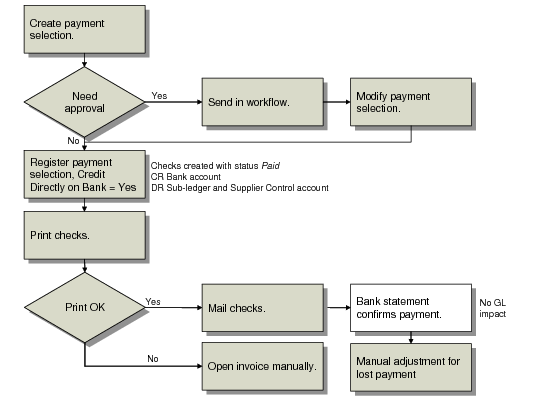
Select the invoices to pay by creating a payment selection. The selection is automatically assigned the Initial status. Following an approval stage, the selection is then confirmed and the Credit Directly on Bank field is selected. This changes the payment selection status directly to Paid, crediting the Bank account and debiting the sub-ledger and Supplier Control account.
The printed checks are sent to the supplier, and no further processing in the system is required. At the period end, the bank account balance must be reconciled with the bank GL account balance. Checks that you marked directly as Paid, but in reality are unpaid, cause discrepancies. You must identify these unpaid checks based on the bank statements you have received.
Note: In this scenario, when you move a payment directly to the Paid status, you cannot void a failed check run. You must reopen the invoice manually with Open Item Adjustment.
Direct Payment by Check
Staged Supplier Payment by Check
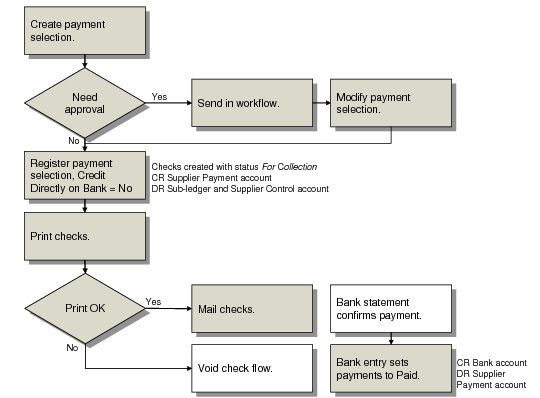
In this example, a selection of checks to a supplier is processed through approval stages, and then confirmed. When you confirm the payment, the Credit Directly on Bank field is not selected. As a result, the status of the payment is changed to For Collection. The posting credits the Supplier Payment account, and debits the Supplier Control account. The control account details default from the supplier record.
When the checks are printed and mailed to the bank, a banking entry posts the payment to the bank account. You change the status of the payment to Paid by recording the cleared payment from the bank statement in Banking Entry Create. However, this could also happen when a bank statement is loaded automatically.
Staged Payment by Check
Note: The payment selection process is, typically, the same for checks and drafts.
Supplier Electronic Transfer
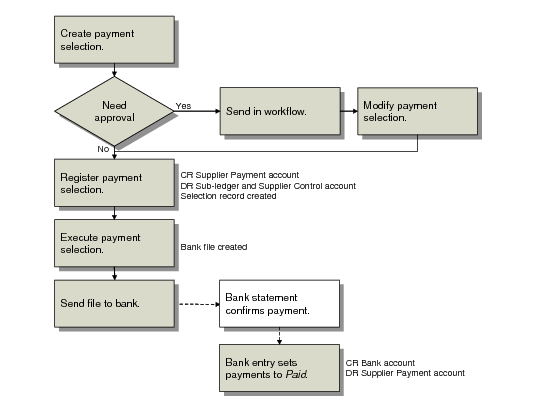
In this example, a series of supplier invoices is processed in one payment selection, and you create an electronic payment file to send to your bank. Different banking systems use different electronic file formats, and you must apply the correct format to electronic payment files. See
Payment Format Maintenance.
The postings are generated when you confirm the payment selection. This step credits the Supplier Payment account and debits the sub-ledger and Supplier Control account.
To create the bank file, an additional execute step is needed. See
Supplier Payment Selection Execute. When you send the file to the bank, the bank transfers funds from your account to your supplier’s, based on the instructions in the file. A bank statement confirms payment, and the final banking entry sets the payment status to Paid.
Note: You can also process payments directly to the Paid status.
Paying a Supplier by Electronic Transfer