Aging Reports
Supplier Aging Analysis Current Report
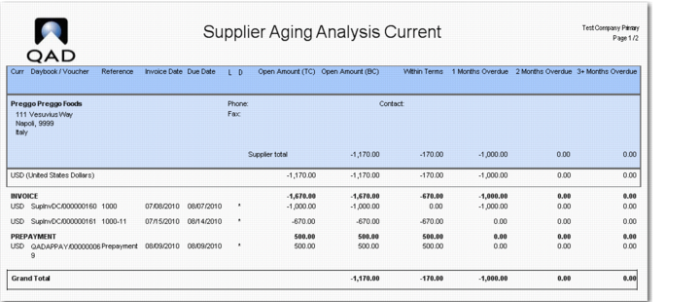
The Supplier Aging Analysis Current report (28.17.9) displays all open items created in the specified time frame. It also lists the due supplier open items by number of periods overdue at the entered date for aging calculation.
The following are the report selection criteria:
|
• Supplier Codes
|
|
• Control GL Account
|
|
• Business Relations
|
|
• Supplier Balance
|
|
• Aging Type
|
|
• Invoices within Terms
|
|
• Aging Offset
|
|
• Reporting Currency
|
|
• Date for Aging Calculation
|
|
• Summary Info By
|
|
• To GL Cal Year
|
|
• Sort By
|
|
• To GL Period
|
|
• Payment Group
|
|
• Entity
|
|
|
The report output is sorted by supplier, currency, and invoice. By selecting one of the three values in the Summary Info By field, you can display summaries by currency, GL account, or sub-account.
If you display summaries by currency, the summary is sorted by currency. If you display summaries by GL account, the summary is sorted by GL account and then by currency. If you display summaries by sub-account, the summary is sorted by sub-account and then by currency.
Supplier Aging Analysis Current Report shows an example of a Supplier Aging Analysis Current report when the report is run for the system date.
Supplier Aging Analysis Current Report
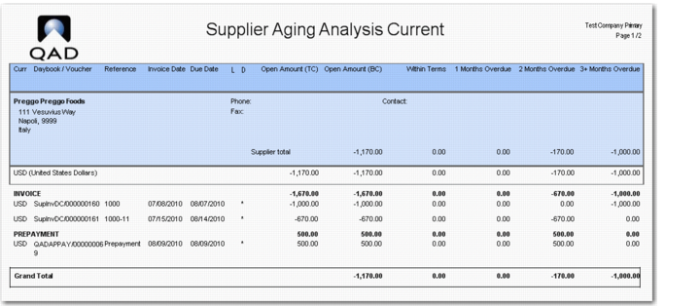
Supplier Aging Analysis Current Report, Aged Two Months shows the report output when the report is run on the same system date, but with the Date for Aging Calculation field set to two months from the system date. Note that the credit note and invoice are now in the 2 Months Overdue column.
The prepayment was not allocated so this remains as an open item. The prepayment is aged and also appears in the 2 Months Overdue column.
Supplier Aging Analysis Current Report, Aged Two Months
Supplier Aging Analysis History Report
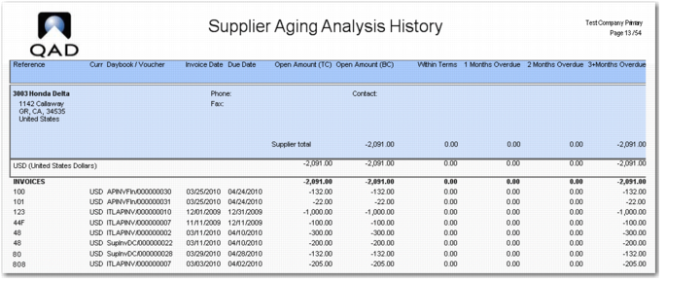
The Supplier Aging Analysis History report (28.17.10) displays aging analysis payments up to the specified period.
The report selection criteria are the same as those for the Supplier Aging Analysis report.
Supplier Aging Analysis History Report
Supplier Aging Analysis by Group Current Report
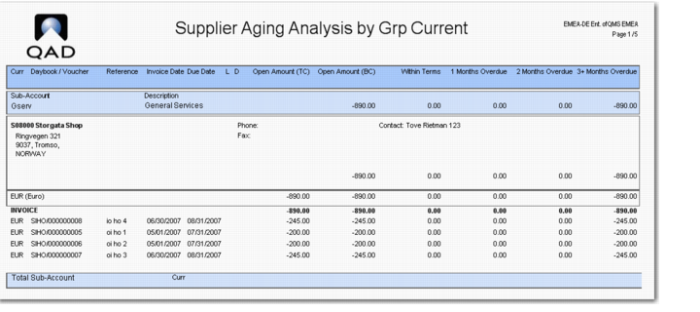
The Supplier Aging Analysis by Group Current report (28.17.11) groups aging analysis data by sub-account or project.
The report has the following selection criteria in addition to those listed for the Supplier Aging Analysis Current report:
• Sub-Account Codes
• Group By (All, Project, Sub-Account)
The output is first grouped by the value you specify in the Group By field, which can be All, Project, or Sub-account. Following this, the output is then grouped by supplier, currency, and invoice type.
Supplier Aging Analysis by Group Current Report
Supplier Aging Analysis by Group History Report
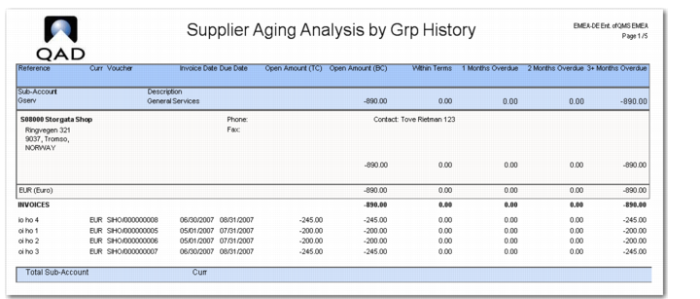
The Supplier Aging Analysis by Group History report (28.17.12) groups aging analysis backwards data by sub-account, purchase code, or project.
The report has the following selection criteria in addition to those listed for the Supplier Aging Analysis Current report:
• Sub-Account Codes
• Group By (All, Project, Sub-Account)
The report output is grouped using the same method specified for the Supplier Aging Analysis by Group report.
Supplier Aging Analysis by Group History Report