Processor Flow for Receipts
The ERS Processor selects all pending invoices linked to a receipt that has been selected for processing.
Note: Lines that generated errors when processed are highlighted in red in the ERS Processor.
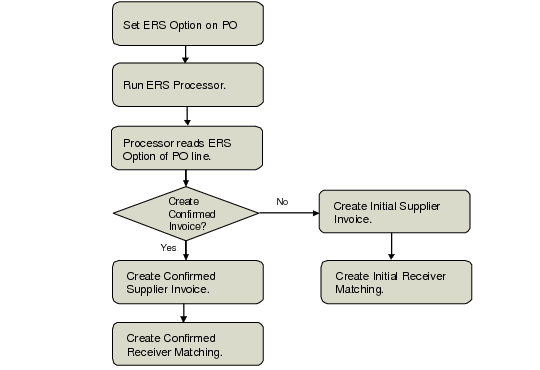
Depending on the value of the ERS option set for each PO line, the ERS Processor creates an initial supplier invoice with no postings and taxes, and a corresponding initial receiver matching record, or creates a confirmed supplier invoice and corresponding receiver matching record for the line. For each receipt that it validates for processing, the ERS Processor creates a single supplier invoice for all pending invoices linked to the receipt.
The ERS Processor calculates the price when it creates a receiver matching line.
• If an item’s price is fixed, the ERS Processor takes the price from the purchase order.
• If the price is not fixed, the ERS Processor refers to the relevant price list.
• If there is no price list, the system looks for a supplier quoted price.
• If there is no supplier quoted price, the system looks for an item price.
If the price has changed relative to the original order price, the ERS Processor also recalculates the associated tax details.
When the ERS Processor updates the supplier invoice with the correct invoice amount from receiver matching and sets the receiver matching to Confirmed, the system generates a number of postings.
The ERS Processor normally creates a single supplier invoice for each purchase order receipt. However, if a PO receipt contains some PO lines with the option to create confirmed pending invoices and other PO lines with the option to create initial invoices, ERS creates two separate supplier invoices for the same purchase order receipt. In this case, one supplier invoice is created with the Initial status and the second invoice is created with the Confirmed status.
ERS posts the supplier invoice amount to the daybook from the daybook set defined for the corresponding purchase order.
ERS Processor Flow
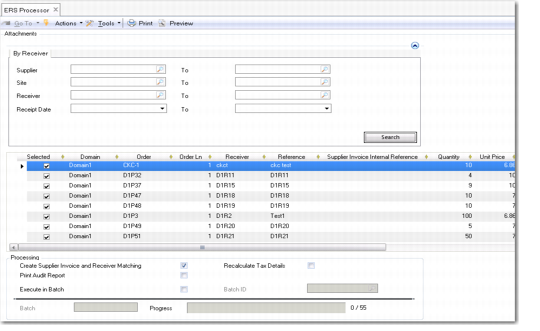
ERS Processor (28.10.13), By Receiver Tab
Supplier From/To
Specify a range of supplier codes for which to retrieve receipts.
Site From/To
Specify a range of sites for which to retrieve receipts.
Receiver
Specify a range of receiver numbers to retrieve from.
Receipt Date
Specify a range of dates for which to retrieve receipts.
Grid
Note: All column values except Select are read only and cannot be modified.
Selected
Select the field to indicate which receipts to process.
ERS removes unselected lines from the grid when you click the Process button.
Order
This field displays the list of received orders that meet the selection criteria and have not yet been processed.
Order Line
This field displays the order line associated with the received order. Each order line generates a separate pending invoice.
Receiver
This field displays the receiver ID assigned to the order when it was recorded as received.
Reference
If a packing slip has been recorded for the PO receipt, it is displayed in this field. Otherwise, the field displays the receiver number.
Supplier Invoice Internal Reference
This read-only field displays the registration number for the supplied invoice created by ERS. The system generates a registration number for all invoices and credit notes, based on the entity and year.
Quantity
This field displays the quantity of items ordered.
Unit Price
This field displays the unit price of the item ordered.
Extended Price
This field displays the extended cost, which is calculated as the number of items multiplied by the fixed price or the price on the price list, as applicable.
Curr
This field displays the currency in which the order was made.
ERS Option
This field displays the ERS option set for the line.
Print Audit Report
Select the field to print an audit report detailing the receipts processed. The report provides an overview of processed receipts and lists validation errors, if the ERS Processor ran with errors. See
ERS Audit Report.
Create Supplier Invoices and Receiver Matching?
Select the field if you want the ERS Processor to create supplier invoices and receiver matching during the run.
Clear the field to run the ERS Processor in audit mode, during which no invoices or receiver matching records are created.
If you select the Print Audit Report field and run the ERS Processor in audit mode, the audit report lists the receipts that would be processed if the processor were run in update mode for the same group of receipts.
Execute in Batch
Select the field to process a group of receipts in batch.
Batch ID
Choose an ID for the batch from the lookup. You must first have defined the batch ID to use in Batch ID Maintenance (36.14.1).
When you run the ERS Processor with the Execute in Batch field selected and the batch ID specified, ERS creates a record in Batch Request Details Maintenance (36.14.3) to run the ERS program with the parameters specified in ERS.
For more information on batch processing, see
QAD System Administration User Guide.
Recalculate Tax Details
When you select this field, the system recalculates tax rates for each line in the grid, based on the taxable, tax class, tax usage, and tax environment values selected for each line. This option ensures that any changes in tax rate between the point when the PO receipt was created and when it is matched are accounted for by the system. If you do not select this field, the system uses the original tax rates applied when the PO Receipt was created, without recalculating.
Effective Issue Date
This field is only populated when you use the grid to process fiscal receipts.