Creating a Payment Selection with the Initial Status
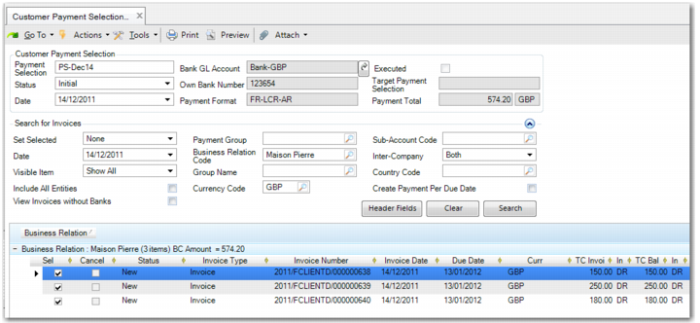
Select open customer invoices and create a payment selection with the Initial status. This payment selection does not create GL entries or update AR open balances. You can create a customer payment selection in the Initial status for both full invoice amounts and staged invoice payments.
A payment can be subject to a discount or an interest charge; both never apply simultaneously.
Important: The payment total is for information purposes only, and is the total of the invoices you select, net of discount. The actual amount you receive from the customer may be net of the discount amount or may be the gross amount. You may also receive the gross amount plus interest if the customer paid late and interest is applied and collected.
When you create a customer payment selection in the Initial status, the system generates an internal reference number for each invoice or for each payment stage of an invoice, in the case of staged payments. The internal reference number is a unique 10-digit number.
Note: An invoice can only be included on one customer payment selection with the Initial status. In addition, if an invoice includes staged payments, you can only include an invoice stage on one customer payment selection with the Initial status. You can include different payment stages for the same invoice on different payment selections.
Customer Payment Selection Create
Modifying Unexecuted Payment Selections
Use Customer Payment Selection Modify to modify unexecuted payment selections with the Initial status. You can modify payment interest rates and due dates, and add and remove payment lines.
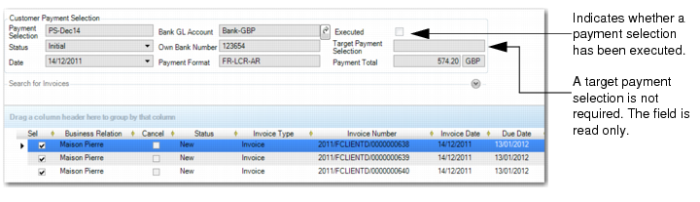
Customer Payment Selection Modify, Unexecuted Payment
Header Fields
Executed
This field is read-only and indicates if the payment selection has been executed.
Target Payment Selection
This field is read-only when you modify an unexecuted Initial payment selection.
Grid Fields
Sel
Clear this field for lines you want to remove from the payment selection.
Due Date
Specify a new due date for the invoice, if required. When you save the modified payment selection, the system updates the due date on the corresponding invoice.
Interest Rate
Specify a new interest rate for the invoice, if required.
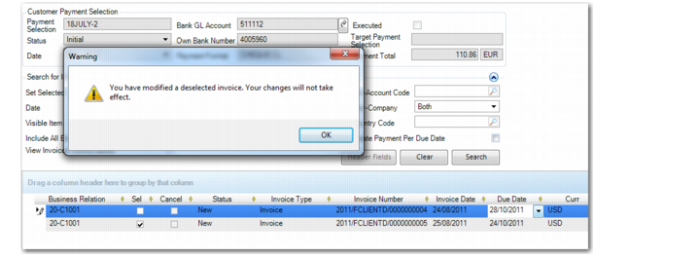
If you modify the interest or due date for an invoice or stage, the system displays a warning message if you subsequently clear the Sel field to remove the line from the payment selection.
Customer Payment Selection Modify, Warning Message
Adding Lines to Unexecuted Customer Payment Selections
You can use Customer Payment Selection Modify to add invoices or staged lines to previously created unexecuted customer payment selections.
In Customer Payment Selection Modify, use the fields in the Search for Invoices frame to retrieve additional invoices or stages for the payment selection. The additional invoices or stages are then appended to the grid after the lines from the original payment selection. You can then update the Sel field to indicate the new lines that you want to add to the payment selection.