Modifying Executed Payment Selections
After you have executed the customer payment selection, you may need to cancel a line from a payment selection or modify payment details, such as the due date or interest rate. You can use Customer Payment Selection Modify to modify executed payments with the Initial status. However, the process differs from that used to modify unexecuted payment selections.
In the browse for Customer Payment Selection Modify, you can search for Initial payment selections using a variety of criteria, such as the invoice number, shipper, internal reference number, and bank title number.
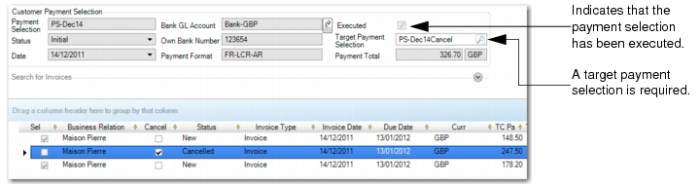
When you cancel an invoice line or modify the due date or interest rate for a line, you must transfer the modified lines to an unexecuted payment selection with Initial status for the same bank account and payment method. You can also transfer the lines to a new payment selection by specifying a new code as the transfer payment selection. When you save the payment selection, the modified or canceled lines are moved to the new or existing target payment selection. If you try to save a modified payment selection and have not specified a target payment selection, an error is displayed.
Customer Payment Selection Modify
Status
This field displays the status of the payment selection line.
New: Indicates an invoice or stage that has never been modified or cancelled from an executed payment selection.
Cancelled: Indicates an invoice or stage that was previously sent to the bank for payment, but was subsequently cancelled when the executed payment selection was modified.
Modified: Indicates an invoice or stage that was previously sent to the bank for payment, but where the interest rate or due date was modified since the payment selection was executed.
Use the following process to cancel an invoice line on a payment selection:
1 Open the payment selection in Customer Payment Selection Modify.
2 In the grid, select the Cancel field for the line or lines you want to cancel, as shown in
Customer Payment Selection Modify. The system updates the line status to Cancelled.
3 In the Target Payment Selection field, specify an existing unexecuted payment selection at Initial status to which to transfer the canceled lines.
Alternatively, specify a new payment selection code to transfer the canceled lines to a new payment selection at Initial status.
4 Save the modified customer payment selection.
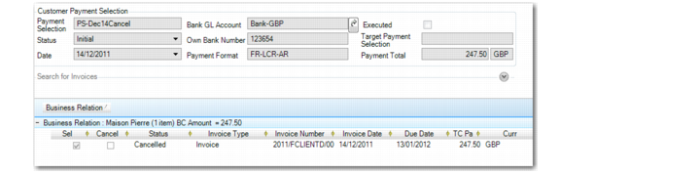
The canceled line is saved to the target payment selection.
Customer Payment Selection View, Target Payment Selection
5 Run Customer Payment Selection Execute for the target payment selection to create a notification file for the bank.
This payment selection creates a notification file informing the bank that the invoices lines referenced in this selection are canceled.
Note: You do not need to run Customer Payment Selection Re-execute for the original payment selection you modified.
EDI eCommerce transfers the file to the bank.
The process for updating the due date or interest rate for an invoice line on an executed payment selection is similar to that for canceling a line. You must transfer the modified lines to a new or existing unexecuted payment selection at Initial status. If you update the due date for an invoice or staged line on a payment selection, the corresponding invoice is updated accordingly.
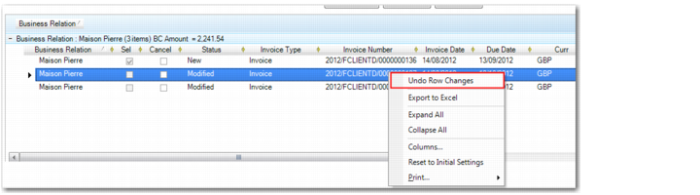
When you use Customer Payment Selection Modify to modify the due date or the interest rate on an executed customer payment selection, you can use a right-click menu option, Undo Row Changes, to revert to the original values on the payment line, if needed. This option is only available before you save changes to the payment line.
Customer Payment Selection Modify, Undo Row Changes
Modifying a Target Payment Selection
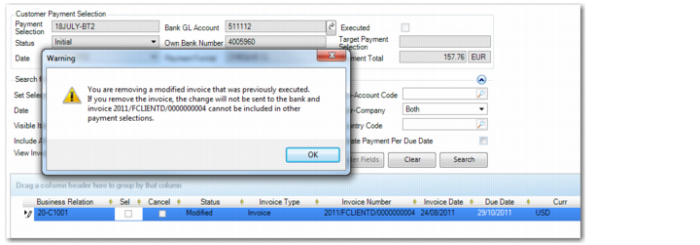
When you use Customer Payment Selection Modify to transfer modified lines from an executed payment selection to an unexecuted target payment selection, it is recommended that you do not remove the transferred lines from the target payment selection to ensure that your changes are sent to the bank. If you deselect a modified line that was previously executed from the unexecuted target payment selection, the system displays a warning message:
Customer Payment Selection Modify, Removal Warning for Modified Lines
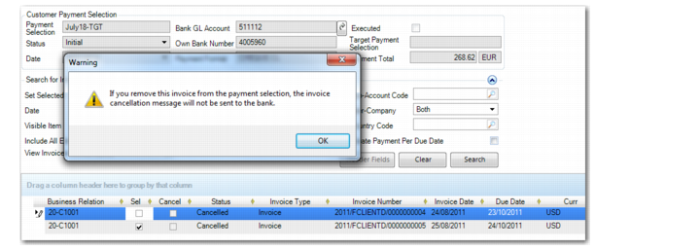
Similarly, if you deselect a cancelled line that was previously executed from an unexecuted target payment selection, the system displays a warning message:
Customer Payment Selection Modify, Removal Warning for Cancelled Lines
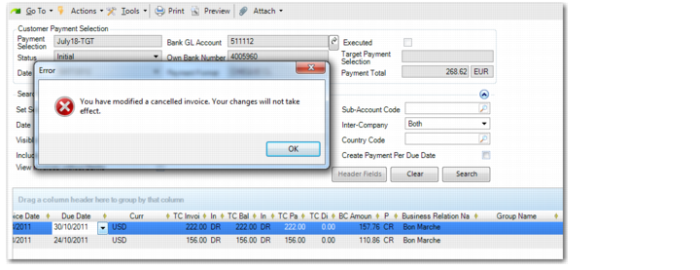
When you use Customer Payment Selection Modify to modify an invoice with the status Cancelled that was previously transferred from an executed payment selection, the system also displays a warning message:
Customer Payment Selection Modify, Modification Warning
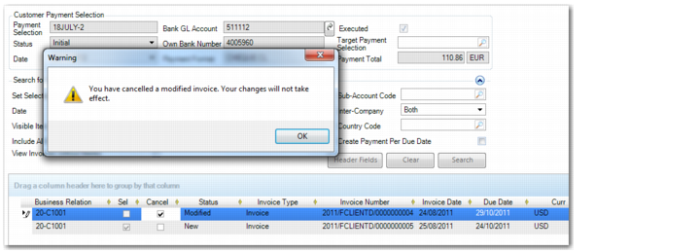
When you use Customer Payment Selection Modify to modify a line on an executed payment selection and then subsequently cancel the modified line before you have transferred it to a target payment selection, the system displays a warning message.
Customer Payment Selection Modify, Cancellation Warning