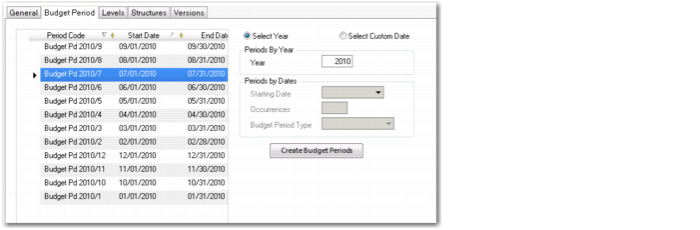
Budget Period Tab
Use the Budget Period tab to create the budget periods for which the budget is valid.
Budget periods can be based on GL periods or can be different. This lets you produce budgets for time periods that do not correspond to GL periods, such as quarterly budgets. Budget periods let you create budgets that operate across entities, and are not restricted to entities sharing the same GL calendar.
Note: The system creates a budget column and a forecast column in the grid in the Structures tab for each budget period you define. If the budget uses quantities, the Structures tab also contains a column for budget quantities and forecast quantities for each budget period.
Budgets can contain a maximum of 54 periods and can run over multiple years. You can also create a single budget period to span an entire year. You cannot define budget levels or structures until you define the budget periods.
You can define budget periods:
• Manually. Enter all budget period codes and start and end dates manually in the budget periods grid.
• Based on an existing GL calendar year. The budget periods are equivalent to the GL periods of the year you specify. Click the Create GL Periods button to create the periods.
• From rules. Enter the start date, the number of periods, and define whether the periods are defined by week, month, or quarter. The system then creates the budget period table when you click Create GL Periods.
Budget Create, Budget Period Tab
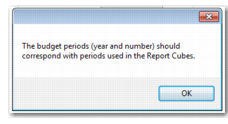
Note: If you are creating a budget structure for use in Financial Report Writer, the budget periods you enter must correspond with periods used in the Report Cubes. When you open the Budget Period tab, a message is automatically displayed to inform you of this, as displayed in
Budget Create Financial Report Writer Message. See
Financial Report Run for more information.
Budget Create Financial Report Writer Message
Periods Grid
This grid contains a row for each budget period you define. When creating budget periods manually, right-click to insert a row.
Periods by Year Field
Year
Specify a GL calendar year on which to base the budget periods. The system creates budget periods that are equivalent to the GL periods of the year you specify.
Use this option independently of the Periods by Dates fields.
Periods by Dates Fields
The system uses the data in these fields to automatically generate budget periods.
Starting Date
Specify the start date of the first budget period.
Occurrences
Enter the number of budget periods to create.
GL Period Type
Choose Quarter, Month, or Week as the period type.
Use this option independently of the Periods by Year field.