Report Analysis Code Example
Report Analysis Code Example
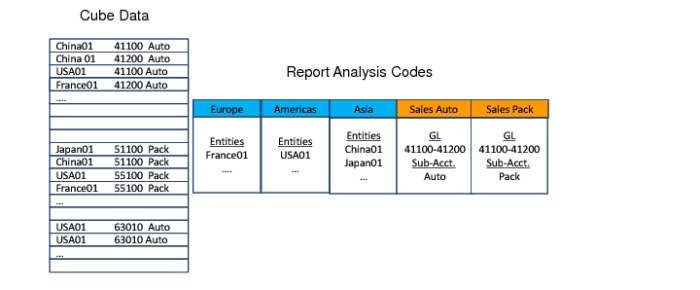
In this example, the report analysis code Europe lets you retrieve data from the report cube for the entity France01. Similarly, the report analysis code Sales Auto lets you retrieve data from the report cube for sub-account Auto, combined with GL accounts in the range 41100-41200.
The report analysis code behaves like a dynamic filter. When new GL accounts are added to the range 41100-41200, these accounts are automatically included in the report analysis code filter result. When you define the report tree (hierarchy), report analysis codes are linked as nodes of the tree.
Report Analysis Code Nodes
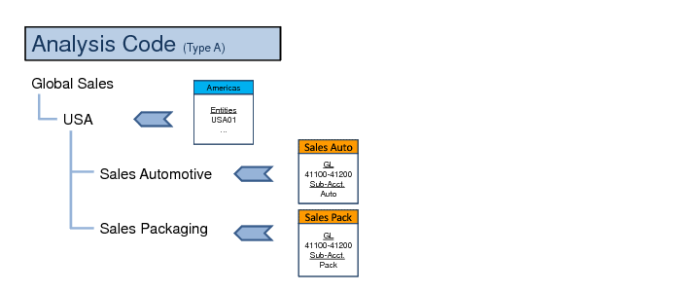
The lowest level nodes are called leaf nodes, which also correspond to the detailed rows on the report. When you define the final report columns layout, you can specify the columns on the report. You can also apply a report analysis code to a column.
In
Report Analysis Code Nodes, Sales Auto and Sales Pack are analysis codes applied to the detailed rows of the report. Europe, USA, and Asia are analysis codes applied to nodes higher in the tree. In the final result, one branch of the report shows the sales for Europe. A second branch shows the sales for the USA and a third branch the sales for Asia.
You can also apply analysis codes to columns in the report. This step enables you to display Europe Sales, USA Sales, and Asia Sales in columns next to each other.