Advanced Exchange Rates
Normally, for foreign currency transactions, the system uses the exchange rate that is valid on the posting date. However, certain European countries have the following legal requirements regarding exchange rates:
• The tax amounts recorded by the purchaser must exactly agree with the tax amounts in the local currency shown on the supplier invoice. Currency conversions on supplier invoices must be based on the invoice date.
• Tax amounts on customer invoices must be recorded and displayed in the local currency and converted using the exchange rate valid at the tax point date.
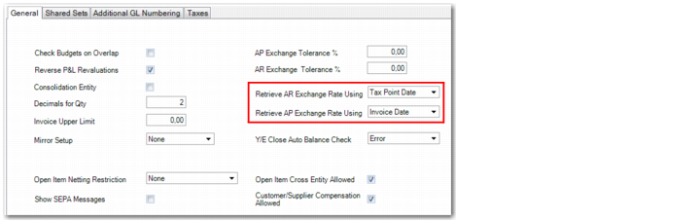
To facilitate these requirements, you can specify at entity level which date the system must use to retrieve the exchange rate for accounts receivable and accounts payable transactions.
For accounts receivable transactions, you can choose to retrieve the exchange rate based on the posting date or on the tax point date. For accounts payable transactions, you can choose to retrieve the exchange rate based on the posting date or on the invoice date.
Entity Modify, General Tab
Using design mode, you can add the following two fields to the General tab of Entity Create (36.1.1.2.1) or Entity Modify (36.1.1.2.2):
Retrieve AR Exchange Rate Using
Choose to calculate AR exchange rates based on either the posting date or on the tax point date. The default is the posting date.
Retrieve AP Exchange Rate Using
Choose to calculate AP exchange rates based on either the posting date or on the invoice date. The default is the posting date.
The date you choose is used to retrieve both the transaction currency to base currency exchange rate, and the statutory currency to base currency exchange rate.
Note: The Retrieve AR Exchange Rate Using (
tCompanyPropertyRef.CompanyPropertyIsARUseInvDate) and Retrieve AP Exchange Rate Using (
tCompanyPropertyRef.CompanyPropertyIsAPUseInvDate) fields are hidden by default. See
QAD System Administration User Guide for more information on design mode.
Using Advanced Exchange Rates in Accounts Receivable
The system uses the date specified in the entity to calculate exchange rates for invoices posted from sales orders and for invoices created in Customer Invoice Create (27.1.1.1).
Invoices Created from Sales Orders
For invoices created from sales orders, the tax point date is the shipment date. If there are multiple lines on an order, the tax point date is the shipment date for the last order line shipped. If the shipment date is not recorded or available, the tax point date is the sales order due date.
Note: For invoices created from sales orders, you can only use advanced exchange rates for the transaction currency to statutory currency conversion. The ability to use advanced exchange rates for the transaction currency to base currency conversion will be available in a later QAD EE release.
Example:
A Polish company sells to a UK customer. The base currency is Polish Zloty (PLN), the statutory currency is US Dollars (USD), and the transaction currency is Pounds Sterling (GBP). The following exchange rates apply:
Exchange Rate Type | From | To | Validity | Rate |
Statutory | GBP | USD | 01/12/2012 – 15/12/2012 | 1.63 |
16/12/2012 – 31/12/2012 | 1.7 |
For the Polish entity, the tax point date is used to calculate the exchange rate. The order date is December 14, 2012, and the shipment date is December 20, 2012.
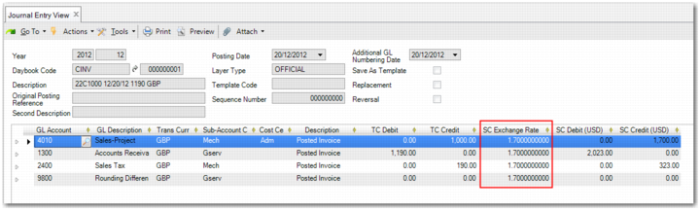
When the invoice is posted, the system uses the shipment date as the tax point date and retrieves the statutory currency rate for the conversion from British Pounds (GBP) to US Dollars (USD), which is 1.7.
Journal Entry View
Invoices Created Manually
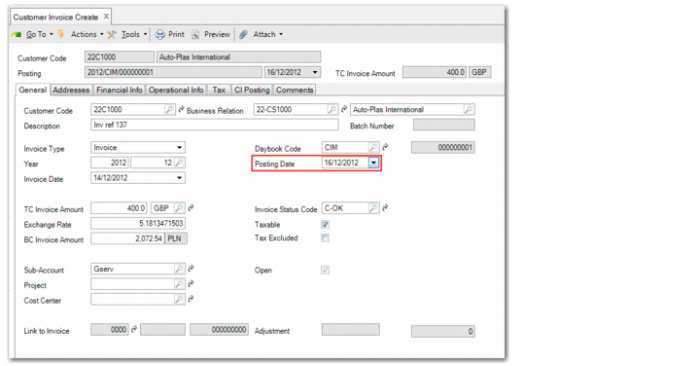
If the Retrieve AR Exchange Rate Using field is set to Posting Date and you create an invoice in Customer Invoice Create, the system uses the date specified in the Posting Date field to retrieve the exchange rate.
Customer Invoice Create
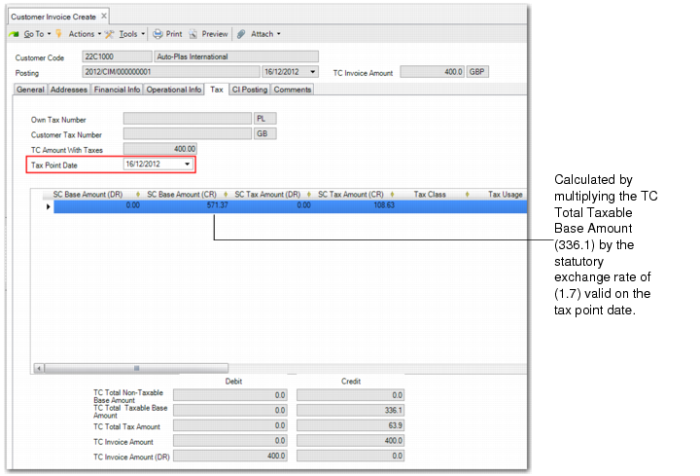
If the Retrieve AR Exchange Rate Using field is set to Tax Point Date, the system uses the tax point date on the Tax tab to retrieve the exchange rate.
Note: The tax point date defaults from the posting date you specify on the General tab. However, you can update the tax point date to be different than the posting date.
Customer Invoice Create, Tax Tab
Using Advanced Exchange Rates in Accounts Payable
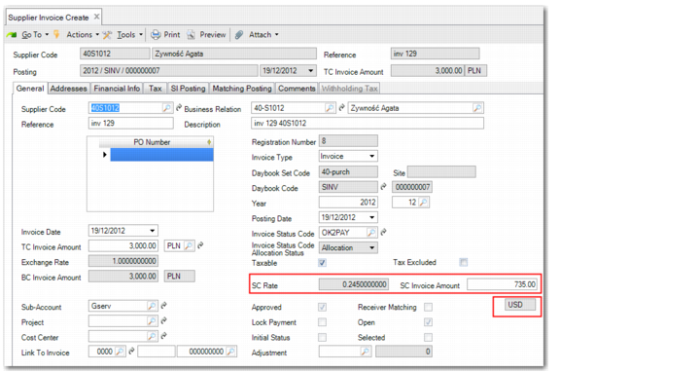
If the Retrieve AP Exchange Rate Using field is set to Posting Date and you create an invoice in Supplier Invoice Create (28.1.1.1), the system retrieves the exchange rate using the date specified in the Posting Date field. If the Retrieve AP Exchange Rate Using field is set to Invoice Date, the system retrieves the exchange rate using the date specified in the Invoice Date field.
In Supplier Invoice Create, you can edit the statutory currency invoice amount.
Supplier Invoice Create
Using design mode, you can add the following three fields to the General tab of Supplier Invoice Create:
SC Rate
Displays the exchange rate used to convert from the transaction currency to the statutory currency.
If you change the calculated value displayed in the SC Invoice Amount field, the statutory exchange rate displayed in the SC Rate field is updated also.
SC Invoice Amount
When you enter an amount in the TC Invoice Amount field, this field automatically displays the amount converted to statutory currency. However, you can edit the statutory currency amount.
Statutory Currency (unlabelled)
Displays the statutory currency defined for the domain.
Note: The SC Rate (tCInvoice.CInvoiceCCRate), SC Invoice Amount (tCInvoice.tdCInvoiceOriginalC), and Statutory Currency (tCInvoice.tcStatutoryCurrencyCode) fields are hidden by default.
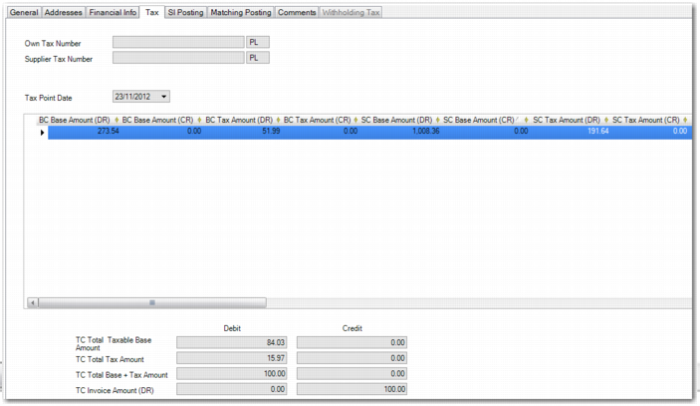
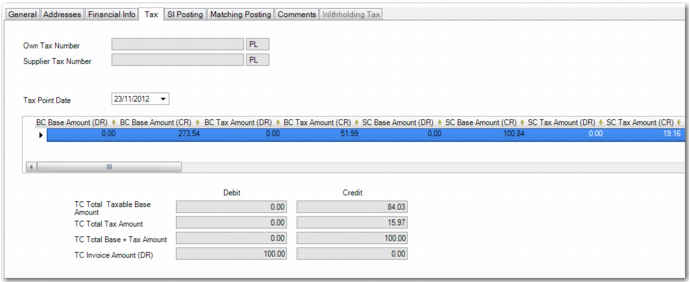
The grid on the Tax tab of Supplier Invoice Create contains read-only fields that allow you to view information on the base and tax amounts for the base and statutory currencies. To display these fields, right-click on any of the grid’s field headings and select Columns.
BC Base Amount (DR)
Taxable portion of an invoice, in base currency.
BC Base Amount (CR)
Taxable portion of a credit note, in base currency.
BC Tax Amount (DR).
Tax calculated on an invoice, in base currency.
BC Tax Amount (CR).
Tax calculated on a credit note, in base currency.
SC Base Amount (DR)
Taxable portion of an invoice, in statutory currency.
SC Base Amount (CR)
Taxable portion of a credit note, in statutory currency.
SC Tax Amount (DR)
Tax calculated on an invoice, in statutory currency. However, you can update the amount.
SC Tax Amount (CR)
Tax calculated on a credit note, in statutory currency. However, you can update the amount.
If you edit the statutory currency tax amount, you can save the posting even if the posting is not balanced in base currency or in statutory currency, within certain limits.
To balance the posting, the system automatically creates an additional posting line that balances the whole transaction. The additional posting line is made to a Rounding Differences system account. The system creates the balancing posting if the unbalanced amount is less than or equal to the maximum number of lines on the SI Posting tab, multiplied by the rounding unit.
Example:
The rounding for a currency is two decimal places, the threshold is 0.005, and the rounding unit is 0.01.
If a posting has four lines, the limit is:
4 * 0.01 = 0.04.
In this case, any balance differences of 0.04 or less are posted automatically to the Rounding Differences system account.
Base and Tax Fields on an Invoice Tax Grid
Base and Tax Fields on a Credit Note Grid displays these fields for a credit note.
Base and Tax Fields on a Credit Note Grid
Supplier Invoices in Open Item Adjustment
When you create supplier invoices indirectly in Open Item Adjustment Create (25.13.5), the system retrieves the exchange rates to use differently, depending on the type of transaction performed.
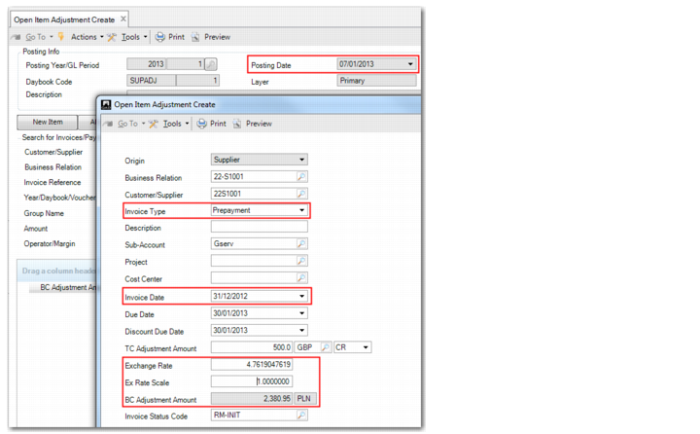
For supplier prepayments recorded in Open Item Adjustment Create, the system retrieves the exchange rate using the posting date, regardless of the setting of the Retrieve AP Exchange Rate Using field.
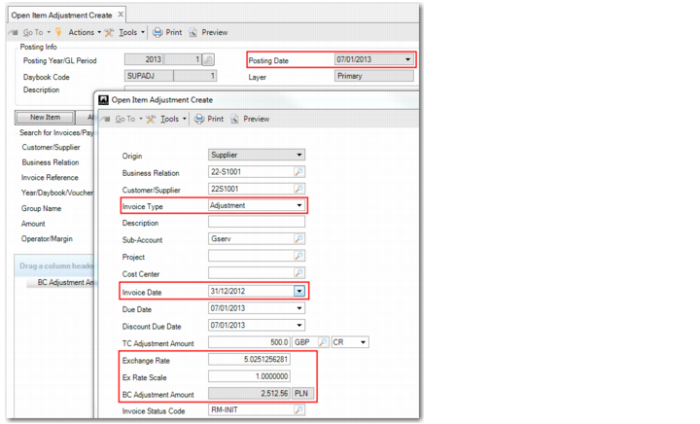
For supplier adjustments in Open Item Adjustment Create, the system always retrieves the exchange rate to use based on the setting of the Retrieve AP Exchange Rate Using field on the entity.
Example:
A Polish company buys from a UK supplier. The base currency is Polish Zloty (PLN) and the transaction currency is Pounds Sterling (GBP). The following exchange rates apply:
Exchange Rate Type | From | To | Validity | Rate |
Accounting | GBP | PLN | 12/27/2012 – 31/12/2012 | 5.025 |
1/1/2013 – 31/01/2013 | 4.762 |
The Retrieve AP Exchange Rate Using field on the Polish entity is set to Invoice Date.
The Polish company records a prepayment in GBP to a supplier in the UK. The posting date is January 7, 2013, but the invoice date is December 31, 2012. For the prepayment, the system uses the exchange rate (4.762) valid on the posting date and not the invoice date, which is the setting on the entity record.
Open Item Adjustment Create, Supplier Prepayment
The company then records an adjustment in GBP for a UK supplier. The posting date is January 7, 2013, but the invoice date is December 31, 2012. For supplier adjustments, the system uses the setting on the entity to indicate the date to use for the exchange rate. The entity setting uses the invoice date, and the exchange rate from GBP to PLN is 5.025 on this date.
Open Item Adjustment Create, Supplier Adjustment