Copying Budgets
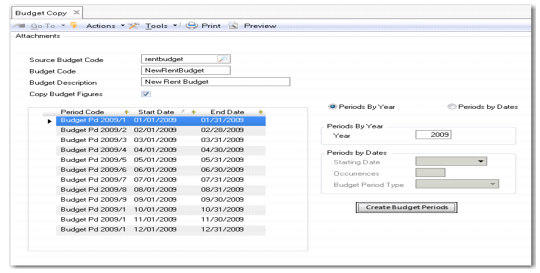
Budget Copy (25.5.1.5) lets you use an existing budget as the basis for a new budget.
When you copy a budget, you copy the budget structure and can optionally copy the budget data. However, you must define budget periods for the new budget.
Budget Copy
Field Descriptions
Source Budget Code
Specify the budget code that you want to copy.
Budget Code
Enter a code (maximum 20 characters) to identify the new budget.
Budget Description
Enter a brief description (maximum 40 characters) of the new budget.
Copy Budget Figures
Select this field to copy the budget structure and budget data from the original budget to the new one. Clear the field to copy the budget structure only.
Use the Periods grid and fields to create budget periods for the new budget. These fields and their functions are described in
Budget Period Tab.
Rebuilding Budgets
The Budget daemon monitors topic values and ensures that the topic used in a budget has current values. Each posting on the budget item simultaneously generates a work record for the daemon.
The Budget Rebuild (25.5.1.2) activity clears all previous actuals calculations for a specific budget and regenerates all daemon records. Rebuilding recalculates all the actuals values.