Setting Up COA Cross-References
You create COA cross-references using COA Cross Reference Modify or COA Cross Reference Excel Integration.
For each dimension that you plan to use in the Financial Report Writer, you must have a complete COA cross-reference of type Separate. This step ensures that the accounts are correctly translated when you generate report cubes.
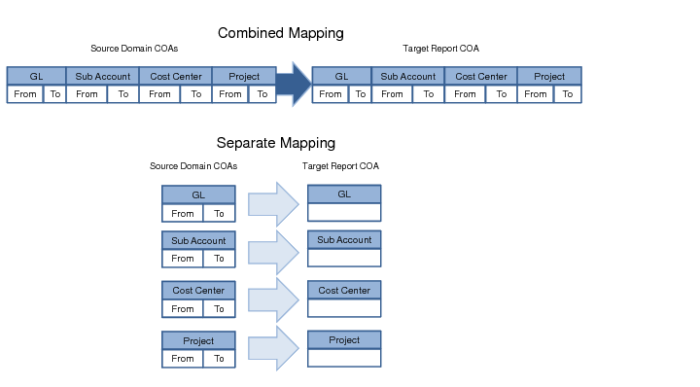
You can create a COA cross-reference of type Combined if you need a special mapping for combinations of GL accounts and sub-accounts or combinations of GL accounts and cost centers.
You only need to create COA cross-references of type Combined for exceptions. Financial Report Writer first checks if there is a COA cross-reference of type Combined for a particular accounting key. If a Combined map is found, Financial Report Writer uses that map. Otherwise, the Separate type mappings are used.
Combined and Separate Mapping
You do not need to create COA cross-references for COA dimensions that use the same shared set in the Financial Report Writer source and target. For COA dimensions you do not plan to use in group reporting, you can leave the COA cross-reference empty in Report Chart of Account Create.
COA Cross Reference Maintenance
Use COA Cross Reference Modify to set up new cross-references. When you open COA Cross Reference Modify, a browse is opened. To modify a COA cross-reference, right-click the cross-reference and click Modify.
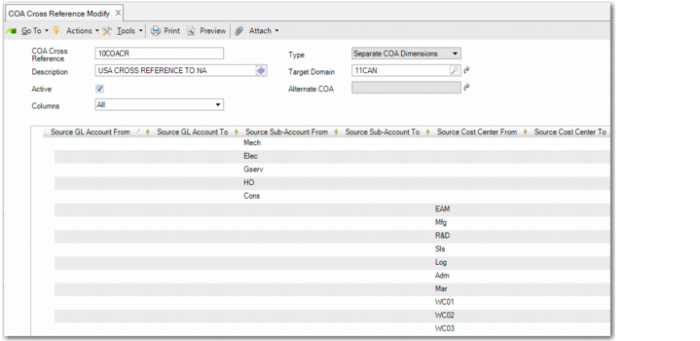
COA Cross Reference Modify
Type
Specify the cross-reference type for Financial Report Writer. The cross-reference type is either Separate COA Dimensions or Combined COA Dimensions.
Columns
This field is enabled if you select the value Separate COA Dimensions in the Type field. The Columns filter lets you focus on one element at a time. You can change the filter type during input.
Specify which grid columns you require to create separate COA cross-references. The options are:
All. Displays fields for mapping ranges of source GL accounts, sub-accounts, cost centers, and projects to COA elements in the target domain.
GL Account. Displays fields for mapping ranges of source GL accounts to a single GL account in the target domain.
Sub-Account. Displays fields for mapping ranges of source sub-accounts to a single sub-account in the target domain.
Cost Center. Displays fields for mapping ranges of source cost centers to a single cost center in the target domain.
Project. Displays fields for mapping ranges of source projects to a single project in the target domain.