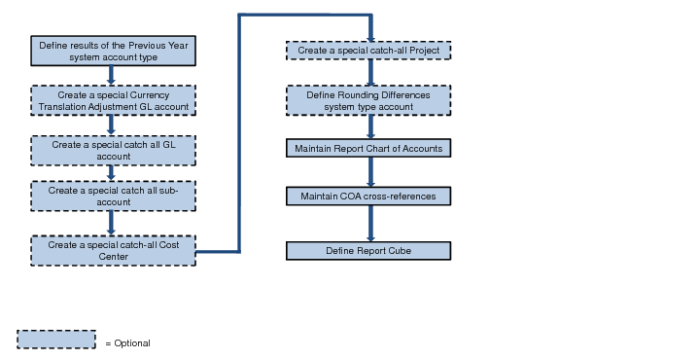
Setting Up Financial Report Writer
Before you set up Financial Report Writer, decide which shared sets to use for the common language reporting COA (GL accounts, sub-accounts, cost centers, and projects).
Financial Report Writer Setup Workflow
1 Verify that the reporting GL shared set contains a system GL account of type Result of the Previous Year.
2 In the reporting GL shared set, create a special Currency Translation Adjustment GL account. This account is a standard P&L account. You can use the GL account setup default values.
Note: This step is only needed for currency translations that use different rates for different account types.
3 In the reporting GL shared set, create a special catch-all GL account. The account type is Standard. You can accept all field defaults.
Note: Steps 3-6 are only needed when you want to allow incomplete translation mapping in the COA cross-reference.
4 In the reporting sub-account shared set, create a special catch-all sub-account.
5 In the reporting cost center shared set, create a special catch-all cost center.
6 In the reporting project shared set, create a special catch-all project.
7 Verify that the reporting GL shared set contains a system GL account of type Rounding Differences.
Note: This step is only needed if you use currency translations that cause rounding differences.
9 Set up the COA cross-references using COA Cross Reference Modify or COA Cross Reference Excel Integration. See
Setting Up COA Cross-References for details.