Posting Transactions from Other Modules
In a production system, most GL transactions originate from operational transactions, such as manufacturing, purchasing, and inventory movements. The system collects most operational transactions in an unposted transaction table. You can review the transactions to ensure that amounts, accounts, and dates are correct. Once the transactions are verified, you must post them to update GL account balances.
Operational transactions fall into four areas:
• Inventory Control (IC)
• Work Order (WO)
• Fixed Assets (FA)
• A limited number of sales order (SO) transactions
Note: Invoicing sales orders using Invoice Post and Print (7.13.4) directly updates the GL.
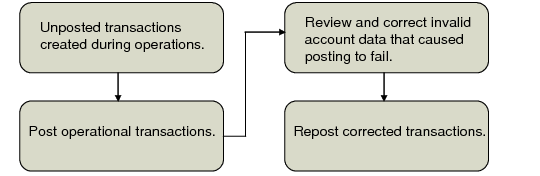
Operational Transaction Flow illustrates the process flow for operational transactions.
Operational Transaction Flow
Note: Before operational transactions can be posted, you must set the Verify GL Accounts field in Domain/Account Control (36.9.24) to Yes. Before setting the Verify GL Accounts field, you can run the Op Account Structure Validation report to determine if any issues exist with combinations of accounts, sub-accounts, cost centers, and projects. See
Domain/Account Control.
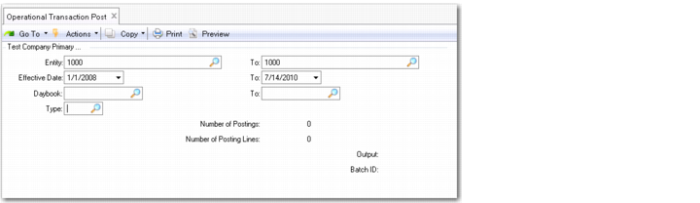
Operational Transaction Post
Entity
Specify the range of entities for which you want to post transactions. You must have security access to all entities in the specified range.
The default is the current entity.
Effective Date
Specify the range of dates for which you want to post transactions. Leave the fields blank to begin with the first date on which transactions exist. The default is the current system date.
Daybook
Specify a range of daybook codes for which you want to post transactions. Daybooks are associated with operational transactions in Default Daybook Maintenance.
This field is optional.
Type
Specify a transaction type for the program to only post unposted transactions with this transaction type. If you leave the field blank, the program posts transactions regardless of their transaction type.
The possible transaction types are:
• FA: Fixed Assets
• IC: Inventory Control
• SO: Sales Orders (non-invoice transactions only)
• WO: Work Orders
Creating Operational Transactions
Unposted operational GL transactions—composed of multiple lines representing debits and credits to individual accounts—are created by operational processing functions outside the GL module. They are identified with a 14-character operational reference number in the following format:
<transaction type><yr><mm><dd><transaction number>
Example: At the same time PO Receipts (5.13.1) generates an RCT‑PO inventory transaction, it also creates an unposted GL transaction with an IC prefix. A typical operational reference would be IC1402210037—the 37th inventory movement transaction created on February 21, 2014.
Important: The use of daybooks is mandatory and you must create at least one daybook of type Journal Entries.
Additionally, based on the daybook associated with the transaction type, the system assigns a GL reference number used to identify the transaction after it is posted to the general ledger:
<Year>/<DaybookCode><SequenceNumber>
Default Daybook Maintenance (25.8.4) records associated with the operational transaction functions must reference active daybooks. If you attempt to post a transaction that references an inactive daybook, the system displays an error, and the transaction is not posted.
Important: As part of daybook setup, you must define at least one record in Default Daybook Maintenance to represent the system daybook in operational transactions.
Use Unposted Transaction Inquiry (25.13.13) or Unposted Transaction Register (25.13.14) to view operational transaction records before they have been posted. In the register program, you can select Unbalanced Only to limit the output to records that failed to post correctly.
Note: The system assigns an operational SO reference number to transactions created in Invoice Post and Print (7.13.4). However, the posting process for invoices is not part of the same process flow as other operational transactions. Only Revenue Recognition (11.5.18.21) in the Service/Support Management (SSM) module creates SO-type transactions that are posted as part of the SO transaction process. See
QAD Sales User Guide for information on invoice post.
Posting Transactions
To apply unposted transaction amounts to the GL, use Operational Transaction Post (25.13.7). You can select transactions for posting by entity, date, or the daybook assigned based on records in Default Daybook Maintenance (25.8.4). The system verifies that all transactions contain valid combinations of active account, sub-account, cost center, and project code; the effective posting date must also be within a valid GL period. Transactions must also be balanced, with debits equaling credits. Otherwise, an error message displays and the transaction is not posted.
The concept of statutory currency does not exist in the operational modules. Therefore, when operational transactions are fed to Financials using Operational Transactions Post and Invoice Print and Post, the resulting GL transactions are updated with the corresponding statutory currency amounts. If the transaction currency is not available, then the system converts the base currency amount to statutory currency using the statutory exchange rate type.
Note: If the criteria ranges select multiple transactions, only those with one or more posting lines that contain invalid account information fail the posting process. Transactions with valid values on all lines are posted.
Both numeric identifiers generated during the creation process are retained as part of the history record. GL reporting functions display both numbers The Reference ID field on GL reports lists both the operational reference number and GL reference.
General ledger operational transaction reports, views, and browses list the following details for operational transactions:
• Reference ID
• Transaction Type
• Doc Type
• Address
These fields can be filtered when generating reports.
Legal Document Number
Inventory movement transactions store the related legal document number in the GL record, if available. When the records are posted, Operational Transaction Post and Invoice Post and Print pass the legal document number to Financials.
The following reports and inquiries display the legal document number in the GL transaction description, if applicable.
• Unposted Transaction Inquiry (25.13.13)
• Unposted Transaction Register (25.13.14)
• Unposted GL Trans Correction (25.13.16)
Split Data
If allocation codes have been set up to split specified percentages of the transaction amount among multiple accounts, the system creates a separate posting line for each account combination.
Operational transactions are created in pairs that are balanced. A single GL reference can contain multiple lines and, when posted, separate transactions are created for each daybook.
For transactions that span multiple entities, operational programs create separate transactions for each entity, as needed. The system automatically generates a reference to link the cross-company transactions during the posting process.
Currency and Exchange Rate
IC and WO transactions use the inventory exchange rate type, if it is defined. FA and SO transactions normally use the existing accounting exchange rate type. If no inventory exchange rate is in effect at the time of PO receipt, then the accounting exchange rate type is used by default.
See
Inventory Exchange Rate for more information.
Correcting Account Errors
Use Unposted GL Transaction Correction (25.13.16) to modify invalid account data for transactions that fail validation. To be accessible in this program, transactions must have failed transaction post. You can update the following fields:
• Account
• Sub-Account
• Cost Center
• Project
In addition to updating the unposted transaction table, this program also modifies the fields in operational transaction history to ensure that the history reflects the same values as the actual GL posting. Any errors you locate and correct using Unposted GL Transaction Correction also exist in Inventory Transaction History, which now contain references to account data that no longer exists. Re-run Operational Transaction Post to update Inventory Transaction History with the account data changes.
You can edit a line of an operational GL transaction only if it contains an account error. For example, if while updating invalid data, you notice an incorrect—but valid—account in one of the posting lines, you cannot change it. You cannot modify transaction dates or amounts either. In these cases, you must create a second operational transaction to reverse the original amount, correct the account data, and run the post program again.
Changes made in this program can be audited by setting GL Transaction Audit Trail to Yes in GL Op Transaction Control (36.9.13). Audit records indicate the field name, old value, new value, user ID, and date and time associated with the change. These records can be archived and deleted using Audit Detail Delete/Archive (36.23.1). See
QAD System Administration User Guide for details.