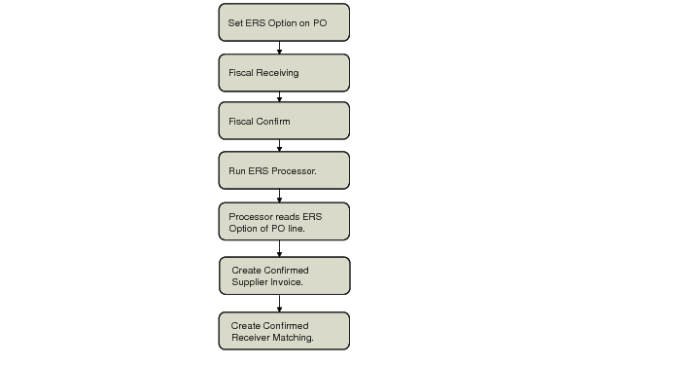
Process Flow for Legal Documents
Use the By Legal Document tab to search for fiscal receipts for which to create supplier invoices and receiver matching. The By Legal Document tab is only available when fiscal receiving is activated in Purchasing Control (5.24).
Important: When you run the ERS Processor for legal documents, you must always use ERS option 3 where the system creates a confirmed supplier invoice and receiver matching record for pending invoices. You cannot use option 1 (disallow ERS processing) or option 2 (create an initial invoice and receiver matching record).
ERS Flow for Legal Documents
When fiscal receiving is activated, the ERS Processor combines fiscal receipts into a single supplier invoice, provided that the fiscal receipts have the same legal document number, the same effective issue date, the same supplier, and the same purchase order project code for the AP control account.
You can specify ranges of suppliers, sites, legal documents, and legal document issue dates to search for fiscal receipts. The processor then retrieves a group of receipts that meet your selection criteria. Selections are always based on the full legal document; you cannot create partial selections.
The ERS Processor creates matched supplier invoices as confirmed (non-initial status) supplier invoices. ERS can create one or more supplier invoices for a single legal document. The matched supplier invoices are created based on the confirmed legal (fiscal) document price, and not the PO price. The ERS Processor assigns the invoices the same due date as the confirmed legal (fiscal) document for which the invoice was created, and the tax values and postings are created based on the confirmed fiscal receipt lines.
Note: When creating supplier invoices, ERS stores the legal document number in the Reference field in the supplier invoice record, and stores the legal document effective issue date in the Supplier Invoice Date field.
When creating supplier invoices and receiver matching based on legal (fiscal) documents, the ERS Processor creates AP rate variances when there is a difference between the fiscal price and the PO price. Similarly, the ERS Processor creates AP usage variances when there is a difference between the physical receipt quantity and the fiscal receipt quantity.
Legal documents are always denominated in the base currency. However, when fiscal receiving is activated, the ERS Processor creates supplier invoices or credit notes in both the base and transaction currencies. ERS uses the fiscal receiving exchange rate to convert the invoice amount from the base currency to the transaction currency.
Example:
You create a PO for 10 items at 100.00 USD each. The total is 1000.00 USD.
The legal document must always be denominated in the base currency, which, in this example, is the Brazilian Real (BRL). The legal document is created in Brazilian Real, and the total amount is 1780.00 BRL. The exchange rate used during legal document creation is 1 BRL = 0.5618 USD.
You run the ERS Processor the next day when a different daily exchange rate is in effect. On that day, 1 BRL equals 0.900 USD.
ERS creates a supplier invoice for 1780.00 BRL (1000.00 USD) because ERS always uses the legal document exchange rate.
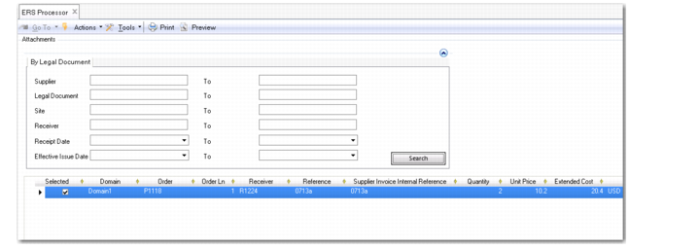
ERS Processor, By Legal Document Tab
The Supplier, Site, Receiver, and Receipt Date fields are described in
Processor Flow for Receipts.
Legal Document
Specify a range of legal documents for which to search for fiscal receipts.
Effective Issue Date
Specify a range of issue dates for which to search for fiscal receipts. The effective issue date is the date on which the legal document is issued from the supplier.
Grid
Effective Issue Date
When using ERS to process fiscal receipts, this field displays the date on which the legal document was issued from the supplier.
The remainder of the grid fields are described in
Processor Flow for Receipts.
Legal Documents for Logistics Charges
You can also use ERS to create supplier invoices for legal documents that include logistics charges and trailer expenses for both domestic purchases and imported goods.
Important: The ability to process legal documents for logistics charges in ERS is only available in QAD Enterprise Applications if you have also installed the QAD Internationalization Extensions package for Brazil.
Logistics Charges for Domestic Goods
If you purchase goods domestically, the logistics charges for material deliveries are often billed separately in a legal document that includes taxes. Alternatively, the supplier can issue a combined legal document that includes both material and logistics charge lines.
When you use Fiscal Receiving to fiscally receive the carrier’s legal document and confirm the receipt, the system creates a pending invoice based on the legal document.
When you run the ERS Processor by legal document to process the pending invoice, the system creates a matched supplier invoice for the legal document logistics charges.
If the legal document includes both material and logistics charge lines and you run the ERS Processor for the pending invoice, the system creates a matched supplier invoice for the combined material and logistics charges if the material supplier is named as the logistics supplier in the purchase order. Otherwise, the system creates separate material and logistics charge invoices.
Logistics Charges for Imported Goods
When importing goods, an import agent can handle the import process and incur certain logistics charges on behalf of the customer. The import agent charges the customer for managing the import and for acting as an intermediary between the customer and the foreign material supplier.
If the legal document contains logistics charge lines only, the ERS Processor creates supplier invoices for the logistics charges and creates the associated AP, matching, and tax postings.
If the purchase order is in a foreign currency, ERS creates a foreign currency supplier invoice, even though the legal document is in base currency. The system uses the exchange rate from the legal document and not from the pending invoice.
If the legal document for the imported goods contains combined materials and logistics charge lines, the ERS processor:
• Creates supplier invoices for the material lines in the name of the material supplier.
• Creates supplier invoices for the logistics lines in the name of the import agent.
• Creates the relevant AP, matching, and tax postings.