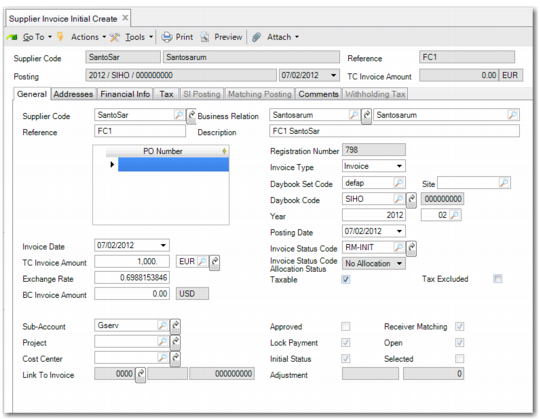
Creating Initial Supplier Invoices
Use Supplier Invoice Initial Create (28.1.1.10) to create invoices with a status of Initial.
Initial supplier invoices let you quickly enter each day’s supplier documents into the system, without generating postings. This ensures that supplier documents are registered from the moment they enter the accounts department and prevents invoices from being mislaid or overlooked. Initial invoices also let you deal with supplier queries before accounts are updated, and provide data for accruals calculation before a period end. You can create initial versions of invoices, invoice corrections, credit notes, and credit note corrections.
The system prevents you from creating duplicate initial invoices by validating the invoice reference you enter against existing invoices. You can also use role-based security to separate the initial invoice and full invoice processing functions, and assign them to different roles.
Note: Initial invoices are not considered open invoices, and you cannot include them in supplier payments.
Initial supplier invoices are also used as part of the receiver matching process. An initial invoice contains the basic information necessary to perform matching against PO receipts, namely the supplier name and code, the invoice amount, and the daybook. You can initiate the matching process using the Matching button on the initial invoice, or by starting Receiver Matching Create and selecting an initial invoice with which to match the receivers. The Receiver Matching and Initial Invoice screens are interactive. You can automatically update the invoice amounts with the totals you produce on the matching grid, or adjust either amount before saving the matching and generating the final invoice postings.
You identify initial invoices in the system by their registration numbers. The Registration Number field identifies all supplier invoices and credit notes in the system, both initial and standard, and is an automatic number generated by entity and year. The system does not assign voucher numbers to initial invoices, and when you retrieve a daybook code during invoice creation, the voucher number is set to zero.
Initial invoices can be viewed and modified (by enabling the Initial Status filter on Supplier Invoice View and Supplier Invoice Modify), but are not displayed in the standard AP reports. However, when you save an initial invoice, the system records the creation date, and you can use Supplier Invoice Extended View (28.18.3) to view initial invoices by their creation date.
You can only select an invoice status code with a status of Initial when creating an initial invoice. These status codes do not allow allocation. See
Invoice Status Codes. When you intend to use an initial invoice in a matching process, you use an invoice status code that has both the Initial Status and Receiver Matching attributes selected. See
Modifying an Initial Invoice.
Initial invoices require minimal input, for speed of entry, and can be deleted without any impact on the sub-ledger, or modified at a later stage and processed as normal. The following fields are mandatory:
|
Tab
|
Field
|
|
General
|
Supplier code
|
|
|
Reference
|
|
|
Description
|
|
|
Amount
|
|
|
Invoice Status Code
|
|
|
Daybook
|
When you complete these fields, you enable the Addresses, Financial Info, and Tax tabs but not the SI Posting and Matching Posting tabs. Because initial invoices do not generate postings, these tabs are not required.
Supplier Invoice Initial Create