Replacing Supplier Invoices
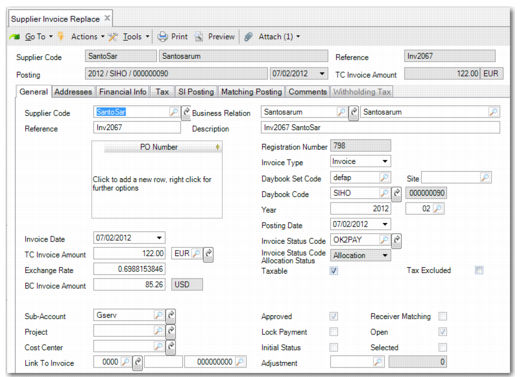
Use Supplier Invoice Replace to retrieve invoices that have been reversed but not yet replaced. The system displays only invoices that have been reversed.
The system retains the following key fields of the invoice you want to reverse:
Supplier code
Business relation code
Invoice reference
Invoice date
Posting date
Year
Period
Daybook
Voucher number
Currency
Amount TC
Invoice description
Purchase orders
The exchange rates used on the original are also retained and applied to the new invoice. Complete the adjustments to the invoice details, and if matching the replacement to receivers, click the Matching button to launch Receiver Matching Create. If PO numbers were linked to the original invoice, you can choose to display them in the matching grid, and begin the matching process again.
Supplier Invoice Replace
Example: The following pending vouchers are generated for goods received:
Voucher A: 100 items @ $25. Total: $2500
Voucher B: 120 items @ $25. Total: $3000
Voucher C: 150 items @ $25. Total: $3750
To Match Total: $9250
The supplier document is received, and a standard supplier invoice is created for $9610. The matching clerk incorrectly adjusts the To Match amount to equal the invoice amount, by increasing the item price on Voucher B from $25 to $28, giving a To Match amount for Voucher B of $3360. This creates a total To Match amount for these receivers of $9610. This To Match amount equals the invoice amount, the matching is saved, and the invoice and matching postings are generated.
The error is detected in the original invoice amount. You reverse and replace the original invoice. The invoice and matching postings are reversed. The replacement invoice retains the financial data of the original. You adjust the invoice total from $9610 to $9250, and click the Matching button to begin matching again. The system displays a prompt to use the original matching information, and the original pending vouchers are displayed in the matching grid and are reopened for matching.