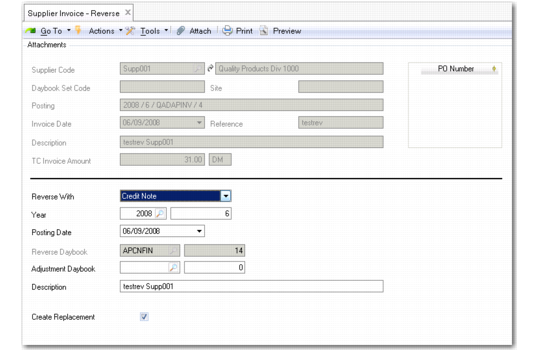
Supplier Invoice Reverse
Use Supplier Invoice Reverse (28.1.1.11) to reverse standard invoices.
You can use the following types of document when reversing:
|
Original Invoice
|
Reversal Invoice
|
|
Invoice
|
Invoice Correction or Credit Note
|
|
Invoice Correction
|
Invoice
|
|
Credit Note
|
Credit Note Correction/Invoice
|
|
Credit Note Correction
|
Credit Note
|
If you have selected the Create Replacement field, the system reverses the invoice and creates a clone invoice displaying the retained key information. If you choose not to create a replacement, the system simply reverses the original invoice postings.
The system retrieves a voucher number for the reversal invoice and then creates the invoice. Both original and reverse invoices are then closed.
You must enter the daybook, year and period, posting date, and description information required for the reversal.
Note: You must ensure that a daybook of the correct reversing type is available in the shared set.
The amounts and postings on the new invoice are the reverse of the original:
• For invoices and credit notes, debits are changed to credits
• For correction invoices or credit notes, minus amounts are changed to positive amounts.
Supplier Invoice Reverse
Field Descriptions
Supplier Code
This field displays the supplier name and description.
Daybook Set
This field displays the daybook set associated with the invoice.
Site
This field displays the site associated with the invoice, if applicable.
Posting
This field displays the invoice voucher number.
Invoice Date
This field displays the invoice creation date.
Reference
This field displays the invoice reference.
Description
This field displays the invoice description.
TC Invoice Amount
This field displays the invoice amount in transaction currency.
PO Number
This grid indicates PO receipts linked to the invoice to be reversed.
Reversing Area
Reverse with
Select the reversing option. These options depend on whether an invoice or credit note is being reversed.
Reversal Daybook Code
This field displays the default reversal daybook code. You must define a reversal daybook for each type of reversal you perform.
Adjustment Daybook Code
Select an adjustment daybook.
Year and Period
Specify a year and period for the reversal. The current year and period are displayed by default.
Posting Date
Specify a posting date for the reversal.
Description
Enter a brief description for the reversal.
Create Replacement
Select this field to automatically create a replacement invoice.
When you click Reverse, the system displays a message that both the original and reversal invoice will be closed. Click OK to continue.