Supplier Payment Selection Confirm
Supplier Payment Selection Confirm (28.9.4.5) lets you confirm supplier payment selections. When you confirm a selection, the system changes the selection status from Initial to Confirmed, and creates all of the sub-ledger and GL postings for the payments.
Note: The system displays an error if you have not defined For Collection and Paid statuses for the bank account.
You can generate multiple postings for several suppliers in the same payment selection. The Transfer account and the Discount account are linked to the bank account and cannot be changed.
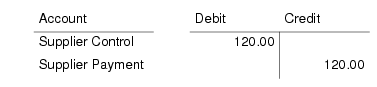
Confirming the payment selection generates a posting that debits the Supplier Control account and credits the supplier payment account defined for the payment status and bank account used. For example, if you pay two invoices for the same supplier that do not have discounted due dates, the system produces the following postings for each invoice:
The postings are grouped by supplier.
The system creates supplier payments by supplier, currency, due date (if Create Payment Per Due Date is selected), and payment attribute, if applicable, for the batches successfully confirmed.
Browse Details Button
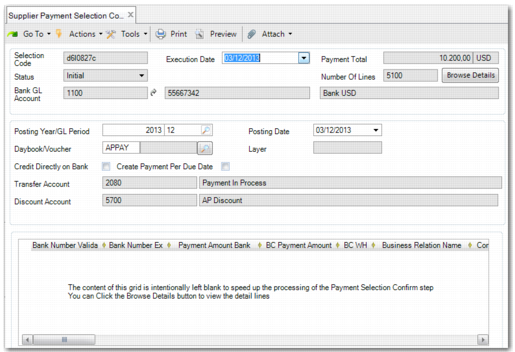
To save time in loading data, when a payment selection returns more than 300 record lines, the details are not displayed in the grid. The screen appears as displayed in
Supplier Payment Selection Confirm Browse Details Button. To view the payment selection detail lines, click the Browse Details button. A separate browse is displayed, enabling you to page through the detail lines and refine your selection.
Supplier Payment Selection Confirm Browse Details Button
Processing In Batches
Using Supplier Payment Selection Confirm, you can confirm up to 10,000 invoices at a time. During confirmation, the system groups the payment selection lines into payments, and then distributes the payments into batches. Before you run Supplier Payment Selection Confirm for the first time, use the Payment Selection Confirm Batch Size field in System Maintain (36.24.3.1) to define the payment selection batch size you want to use. The system then processes batches with a number of payment selection lines up to the maximum batch size. For more details on System Maintain, see
QAD System Administration User Guide.
During the confirmation, the system optimizes the effective size of the batches so that payments to the same supplier are not split up. A payment for a single supplier is only split up into two or more batches when it contains more lines than the system batch size.
Note: Some batches can be less than the batch size specified in System Maintain. This situation occurs because the system avoids splitting payments for the same supplier into separate batches.
Each batch is a single transaction and the status is only changed to confirmed when the transaction completes successfully. If a system-handled error occurs during processing, the issue only affects the current batch. The transactions processed in previous batches are unaffected. The process stops and the status of supplier payment selection becomes Partially Confirmed.
You can fix the cause of the error and resume the payment selection confirmation. The transaction restarts from the point where it stopped processing. The system then confirms the records in the batch that failed, provided that the reason for the failure has been addressed. Alternatively, you can unconfirm the selection, which undoes the parts that are already confirmed.
While the system is confirming the payment selections, the status of the supplier payment selection is Processing. If the status of a supplier payment selection is Processing or Partially Confirmed, you cannot modify, delete, or execute the payment selection. In Banking Entry Create (31.1.1) and Banking Entry Allocate (31.1.5), you cannot allocate a banking entry to a supplier payment selection with the statuses Processing or Partially Confirmed.
If an unhandled error occurs during processing, the payment selection status remains Processing. When the status is Processing, you must leave at least 30 minutes of inactivity on the selection before resuming the Confirm. This delay prevents another user from restarting the Confirm for another selection while it is still being processed in another session.
Supplier Payment Selection Confirm
Field Descriptions
Selection Code
This field displays the payment selection code.
Execution Date
This field displays the selection execute date. The default is today’s date.
Note: The posting is created on the execution date you specify and not the date on which you create the Supplier Payment Selection Confirm record (system date) if these dates are different.
Payment Total
This field displays the total amount of the payment in the payment currency.
Status
This field displays the current status of the payment.
Bank GL Account
This field displays the bank account code, account number, and payment format being used for this selection.
Posting Year/GL Period/Posting Date
Select a posting year, GL period, and posting date for the selection. The current year, GL period, and posting date are displayed by default.
Daybook/Voucher/Layer
Select a daybook for this selection. The Layer field displays the accounting layer for this daybook.
Credit Directly on Bank
Use this field to control the status assigned to the confirmed payment selection and the corresponding GL postings.
Select: The Paid status is applied, crediting the bank account and debiting the sub-ledger and Supplier Control account.
Clear: The For Collection status is applied, crediting the account associated with the For Collection payment status, and debiting the sub-ledger and Supplier Control account.
This field is selected by default when you have defined a Paid status for the payment but not a For Collection status.
Transfer Account/Discount Account
These fields display the transfer and discount accounts defined for this payment status. The discount account is used in postings for early payment discounts. These accounts default from the supplier.
Grid Fields
Sel
Select the field to indicate the payments you want to confirm. Clear to field for payments that you do not want to confirm.
Confirmed
This field is read only and indicates payments that have been confirmed. This indicator is especially useful when you are processing a large number of payments in batches. You can see which payments are processed and confirmed, and which payments are yet to be confirmed.
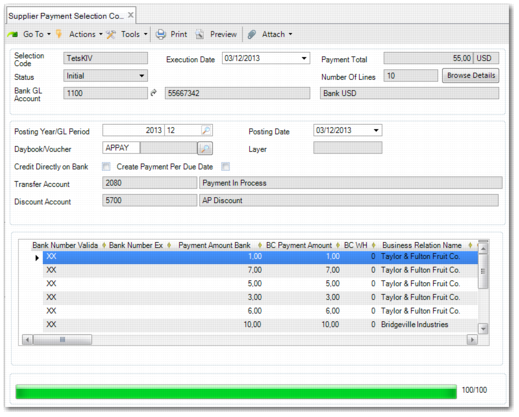
Click Confirm to generate the payment selection postings and change the payment selection status to Confirmed. The progress bar at the bottom of the window indicates the status of the confirm process.