Creating Supplier Payment Status Codes
Use the Supplier Payment Status activities (28.9.1.1) to create, modify, view, and delete payment statuses.
The payment status is the transition state through which you process the payment, and contains the posting details for the transitions.
Note: Once a payment status has been used in a transaction, it cannot be modified.
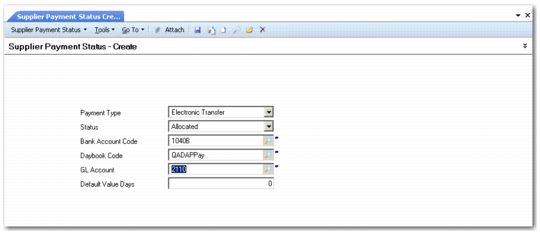
Supplier Payment Status Create
Field Descriptions
Payment Instrument
Select a payment instrument from the drop-down list. See
Types of Supplier Payment Instruments for details about each instrument.
Check
Draft
Promissory Note
Summary Statement
Transfer
Electronic Transfer
Status
Select a status to associate with the payment instrument from the drop-down list. See
Supplier Payment Statuses and Account Activity for status descriptions.
Allocated
Bounced
For Collection
Initial
Paid
Void
Bank GL Account
Specify the account code for your bank that will be used to process the payment. The account must be of type Bank.
Daybook Code
Specify a code for the daybook to contain the status transition postings. The daybook must be of type Supplier Payments. Daybook cannot be specified for the Initial or Void statuses.
Supplier Payment Account
Specify the code of the account used for status transition postings.
• For the Initial and Void statuses, this field does not apply.
• For all other statuses, an account of type Supplier Payment must be specified.
Accounts are updated automatically when you change the payment status. The account balance reflects the value of all payments that have this status.
Default Value Days
Specify the number of value days it takes to change from one payment status to another.
This value defaults to 0 (zero). When a status transition requires some activity on the part of the bank, you can increase the number of days, in line with banking practice. This information is added to the current date when determining the due date for cash reporting.