|
Secured Item
|
Description
|
|
Customization – Design Mode General (Entity)
Customization – Design Mode Role (Entity)
Customization – Design Mode User (Entity)
|
Determines if users with this role can customize the user interface through the Design Mode features at the system, role, or user level. For details, see the section on design mode in QAD System Administration User Guide.
|
|
Supplier – Supplier Invoices (Entity)
|
Determines if users with this role can access the Supplier Invoices (for the current entity) Related View as a right-click option on Supplier browses.
|
|
Customer – Customer Invoice (Entity)
|
Determines if users with this role can access the Customer Invoices (for the current entity) Related View as a right-click option on Customer browses.
|
|
Customer – Customer Invoices Activity
|
Determines if users with this role can access the Customer Invoices Activity Related View as a right-click option on Customer browses.
|
|
Customer Invoice – Modify Due Date (Entity)
|
Determines if users with this role can modify invoice due dates using Customer Payment Selection Modify.
Customer Payment Selection Modify is used in EDI Advanced Banking for Accounts Receivable. For details, see QAD Financials User Guide.
|
|
Evaluated Receipt Settlement Create – (Entity)
Evaluated Receipt Settlement Modify – (Entity)
|
Determines if users with this role can run the ERS Processor to generate supplier invoices and corresponding receiver matching records based on completed purchase order or fiscal receipts. For details, see QAD Financials User Guide.
|
|
ERS Line – Create (Entity)
|
Determines if users with this role can access the ERS logging activities run by the ERS Processor. You cannot run the ERS Processor if you do not have access to these activities.
|
|
General Ledger Masks – Maintain GL Masks (Entity)
|
GL masks have been replaced by COA masks. This option lets you access the old GL Mask Maintain function to verify the conversion to the newer COA mask functions.
|
|
Journal Entry – Create (External)
|
Determines if users with this role can create journal entries using an API. The API create method is used by both Operational Transaction Post (25.13.7) and Invoice Post and Print (7.13.4) to create journal entries. It could also be used to post transactions from an external system.
You must assign this resource to any users that will be posting operational transactions to the GL.
|
|
Posting - Create External Posting (Entity)
|
Determines if users with this role can post transactions to external systems from the current entity during Operational Transaction Post (25.13.7).
|
|
Report Schedule – MaintainSchedule (Entity)
|
Determines if users with this role can maintain report schedules.
|
|
Report Variant Maintain on Role Level (Entity)
Report Variant Maintain on System Level (Entity)
Report Variant Maintain on User Level (Entity)
|
Determines if users with this role can save report variants at the role, system, or user level. For details, see QAD Financials User Guide.
|
|
Stored Search Maintain on Role Level (Entity)
Stored Search Maintain on System Level (Entity)
Stored Search Maintain on User Level (Entity)
|
Determines if users with this role can save stored searches at the role, system, or user level. For details, see Introduction to QAD Enterprise Applications User Guide.
|
|
User – Create (Entity)
User – Delete (Entity)
|
Determines if users with this role can create or delete a user with User Maintenance (36.3.1). A role must have access to both User Maintenance and these two options to successfully create or delete a user. See Defining Users.
|
|
Tax Code – Create
Tax Code – Modify
Tax Code – Delete
|
Determines if users with this role can create, modify, or delete tax rates with Tax Rate Maintenance (29.4.1). A role must have access to both Tax Rate Maintenance and one of these options to successfully create, modify, or delete tax rates. Tax rates are described in the chapter on Global Tax Management in QAD Global Tax Management User Guide.
|
|
gencodegroup:APP (Domain)
gencodegroup:SYSTEM (Domain)
|
Determines if users can modify generalized code fields belonging to these groups. If the administrator creates other generalized code groups, they are also displayed in this list. Generalized code groups are described in the chapter on Domain Constants in QAD System Administration User Guide.
|
|
Role
|
Description
|
|
_EveryOne
|
This role is only present in systems that were converted from an earlier version of QAD software. It includes all users that were defined in the previous system.
|
|
CustomerNotify
|
Members of this role receive e-mail notification when a new customer record is created with Customer Create so that the operational data can be completed in Customer Data Maintenance (2.1.1).
|
|
EmployeeNotify
|
Members of this role receive e-mail notification when a new employee record is created with Employee Create so that the employee can be defined as a service/support engineer in Engineer Maintenance (11.13.1).
|
|
EndUserNotify
|
Members of this role receive e-mail notification when a new end user record is created with End User Create so that the operational data can be completed in End User Data Maintenance (11.9.1).
|
|
SuperUser
|
This role provides initial access to all menu functions and is typically assigned to users with an administrative role during system implementation.
|
|
SupplierNotify
|
Members of this role receive e-mail notification when a new supplier record is created with Supplier Create so that the operational data can be completed in Supplier Data Maintenance (2.3.1).
|
Role | User |
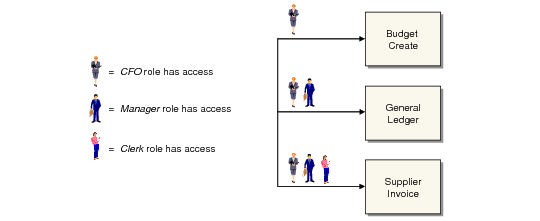
Clerk | Sara, Don, Jane |
Manager | Don, Jane |
CFO | Jane |