SOD Matrix Excel Integration
SOD Matrix Maintain (36.3.27.3) contains options that let you export segregation of duties matrix data to Excel, maintain the data offline, and re-import the data using Excel integration.
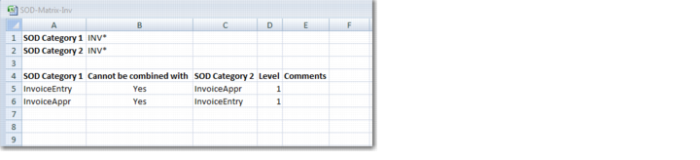
The Export to Excel option in SOD Matrix Maintain (36.3.27.3) copies the matrix data to an Excel spreadsheet that you can save on your local drive. The Excel spreadsheet only contains the data that you have displayed in the grid. Therefore, if you have refined the SOD Matrix Maintain (36.3.27.3) search criteria to only display a limited number of categories in the grid, only this information is exported to Excel.
SOD Matrix Maintain Excel Spreadsheet
A segregation of duties category combination can appear twice in the grid, for example, one entry for InvoiceEntry-InvoiceAppr and another entry for InvoiceAppr-InvoiceEntry. In this case, both rows are exported to Excel.
You can import your modified segregation of duties matrix spreadsheet using the Import from Excel option in SOD Matrix Maintain (36.3.27.3).
If there are two entries in the segregation of duties matrix spreadsheet for the same segregation of duties category combination (for example, A-B and B-A), you must modify both rows if you want to update the segregation of duties matrix for these categories. If you modify one row, for example, to add comments or deselect the compatibility indicator, but do not make an identical modification to the other row, the system displays a screen indicating that conflicts exist.
SOD Matrix Maintain, Conflicts
For every conflict found, you must indicate which of the conflicting pairs you want to import by selecting the Selected field. In the example shown in
SOD Matrix Maintain, Conflicts, the Cannot be Combined with indicator has a different value for the otherwise identical pairs for categories APClerk/APPayments and APPayments/APClerk. In this example, the user selects the field to indicate that the first row is the correct one, and this value is imported.