QAD 2016 Enterprise Edition Training Guides
>
Financials-Advanced
>
Consolidation
>
Consolidation Process Flow
Consolidation Process Flow
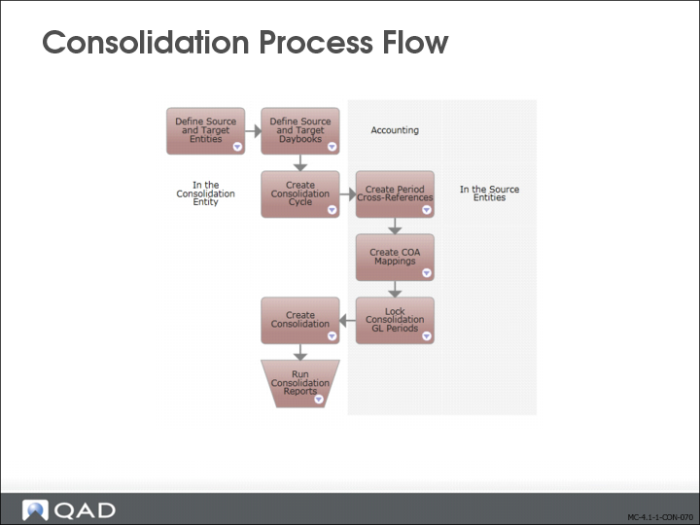
The system uses source and target entities in the consolidation process. Source entities are the subsidiary entities whose accounts you want to consolidate. The target entity is the consolidation entity in which you combine the source account balances.
From within the consolidation entity, you create a consolidation cycle, which identifies the source entities, the daybooks to be used for balances in each entity, and the participation percentage to be applied to each entity.
Consolidation is performed for specific GL periods, and you must align your consolidation entity GL periods with those of the source entities. You must also map GL elements in your source entities to the consolidation accounts in your consolidation entity.
Consolidation Steps Detail
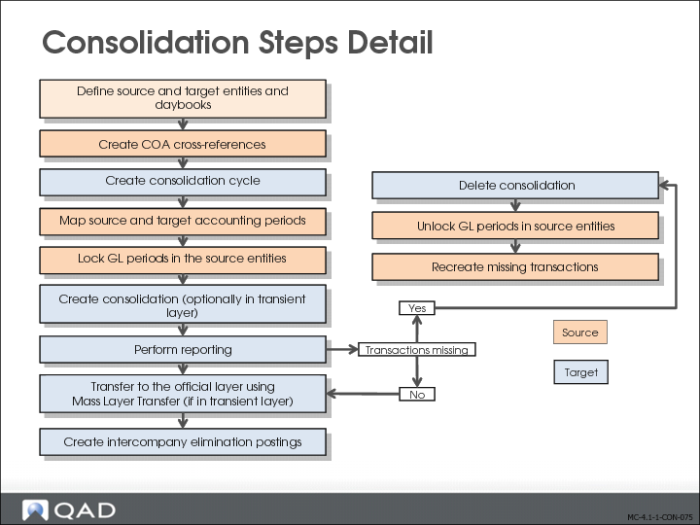
You set up and run consolidation in the following order:
1 Create the source and target entities and daybooks required for consolidation.
2 From within each of the source entities, map source and target GL accounts and, optionally, sub-accounts, cost centers and projects, to create COA cross references for use in the consolidation cycle. Each subsidiary entity and the COA cross reference it uses must belong to the same domain.
3 From within the consolidation entity, create the consolidation cycle, which defines the source entities and daybooks to use.
4 From within each of the source entities, define a range of GL periods to be mapped to the consolidation GL calendar.
5 From within each of the source entities, lock the GL periods that are to be included in the consolidation.
6 From within the consolidation entity, create the consolidation. In this step, you define source and target accounting layers, set the GL period range, and run the consolidation.
7 Perform reporting.
8 Create elimination postings.
We will now review these steps in more detail.
Setup Prerequisites
Prior to creating a consolidation cycle, the following setup is required:
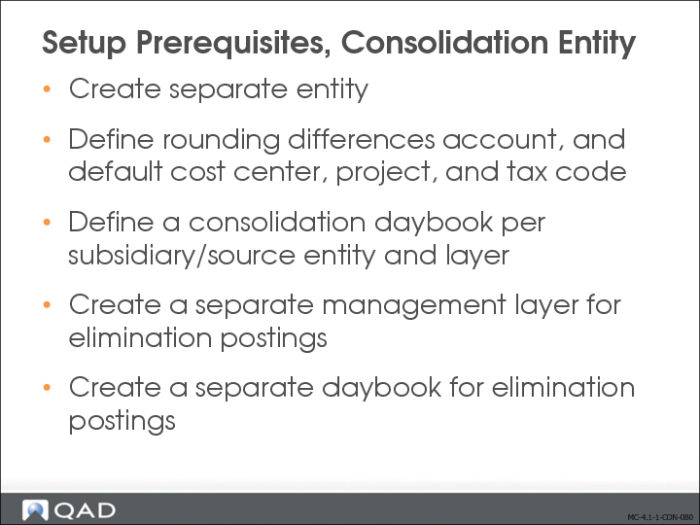
Consolidation (Target) Entity
You must set up a new, separate consolidation entity, including the business relation.
You must create a rounding difference account, default cost center, project codes, and tax code for the consolidation entity.
Additionally, you must create a consolidation daybook for each source entity and layer.
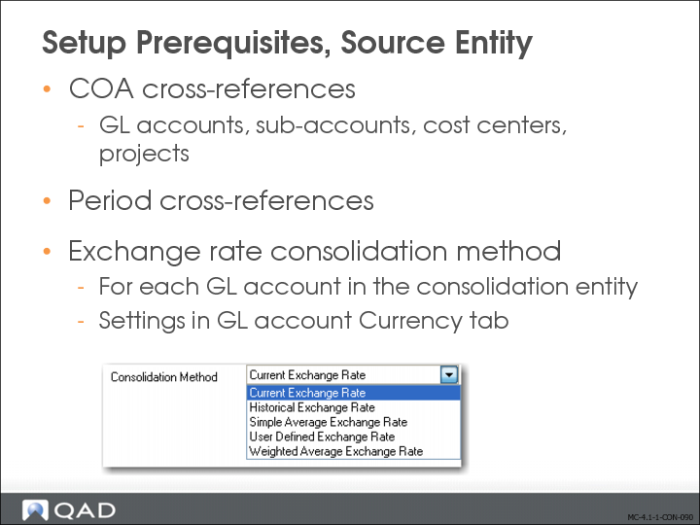
In each source entity, use COA Cross Reference Create (25.3.14.1) to create mappings between the GL dimensions in source and consolidation entities.
Special attention is required when mapping open item accounts, cross-company accounts and tax accounts. When posting to any of these accounts, the system requires additional input that cannot be given during consolidation posting. Therefore, all accounts of one of these three types should be matched to standard accounts in the consolidation entity. For intercompany accounts, this results in a zero balance, as expected.
Use Consolidation Period Cross-Reference Maintain (25.19.1.3) to create cross-references between GL periods in a source entity and GL periods in consolidation entities.
Finally, for each GL account of a specific shared set, select the consolidation method in the currency tab of GL Account Create (25.3.13.1) or GL Account Modify (25.3.13.2).
Consolidation can be performed between entities using the same or different base currencies. When the entities are in domains with different base currencies, the system converts transactions in the base currency of the source entity into the base currency of the consolidation entity using rates in the exchange rate shared set of the consolidation entity. The exact rate used is determined for each account based on the setting of the Consolidation Method field in the Currency tab of GL Account Create. This field can have one of the following values:
• Actual Rate (accounting rate at period end, also known as current rate)
• Historical Rate
• Simple Average Rate
• User-Defined Rate (Own Method)
• Weighted Average Rate
These methods are described in detail in the
QAD Financials User Guide.
When different methods are used, exchange rate differences can result. These are posted to the Rounding Differences account specified in Consolidation Cycle Create (25.9.1.7).
Creating COA Cross-References
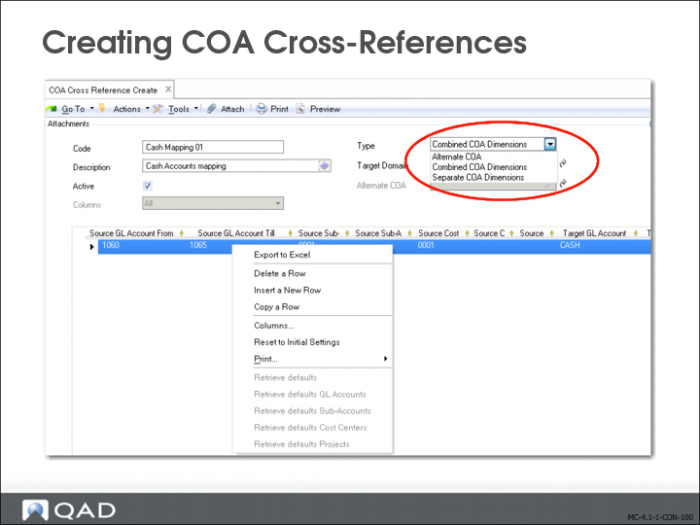
Use COA Cross Reference Create (25.3.14.1) to define mappings between the source and target entity charts of accounts. You can choose between two different types of cross-references: combined, or separate COA dimensions. The third available type is reserved for the setup of alternate COAs. On the next slide, we will explain more about the two consolidation types.
You must create a cross-reference structure in the same domain as the source entity. The target domain is the consolidation entity’s domain. Each cross reference should be valid. For details on the validations performed, refer to the
QAD Financials User Guide. Many-to-one combinations are possible.
A Copy function, as well as Excel integration, are available when creating COA cross-references.
Combined vs Separate GL Dimensions Types
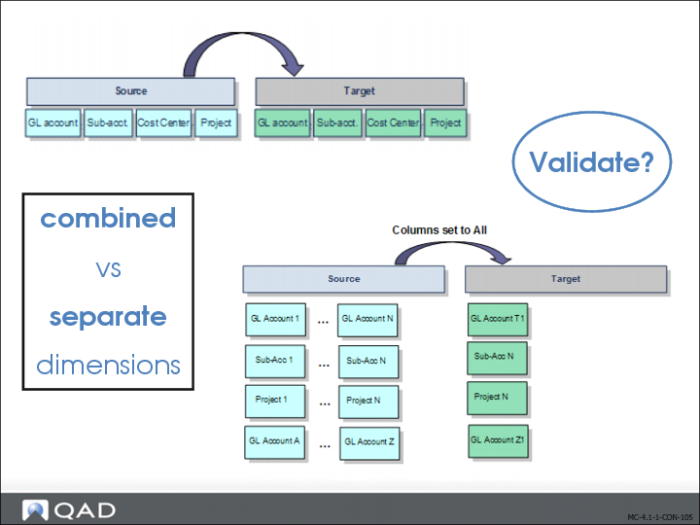
When the cross reference type is Combined GL Dimensions, you specify cross-references from source GL combinations (account, sub-account, cost center, project, SAF) to target GL combinations. The system reads the GL combination from the source transaction, and looks for a match in the cross-reference table of the consolidation entity’s domain, in the following order:
• Matching account, sub-account, cost center, and project
• Matching account, sub-account, cost center, and blank project
• Matching account, sub-account, blank cost center, and project
• Matching account, sub-account, blank cost center, and blank project
• Matching account, blank sub-account, blank cost center, and blank project
If no match is found, the transaction is posted to the same GL combination as the source transaction.
When the cross reference type is Separate GL Dimensions, you can specify cross-references from separate source GL COA elements to separate target GL COA elements (GL accounts to target GL account, sub-accounts to target sub-accounts, and so on).
When creating separate COA cross-references, use the Columns field to indicate the type of mapping to filter on—All, GL Account, Sub-Account, Cost Center, or Project. The filter lets you focus on one element at a time, and you can change the filter type during input.
By selecting the Validate option at the end of the COA Cross Reference Create, you can validate the cross references that you have defined against posting history. If the cross reference type is Separated GL Dimensions or Combined GL Dimensions, you can indicate whether or not to validate the sub-account, cost center, or project.
If gaps exist in the cross reference mappings used in a report or consolidation, the system will display an error. If there are any overlaps in the cross reference mappings you create, the system will use the first mapping record it finds in the grid.
Note that the validation option does not prevent saving; it is only a means to verify and detect conflicts with the current posting history.
Refer to the
QAD Financials User Guide for a detailed explanation of validation in COA Cross Reference Create (25.3.14.1).
Creating a Consolidation Cycle
When the prerequisites are set up for the source and target entities, a consolidation cycle can be created.
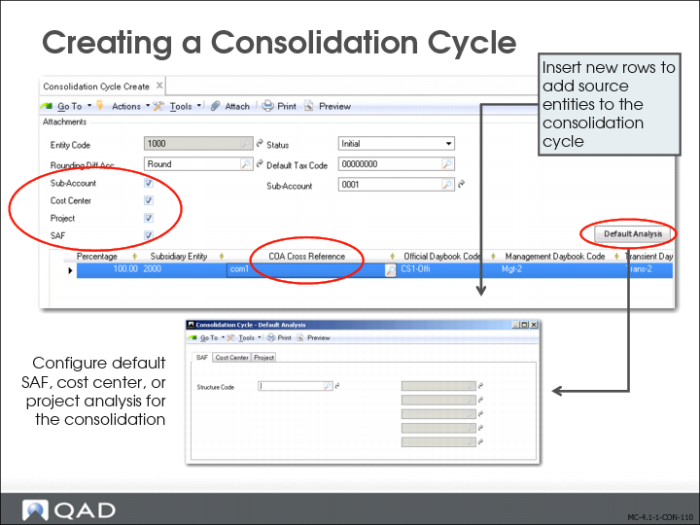
Use Consolidation Cycle Create (25.19.1.7) to create a consolidation cycle in the consolidation entity that defines the consolidation structure. You indicate the source and target entities; and whether consolidation is full or proportional.
An entity can be a consolidation entity for several source entities in one consolidation cycle and a source entity in another consolidation cycle. The consolidation process is started in the consolidation entity for a range of periods or for one period.
You add source entities to the consolidation cycle by inserting a new row.
You also add the daybook codes for the consolidation transactions. You specify a daybook for each source layer, and the system posts the consolidation transactions to the appropriate consolidation daybook.
Indicate whether sub-accounts, cost centers, projects, and SAFs should be included in the consolidation.
On each row, specify the COA cross-reference code used for each source entity in this consolidation cycle. When a consolidation cycle’s status is changed to Valid or Operational, cross-references are validated.
Click the Default Analysis button to display a new window with multiple tabs where you can configure default SAF, Cost Center, or Project analysis for the consolidation. When source transactions use any of these, and the Sub-Accounts, Cost Center, Project, and SAF fields are not selected, the system applies the defaults you define here to the consolidation transactions.