Multiple-Domain Processing
The primary factor the system uses in determining how to process EDI transactions in a multiple-domain environment is the eCommerce processing domain—the domain in which repository records and business documents are stored. This domain is one of the following:
• By default, the login domain of the EDI eCommerce user—either at initial login or modified by changing the domain during a processing session
• The processing domain specified after login using Change Current eCommerce Domain (35.11.11)
• The domain associated with the user’s login domain in Domain Cross-Reference Maintenance (35.11.1)
In some cases, all EDI eCommerce processing and document creation happens within a single domain. For example, the user who imports a purchase order is logged in to the same domain where the resulting sales order is created. System-generated repository records are in the user’s domain. Error-reporting and repository maintenance functions have direct access to the records that the transformation and gateway processes use to create the sales order.
In a different scenario, the user might not create records in the login domain, based on one of the following factors:
• A record created in Domain Cross-Ref Maintenance associates the user’s login domain and a second domain used for eCommerce processing. See
Specifying Domain Cross-References.
• A domain identifier in the transformation definition sets the value of the DOMAIN token during transformation. In this case, a token variable set to this value causes the system to create the document in the EDI eCommerce processing domain. However, the transaction data is created in a different domain. See
Changing the Target Domain During Transformation.
In either of these cases, the system can load repository data and create the business document—the sales order, for example—in a different domain than where the user is logged in.
Note: If any user transformation functions were defined before the release of multiple-domain functionality, update them to reference an additional Progress include file and a domain-associated variable used during transformation. See
Updating Legacy User-Defined Functions.
During export, the system similarly uses either the user’s session login domain or a cross-reference record to determine the eCommerce processing domain that provides domain-specific data—such as trading partner information—for outbound documents. It uses the DOMAIN variable for reference to determine the correct source domain for exported data, including any turnaround data.
Turnaround data is stored based on the eCommerce processing domain used when the source document is imported. When you update turnaround data using Turnaround Data Maintenance (35.9.17), use the Target Domain field to specify the domain associated with the turnaround data you want to maintain. You can also specify the target domain when you archive and delete turnaround data using Turnaround Data Archive/Delete (35.17.16).
Note: When you use a single-domain database, the domain is transparent to the EDI eCommerce setup and processing functions. No special setup or implementation steps are needed, except for updating existing user-defined functions that access the database to let them handle system-required domain values. See
Updating Legacy User-Defined Functions.
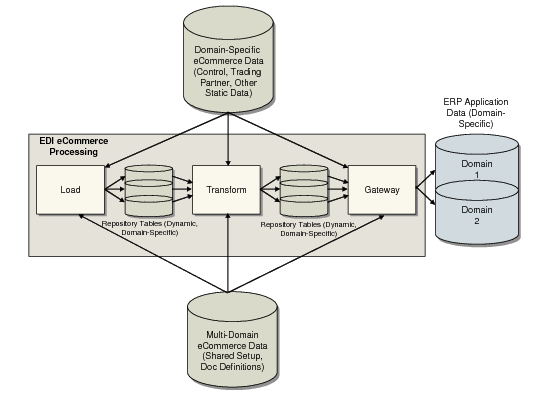
EDI eCommerce Multiple-Domain Processing Flow is an overview of how EDI eCommerce processes documents in a multiple-domain environment.
EDI eCommerce Multiple-Domain Processing Flow