Exporting Consignment Usage Data
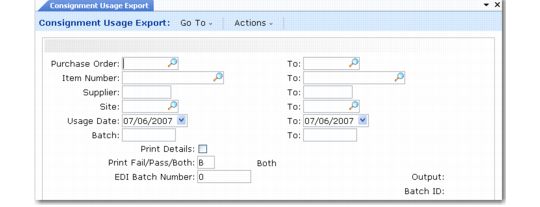
Use Consignment Usage Export (35.4.2) to notify your supplier that you have consumed inventory shipped to your location on a consignment basis. Ownership of consigned inventory items is not transferred from the supplier to the customer until the items are used. The supplier can use the information in the exported file to determine how much of the total order quantity is available for invoicing.
For information on Supplier Consignment Inventory, see
QAD Purchasing User Guide.
This export uses the following trading partner parameters, which are set up in Trading Partner Parameter Maint (35.13.10):
• Logical position 14: Send EDI Consignment; set to Yes or No
• Character: Supplier Consign Doc; set to the name of the application document definition to use; for example, Consignment
• Integer: Supplier Consign Ver; set to the version number of the application document definition to use
Enter ranges of selection criteria for purchase order, item number, supplier, ship-to site, and transaction dates that apply to the records you want to export. You can also select records based on batch numbers. Some Supplier Consignment Inventory functions assign batch numbers when consumption is recorded.
Consignment Usage Export (35.4.2)