Exporting Cycle Count Data
Use Inventory Cycle Count Export (35.4.13) to export cycle count information that your trading partner can use to compare inventory discrepancies between physical counts and the inventory levels recorded in the trading partner’s database.
The exported document includes the information generated when you run Inventory Balance Update (3.16.21) in response to a request for a cycle count.
See
QAD Master Data User Guide for information on cycle counts.
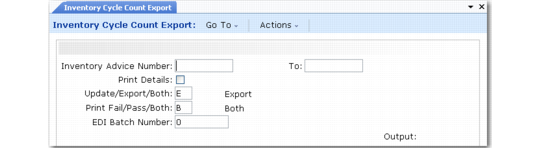
Inventory Cycle Count Export (35.4.13)
Enter an ID number range in Inventory Advice Number to select records for export. This number is included on the cycle count request.
Based on the implementation definition, you can optionally update some of the data in the document before exporting it. Use the Update/Export/Both field to control this feature.
This export uses the following trading partner parameters, which are set up in Trading Partner Parameter Maint (35.13.10):
• Logical position 12: Send Inv/Recv Adjustments; set to Yes or No
• Character: Inv Adv CC Doc Name; set to the name of the application document definition to use; for example, Inv-Cycle-Count
• Integer: Inv Adv CC Doc Name; set to the version number of the application document definition to use