Reprocessing Documents
After resolving a problem with import or export processing, use the appropriate program—Import Reprocessing (35.9.21) or Export Reprocessing (35.9.22)—to repeat processing for selected process sequence numbers. Based on the status of the document, the system automatically begins the processing flow from the point the error occurred.
The system generates a report on the reprocessed files to the device specified in Output. You can choose to run this process later using the Batch ID field.
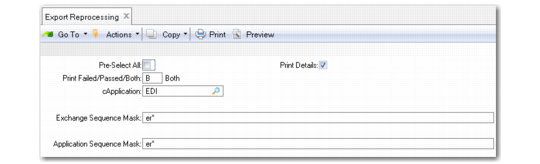
Export Reprocessing (35.9.22)
Pre-Select All
Enter Yes to have all documents selected—that is, marked with an asterisk (*)—when displayed on the selection list. When this field is No, the documents still display, but none are initially selected.
When the list displays, you can select or deselect documents as needed.
Print Details
Enter Yes to include detailed information on the report that is output when this program is executed. If you enter No, the report includes only summary information.
Application
Enter a code representing the application to have documents processed. The default is EDI.
Exchange, Application Sequence Mask
Specify one or more patterns, including wildcards (*), for the system to use in selecting records from the exchange or application repository for processing. For example, if you enter EDW* in Exchange Sequence Mask, the system selects all sequence numbers in the exchange repository that begin with EDW. Separate multiple entries with commas.
The system associates the values you enter with your user ID. Next time you run this program, the field defaults to the same values you entered previously.