Setting Up Books
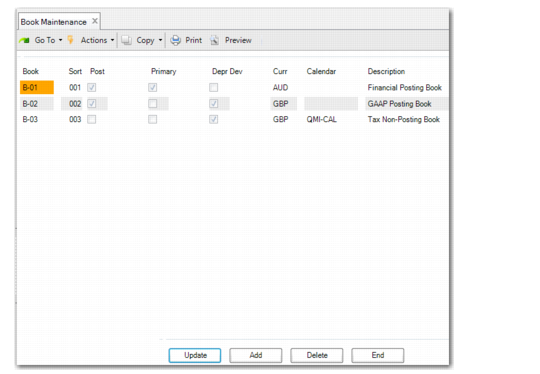
Use Book Maintenance (32.1.9) to set up depreciation books for fixed assets. You can add, modify, and delete fixed‑asset books. Any fixed assets that are depreciated must be assigned to a posting book.
For each book, you specify:
• If it is the primary posting book
• The book currency
• If the book updates the GL
• Any user‑defined fixed‑asset calendars associated with non‑posting books
• The unique sort sequence used for reporting
A depreciable asset must be assigned to a posting book for fixed‑asset transactions to be recorded in the GL. Multiple depreciation books are often required to meet different reporting needs. An asset can be depreciated under an unlimited number of non-posting books. However, only posting books affect the GL.
Book Maintenance (32.1.9)
Click Add to add a new book or Update to modify the selected book.
Book
Enter a unique ID (maximum four characters) identifying the fixed‑asset book. The information set up in Book Maintenance establishes default book information for assets set up in Fixed Asset Maintenance.
Sort
Enter the order in which the system should display this book in browses, reports, and on the Depreciation Books screen in Fixed Asset Maintenance.
Post
If Yes, this book posts to the GL. There can be more than one posting book, but only one can be a primary book; the others are secondary posting books. Fixed Asset Transaction Post (32.13) creates unposted transactions for accumulated depreciation and depreciation expense accounts based on depreciation calculated for this book. Posting books always follow the GL calendar.
Primary
If Yes, this book is referred to as the primary posting book. Only one primary posting book is allowed.
Depr Dev
If Yes, the differences between the primary and secondary books are posted to the GL. If No, the full amounts of the secondary posting books are posted to the GL. You can specify a depreciation deviation value for non-primary posting books only.
To select the Depr Dev field for a book, the book currency must be the same as the primary book currency. If the Depr Dev field is cleared, the book currency can be any value in the system currency list.
The default value is retrieved from Fixed Asset Control. However, you can change the default value for non-primary posting books.
For primary books and non-postable books, the Depr Dev field is cleared and read only.
Curr
Specify the book currency. Use the lookup to select any currency defined in the system. You can only specify one currency for each fixed asset book.
The default value is the base currency for the current domain.
Note: If a book has been used in a fixed asset class or assigned to a fixed asset in Fixed Asset Maintenance, you cannot change the book currency.
Calendar
This field only applies to non-posting books. Enter the calendar ID for the calendar you want associated with this non‑posting book. Define calendar IDs in Fixed Asset Calendar Maintenance. If this field is blank, the non‑posting book automatically follows the GL calendar.
Description
Enter a brief description (maximum 30 characters) describing this fixed‑asset book. This description displays on various reports and inquiries.
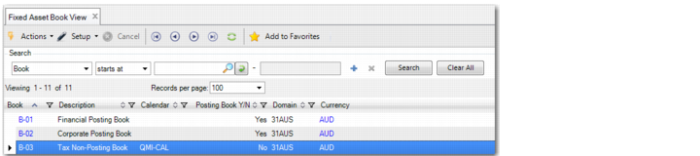
Fixed Asset Book View
Use the Fixed Asset Book View to view the list of books defined for the current domain. The view also displays the book currency and indicates whether the book is a posting book.
Fixed Asset Book View