Setting Up Classes
Use Class Maintenance (32.1.17) to set up, modify, and delete fixed‑asset classes. Also set up default depreciation books and GL accounts. Depreciation for assets in the same class generally affects the same GL accounts for the asset investment, accumulated depreciation, and depreciation expense.
Primary criteria for a class are:
• Items are similar and grouping is reasonable.
• Items are related for accounting purposes, affecting the same GL accounts. These accounts are set as the default entries for the class.
• Items use the same books.
• Items have the same service lives for calculating depreciation.
• Items use the same depreciation methods for both book and tax purposes.
After you set up a class, assets can be assigned to it in Fixed Asset Maintenance. The information set up in Class Maintenance provides default book and account information for the asset.
In Fixed Asset Maintenance, accounts default from the class-book combination. The entity, sub‑account, and cost center default from the location.
Class Maintenance (32.1.17)
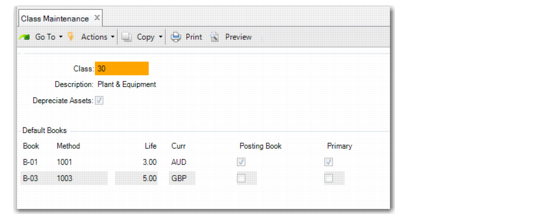
Class
Enter a unique class ID.
Description
Enter a brief (43 characters maximum) description of this fixed‑asset class ID. This description displays on various reports and inquiries.
Depreciate Assets
If Yes, this fixed‑asset class is depreciated. Depreciation schedules are created for assets assigned to this class.
Choose the Books function to specify default fixed-asset books.
Note: You must choose the Books function before the Accts function, which lets you maintain the account numbers for the selected book of the fixed asset. Account numbers default from the class-book combination.
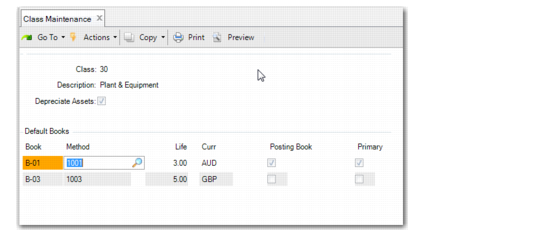
Class Maintenance, Default Books
Book
Enter a predefined fixed‑asset book ID for this class. Define book IDs in Book Maintenance (32.1.9). Any fixed assets that are depreciated must be assigned to a posting book. See
Setting Up Books.
Method
Enter the predefined depreciation method ID. It cannot begin with a zero. Set up depreciation methods in Method Maintenance. Methods identify how depreciation is calculated for the asset service years. See
Setting Up Methods.
Life
Enter the number of years for the book’s life. This number is used as a basis for depreciation calculations.
Curr
Displays the book currency as defined in Book Maintenance. This field is read only. You can only update the book currency in Book Maintenance.
Posting Book, Primary
The system displays the values associated with the book in Book Maintenance. See
Post.
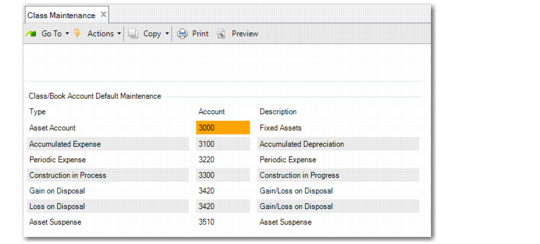
Choose the Accts function to specify default GL accounts. This screen can only be accessed for a posting book. When the book is not a posting book and the Accts button is selected, an error displays. No accounts can be entered for a non-posting book.
Class Maintenance, Class/Book Account Default Maintenance
Account
Enter valid, active GL accounts to be associated with each type of fixed‑asset account.
Fixed-Asset Accounts lists the accounts and GL types that you specify here. The system validates the account types you enter.
Primary posting books and secondary posting books can use the same account or different accounts.
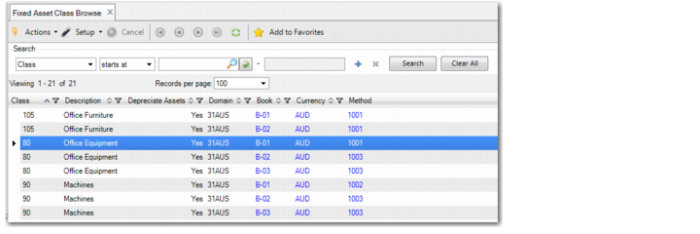
Fixed Asset Class Browse
The Fixed Asset Class Browse (32.5.25) displays book, book currency, and method information for assets.
Fixed Asset Class Browse
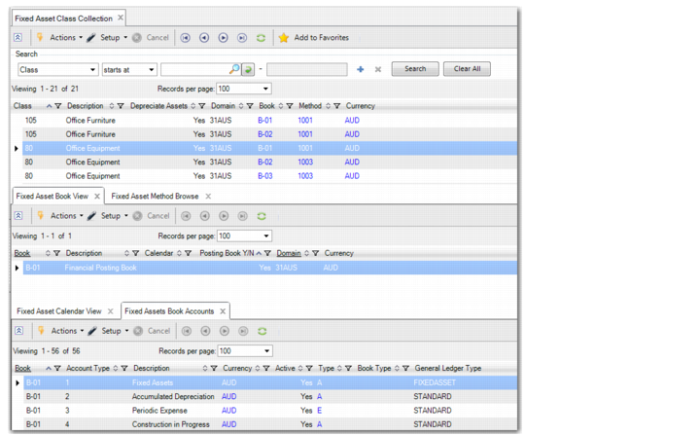
Fixed Asset Class Collection
The Fixed Asset Class Collection displays book, book currency, method, and GL account information for assets. For each class, you can browse a listing of books or methods. You can then optionally browse calendars.
Fixed Asset Class Collection