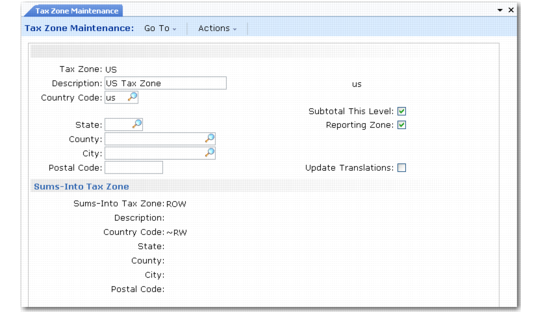
Tax Zone Maintenance
Set up tax zones in Tax Zone Maintenance (29.2.1). To verify data setup, use Tax Zone Browse (29.2.2) and Report (29.2.3). To verify sums-into relationships, use Tax Hierarchy Inquiry (29.2.6) and Report (29.2.7).
Tax Zone Maintenance (29.2.1)
Tax Zone
Specify a code (maximum 16 characters) identifying a geographic region subject to the same tax laws. Set up tax zones for every level at which separate tax calculations and reporting are required, starting with the top level and working downward. For example, set up tax zones for countries before states, states before counties, and so on.
Description
Enter a brief (maximum 24 characters) description of the tax zone. This field is required. You can enter the same description for more than one zone. The description prints on most reports and browses, as space permits.
Multiple language descriptions are supported. See
Multiple Language Descriptions for details.
Country Code
Enter the valid, active code that identifies the country that assesses tax. For new tax zones, the value defaults from Global Tax Management Control (29.24).
This field is required. The combination of country, state, county, city, and postal code must be unique for each zone.
State
Enter the valid, active code for the state or province included in the tax zone.
County
Enter the valid, active code for the county included in the tax zone.
City
Enter the name of the city included in the tax zone. The City field is not validated.
Postal Code
If necessary, enter the postal code included in the tax zone. If taxes never vary by postal code, do not set up tax zones by postal code.
Update Translations
Indicate if you want to create or modify descriptions for the tax zone in other languages.
Subtotal This Level
Enter Yes if custom tax reports can show subtotals for this tax zone. No standard reports show tax amounts by tax zone.
Reporting Zone
Enter Yes if the tax zone directly assesses tax.
Sums-Into Tax Zone
Enter a code identifying the parent tax zone that actually assesses tax for this geographic region. The description, country code, state, county, city, and postal code display.
In addition to the geographic tax zone codes, set up an error code and specify it in Global Tax Management Control (29.24). When you enter or update an address record, GTM attempts to match the address to a tax zone for the country, state/province, county, city, and postal code. If it cannot find a matching tax zone, it assigns the error zone. See
Setting Up GTM Control.
To make it easier to identify error conditions, set up a meaningful code, such as ERROR-ZONE.