QAD 2017 Enterprise Edition
>
User Guides
>
Global Tax Management
>
Processing GTM
>
Specifying Tax Data
Specifying Tax Data
All transactions subject to tax prompt for tax data in the header, line item, and trailer frames.
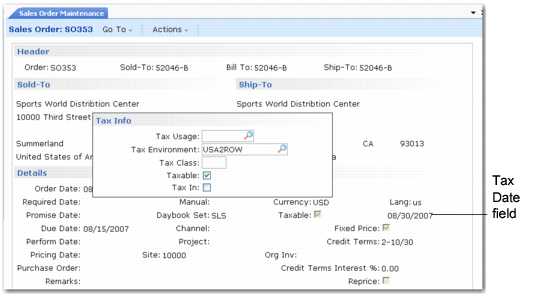
Sales Order Maintenance (7.1.1), Header Frame illustrates the tax pop-up in the Sales Order Maintenance (7.1.1) header. Most values specified in the header can be modified for each line.
Sales Order Maintenance (7.1.1), Header Frame
Tax Date
The transaction tax date is used to select tax rates. At order entry, the default tax date is the order due date. At shipment and receipt, the default tax date is the transaction effective date.
In some situations, you should specify another tax date. For example, when processing a return, you can enter the original order date. You cannot override the transaction tax date for individual line items and trailer charges. GTM does not use a tax rate if the transaction’s tax date is outside the tax rate’s effective date range.
Tax Usage
Tax usage is used to select tax rates. Tax usage defaults from the relevant address record: customer, supplier, or end user. You can override the transaction tax usage for line items but not for trailer charges.
Tax Environment
The tax environment is used to select tax types for the transaction. The ship-from/ship-to tax zones and tax class, if any, determines the default tax environment. A line item can have a different tax environment if its ship-from tax zone is different from the one for the rest of the transaction.
Tax Class
Tax class is used to select the transaction tax environment and/or tax rates for items and trailer charges. Tax class defaults from the relevant address record: customer, supplier, or end user.
For inventory items, the default tax class is the item tax class. For memo items, the default tax class is the transaction tax class. For trailer charges, the tax class is the one for the (1) trailer tax detail, (2) trailer charge, or (3) transaction, depending on which one the system finds first.
Taxable
The taxable status determines how tax types apply to the transaction. If Taxable is No, the amount is nontaxable. However, if Taxable is Yes, the amount can also be nontaxable if you use tax types and zero-percent tax rates to report tax exemptions.
The customer, supplier, or end user taxable status determines the default status of the transaction. If the transaction taxable status is No, the entire order has this status.
For inventory items, the default status is the item status. For memo items, the default status is the transaction taxable status. For trailer charges, the status is the one for the (1) trailer tax detail, (2) trailer charge, or (3) transaction, depending on which one the system finds first.
Tax In
Tax In (tax included) determines whether tax is already included in line item amounts. If it is, the system reverse-calculates the tax from the item amount and displays it along with the other tax amounts.
The customer, supplier, or end user Tax In status determine the default status of the transaction. You can override this status for line items. For an amount to be tax included, Tax In must be Yes and the Allow Tax Included setting for the tax rate must be Yes.
Note: Tax is always added to trailer charges, regardless of the value of Tax In.