Processing GTM
This chapter includes details of the data required to process taxes.
OverviewProvides an overview of tax calculation in GTM.
Specifying Tax DataDescribes how to enter tax data for transactions.
Viewing Tax AmountsReview system-calculated tax amounts.
Correcting Transaction Tax AmountsOverride system-calculated tax amounts.
Exchange Rate EffectsDescribes the effect of exchange rates on tax.
Recoverable, Non-Recoverable TaxIntroduces the concepts of recoverable and non-recoverable tax.
VariancesDescribes the kinds of variance that can occur during the accounts payable cycle.
Memo ItemsDiscusses tax processing for memo items.
Returned ItemsDiscusses tax processing for returned items.
Tax Point EffectsDescribes the effect of tax points on tax rates.
Standard Cost, Recoverable Tax ExamplesShows standard costing recoverable tax accruals.
Average Cost, Recoverable Tax ExamplesShows average costing recoverable tax accruals.
Average Cost, Non-Recoverable Tax ExamplesShows average costing non-recoverable tax accruals.
Fixing Common Tax ProblemsDescribes common tax processing problem.
Overview
This section describes how GTM processes tax transactions. It also discusses GL transactions created for tax amounts under standard and average costing.
Calculating Taxes
To calculate taxes on transactions, GTM first identifies the tax environment—the set of tax types for each line item and trailer charge. It then determines the most appropriate tax rate for each tax type in the environment.
GTM searches for an optimal tax environment based on a combination of transaction conditions:
• Ship-from tax zone for the line item
• Ship-to tax zone for the transaction
• Customer or supplier tax class, if any
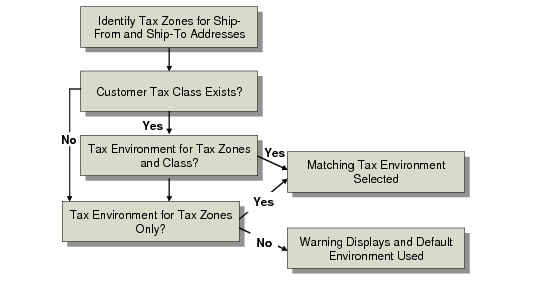
Selection of Tax Environment summarizes the search priority for selecting a tax environment.
Selection of Tax Environment
If GTM finds a matching environment, it assigns this environment to the transaction. Otherwise, the following message displays:
Warning: No tax environment found, using default.
The system then uses the error environment from Global Tax Management Control (29.24). If this happens, investigate and correct the problem. See
Fixing Common Tax Problems.
Tax Environment Selection Criteria describes the tax environment selection criteria for different transaction amounts.
Tax Environment Selection Criteria
Item | Ship-To Tax Zone | Ship-From Tax Zone | Tax Class |
Inventory items | Transaction ship-to tax zone | Line item ship-from tax zone | Transaction tax class, if any |
Memo items | Transaction ship-to tax zone | Transaction ship-from tax zone | Transaction tax class, if any |
Trailer charges | Transaction ship-to tax zone | Transaction ship-from tax zone | Transaction tax class, if any |
Next, GTM searches for the tax rate for each tax type in the tax environment. For each tax type, GTM searches for an optimal tax rate based on a combination of transaction and line item conditions:
• Tax class
• Tax usage
• Transaction tax date
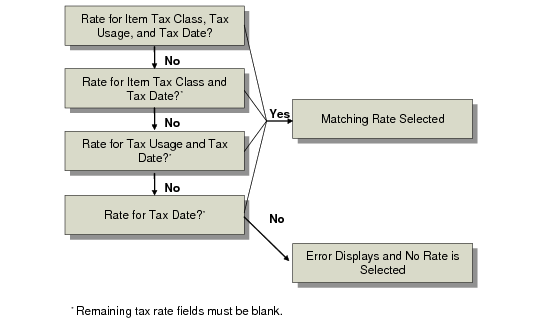
Selection of Tax Rate summarizes the search priority for selecting a tax rate for a tax type. GTM selects a rate only if there is a complete match between the conditions of the transaction and the tax rate. Any nonmatching criteria must be blank. For example, if a tax rate has a matching item tax class and tax date but a different tax usage, it is not selected.
Selection of Tax Rate
If GTM finds a matching rate, it uses this rate for the tax calculation. Otherwise, the following message displays:
Error: Tax rate does not exist.
“Tax Type” “Tax Class” “Tax Usage”
The message displays the tax type, tax class, and tax usage not found, and no tax is calculated. If this happens, investigate the problem. See
Fixing Common Tax Problems.
Tax Rate Selection Criteria describes the tax rate selection criteria for different transaction amounts.
Tax Rate Selection Criteria
Item | Tax Class | Tax Usage | Tax Date |
Inventory items | Item tax class, if any | Transaction tax usage, if any | Transaction tax date |
Memo items | Transaction tax class, if any | Transaction tax usage, if any | Transaction tax date |
Trailer charges | (1) Tax class from trailer charge detail, if any (2) Trailer charge tax class, if any (3) Transaction tax class, if any | Transaction tax usage, if any | Transaction tax date |