Tax Rates
In GTM, the tax rates associated with the tax type determine how the system calculates and posts tax amounts for each tax type.
When you use AvaTax to calculate taxes, it uses the same calculation logic as GTM. Just like GTM, it needs to know which tax types apply, and which tax rate or rates apply for each type.
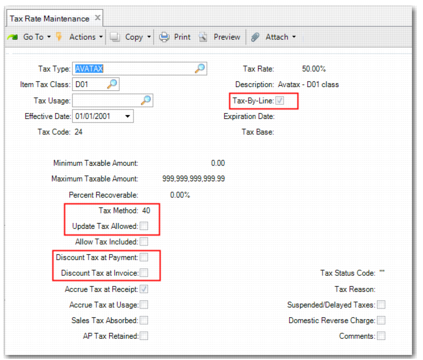
Use Tax Rate Maintenance (29.4.1) to define tax rates for use with AvaTax for all of the tax types previously defined in Tax Type Maintenance. Use the Item Tax Class field to differentiate between the different AvaTax items. AvaTax items correspond to tax classes in GTM.
Note: In Tax Rate Maintenance, always specify a tax method of 40 when using AvaTax.
Tax Rate Maintenance
Tax Type
Enter a valid tax type supported by AvaTax.
Tax Rate
Specify the rate at which tax is applied.
Tax-By-Line
Always set Tax-By-Line to Yes when using AvaTax tax method 40.
Item Tax Class
Specify the GTM tax class (AvaTax item code) to which the tax rate applies. See
Tax Classes and
AvaTax Item Codes.
Tax Method
Specify method 40; otherwise, AvaTax is not used to calculate taxes.
For tax rates with tax methods other than 40, GTM performs the tax calculations using standard GTM functionality, with no changes in setup or processing required. This ensures that you can use AvaTax to calculate US and Canadian taxes while still using GTM for all other taxes.
Update Tax Allowed
Always set Update Tax Allowed to No when using AvaTax tax method 40.
Discount Tax at Payment
Always set Discount Tax at Payment to No when using AvaTax tax method 40.
Discount Tax at Invoice
Always set Discount Tax at Invoice to No when using AvaTax tax method 40.