QAD 2017 Enterprise Edition
>
User Guides
>
Intrastat
>
Intrastat Process
>
Intrastat Workflow
Intrastat Workflow
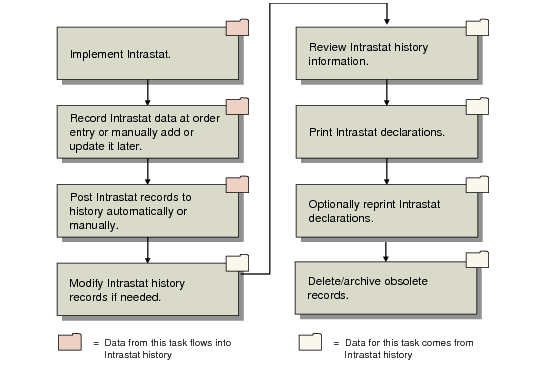
General Intrastat Workflow shows a general workflow for Intrastat from setup, through recording data, to printing declarations.
General Intrastat Workflow
These steps reflect the general Intrastat workflow:
1 Set up base data required for Intrastat processing and set up Intrastat-specific codes and data:
• Set up basic codes in programs on the Intrastat Setup Menu (29.22.1).
• Set up codes in Intrastat Commodity Code Maintenance (29.22.3).
• Update items with Intrastat defaults in Item Intrastat Data Maintenance (29.22.6).
• Define control parameters in Intrastat Control (29.22.24).
2 Automatically collect Intrastat data during transaction processing in supported programs. Optionally, create order data manually or update existing data using Order Intrastat Data Maintenance (29.22.11).
3 Post Intrastat data to history automatically during shipment or receipt or—for movements initiated from inventory transfer programs—manually using Manual Post IC Transactions (29.22.9).
4 Use Intrastat Maintenance (29.22.13) to manually modify history records before they are reported on a final declaration.
5 Review Intrastat history using various inquiries on the Intrastat menu, as well as Intrastat History Report (29.22.22).
6 Print Intrastat declarations using Intrastat Declaration Print (29.22.19).
7 Optionally reprint declarations if needed using Intrastat Declaration Reprint (29.22.20).
Note: A special-purpose program, Intrastat Declaration Exchange (29.22.18), is available for declarants in Poland. It lets you generate a corrected declaration report on either arrivals or dispatches, as required by local regulations.
8 Remove Intrastat history records when online storage is no longer needed using Intrastat Delete/Archive (29.22.23).