Setting Up Intrastat
This chapter describes the base data that must be configured before you can collect intrastat trade statistics.
OverviewSummarizes the setup required for Intrastat.
Setting Up Base DataDescribes the base data required for Intrastat processing.
Setting Up Intrastat DataDefine Intrastat-specific codes.
Overview
Before Intrastat data can be collected and reports generated, you must set up base data required by Intrastat, define Intrastat-specific codes, and set up the Intrastat control program. These codes and settings are used during transaction processing.
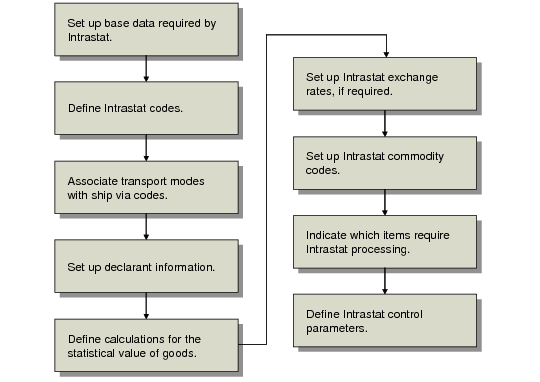
Intrastat Implementation Workflow outlines typical steps for implementing Intrastat.
Intrastat Implementation Workflow
Use the following steps to set up Intrastat:
1 Set up base data required for Intrastat processing including country codes, address records for sites, and net weight data for items.
2 Define codes used during transaction processing including flow indicators, terms of delivery, nature of transaction codes, modes of transports, ports, statistical procedures, and regions.
3 Associate Intrastat mode of transport codes with standard ship via codes in Intrastat Transport Maintenance (29.22.1.10).
4 Define information associated with the addresses that generate Intrastat reports in Declarant Maintenance (29.22.1.20).
5 Define the calculations used to generate the statistical value for items—including insurance, freight, and so on—using Statistical Value Calculation Maintenance (29.22.1.19.1).
6 Define exchange rates for use with Intrastat reporting by creating rates using the Intrastat rate type in Exchange Rate Create (26.4.1).
7 Define Intrastat commodity codes in Intrastat Commodity Code Maintenance (29.22.3).
8 For each country, indicate the items to be included in Intrastat reports and specify their associated commodity codes in Item Intrastat Data Maintenance (29.22.6).
9 Set up Intrastat Control (29.22.24).